MCP server · Analytics
TikTok Ads MCP server
by AdsMCP
Lets your AI look up your TikTok ad campaigns, ad groups, ads, and performance numbers for you.

This is a helper that connects your AI assistant to your TikTok Ads account. Once it is set up, you can ask your AI things like which campaigns are running or how much you spent last week, and it will go fetch the answer from TikTok for you. It is handy for marketers and small business owners who run TikTok ads and want quick answers without clicking through the ads dashboard.
What is an MCP server? The 30-second version
On its own, your AI can only chat with you using what it already knows. An MCP server is a small helper program that gives your AI a new skill or a connection to another service. This one connects your AI to TikTok Ads, so it can look up your campaigns, ad groups, ads, and performance numbers when you ask. You stay in the chat, and the helper does the boring clicking behind the scenes.
What this MCP server does
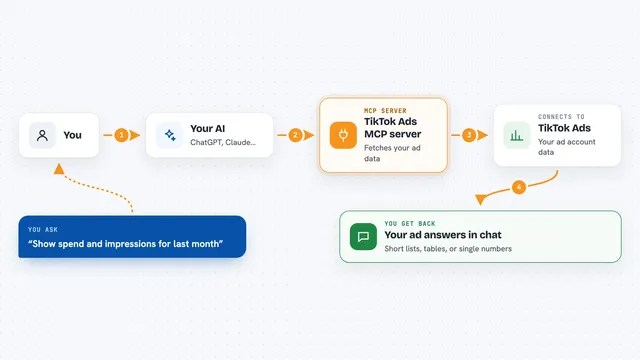
You ask your AI a question about your TikTok ads, like how a campaign is doing. The AI passes that request to this helper program running on your computer. The helper signs in to TikTok using your developer app details and calls the TikTok Ads system to fetch the data you asked for. Then it hands the answer back to your AI, which explains it to you in plain words in the chat. It only reads information; it does not create or change campaigns.
 Click to zoom
What you can do with it
- List your TikTok ad campaigns and see details for each one
- List ad groups and ads inside a campaign
- Pull performance numbers for campaigns, ad groups, and ads
- Break down performance by audience groups
- Run a read-only audit for spend with no conversions
- List your custom audiences and pixels
- Check your advertiser account info like currency and timezone
Try asking your AI
- “List my TikTok campaigns and tell me which ones are active”
- “How much did I spend on each campaign last week?”
- “Show me the ad groups in my top campaign and their click numbers”
- “Which ads got clicks but no conversions in the last 14 days?”
What it gives back to you
You get answers in the chat, not files. Your AI will show lists of campaigns, ad groups, or ads, and tables or summaries of performance numbers like spend, clicks, and impressions. It can also give you short write-ups, for example which campaigns spent money without getting any conversions. Everything stays read-only, so nothing in your TikTok account gets changed.
Before you start
What you need
- Python 3.10 or newer on your computer
- The uv tool (a small installer for Python projects; the README shows a one-line command to install it)
- A TikTok For Business account with Marketing API access
- A TikTok developer app with an App ID and App Secret (TikTok's developer portal gives you these)
- An MCP client that supports local servers, like the Claude desktop app
Good to know
It can read your TikTok Ads data and stores a sign-in token file on your computer at ~/.tiktok_ads_mcp/tokens.json, so keep that file private and never share your App Secret or OAuth codes.
Install it with your AI
Add TikTok Ads MCP server to your AI, no technical skills needed
You don't install anything by hand. You copy one prompt, paste it into an AI that can work on your computer, and it checks, installs and connects the server for you, asking you when it needs something.
Sign in to get the install prompt
Members get a ready-made prompt that lets the Claude desktop app check TikTok Ads MCP server, install it and connect it for them, step by step. You don't need any technical skills: you copy, paste and answer a few questions. Your connected AI can also find and install any of the 4,361 MCP servers here for you.
Who it's for
Marketers, media buyers, and small business owners who run TikTok ads and want quick answers without digging through the ads dashboard.