MCP server · Analytics
AgentLens MCP server
by agentkitai
Let your AI look up agent activity, costs, and tamper-proof audit records from AgentLens.
AgentLens is a tool that records what your AI agents do, like a flight recorder. It keeps a tamper-proof log of every AI call, tool use, and error. This MCP server lets your AI assistant read that log and answer questions about it for you.
What is an MCP server? The 30-second version
On its own, your AI can only chat with you. An MCP server is a small helper program that gives your AI a new skill or a connection to an app. This one connects your AI to AgentLens, the place where your agent activity is recorded. Once connected, your AI can look things up there and bring answers back to your chat.
What this MCP server does
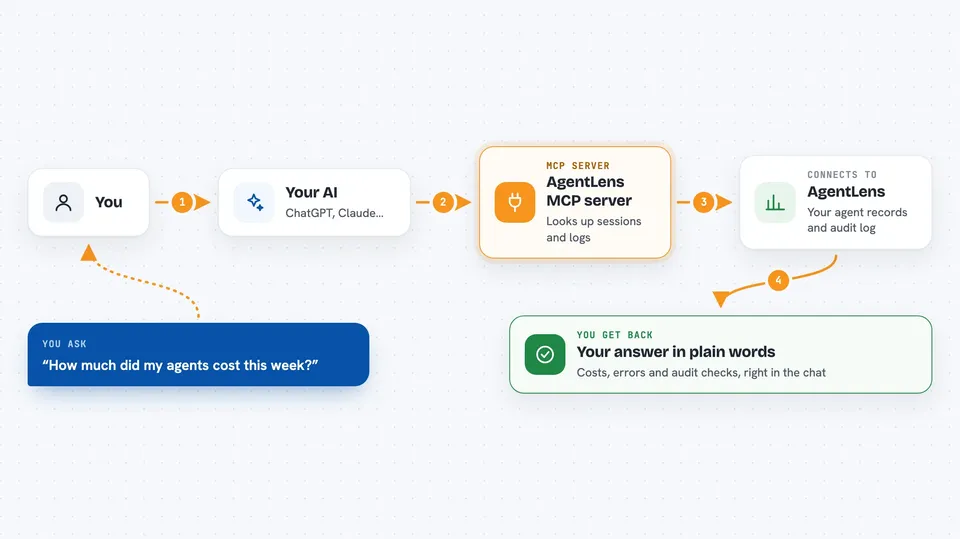
You ask your AI a question about your agents, like how much they cost or what went wrong. Your AI uses this helper to talk to your AgentLens server. AgentLens looks through its recorded sessions, events, and audit log. Then your AI shows you the answer in plain words, right in the chat.
 Click to zoom
What you can do with it
- List recent agent sessions and their status
- Look up LLM calls, token use, and estimated cost
- Check whether the audit log hash chain is still valid
- Search events by type, agent, or time
- Show error events and health scores for an agent
- Export a signed audit snapshot for record-keeping
- Replay a past session step by step
Try asking your AI
- “Show me my agent sessions from today”
- “How much did my agents cost this week?”
- “Is the audit log for session abc123 still valid?”
- “List the errors from my last agent run”
What it gives back to you
You get back lists, summaries, and numbers in the chat. For example, a list of sessions with their status and cost, or a clear yes or no about whether the audit chain is intact. If you ask for an export, it gives you a signed snapshot you can save. Changes are not made to your data; this server reads and reports.
Before you start
What you need
- An AgentLens server running somewhere you can reach (local or cloud)
- An AgentLens API key, which starts with als_ (you create it once in AgentLens)
- Node.js installed if you use the npx command
- An MCP client like Claude Desktop or Cursor
Good to know
This server reads your agent activity and audit records, which may include prompts and completions, so keep your API key private and only connect it to an AgentLens server you trust.
Install it with your AI
Add AgentLens MCP server to your AI, no technical skills needed
You don't install anything by hand. You copy one prompt, paste it into an AI that can work on your computer, and it checks, installs and connects the server for you, asking you when it needs something.
Sign in to get the install prompt
Members get a ready-made prompt that lets the Claude desktop app check AgentLens MCP server, install it and connect it for them, step by step. You don't need any technical skills: you copy, paste and answer a few questions. Your connected AI can also find and install any of the 4,361 MCP servers here for you.
Who it's for
Anyone who runs AI agents and needs to check their activity, cost, or audit records, especially teams with compliance or record-keeping duties.