
MCP server · Developer tools
AIDE MCP server
by aidemd-mcp
Lets your AI read and write .aide spec files so it understands your project's intent before touching code.
This is a helper for your AI that works with .aide spec files. Those are small text files that sit next to your code and describe what each part of the project is supposed to do. It is handy if you use an AI coding assistant and want it to plan and build from your written intent instead of guessing.
What is an MCP server? The 30-second version
On its own, your AI can only chat with you. An MCP server is a small helper program that gives your AI a new skill or a connection to something else. This one connects your AI to the .aide spec files in your project, so it can find them, read them, and create new ones when you ask. You stay in the chat; the helper does the file work behind the scenes.
What this MCP server does
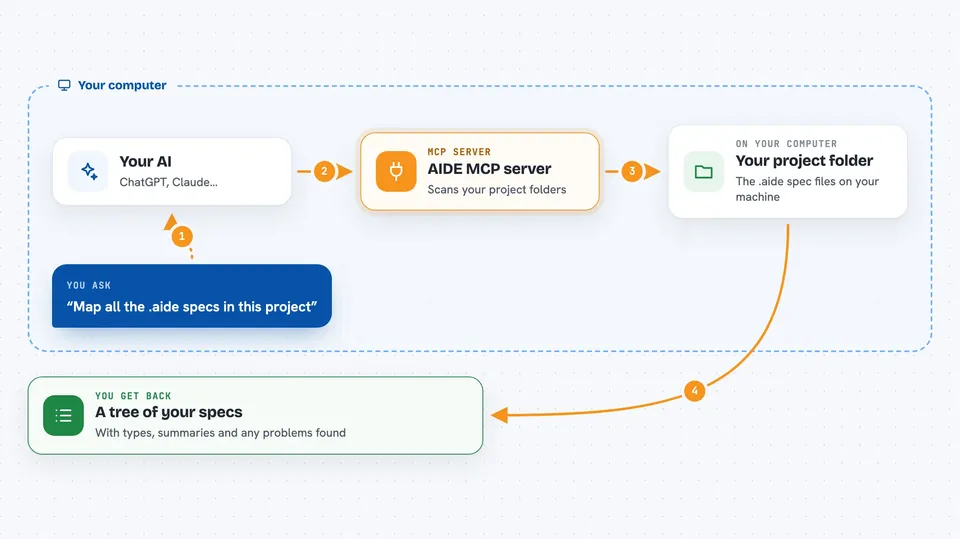
You ask your AI something about your project, like where the specs live or what a module is meant to do. The AI calls this helper, and the helper scans your project folders for .aide files. It builds a tree map of what it found, with each spec's type and a short summary. It hands that back to the AI, which explains it to you or uses it to plan the next step. It can also create new spec files and check existing ones for problems.
 Click to zoom
What you can do with it
- Map every .aide spec in your project as a tree
- Read a single .aide file with its full context and links
- Create new intent, research, plan, or todo specs in the right folder
- Check specs for orphans, broken links, and naming conflicts
- Look up a function or class signature without opening the file
- Set up the whole AIDE setup in a project with a guided wizard
- Compare your setup against the latest version and update it
Try asking your AI
- “Map all the .aide specs in this project and show me the tree”
- “Scaffold an intent spec for my authentication module”
- “Run a health check on the specs under src/payments”
- “What does the spec in src/api say, and what links does it have”
What it gives back to you
You get back plain answers in the chat: a tree of spec locations and types, the full text of a spec with its related files and links, or a list of problems found during a check. When it creates or updates files, it tells you which ones it wrote. For a symbol lookup, it gives you the signature, the doc comment, and what kind of thing it is.
Before you start
What you need
- Node.js installed on your computer
- An AI coding tool that supports MCP, such as Claude Code, Claude Desktop, Cursor, VS Code with Copilot, or Windsurf
- A project folder where you want to keep .aide spec files
Good to know
It can create and change files in your project, so it is worth checking what it wrote before committing.
Install it with your AI
Add AIDE MCP server to your AI, no technical skills needed
You don't install anything by hand. You copy one prompt, paste it into an AI that can work on your computer, and it checks, installs and connects the server for you, asking you when it needs something.
Sign in to get the install prompt
Members get a ready-made prompt that lets the Claude desktop app check AIDE MCP server, install it and connect it for them, step by step. You don't need any technical skills: you copy, paste and answer a few questions. Your connected AI can also find and install any of the 4,609 MCP servers here for you.
Who it's for
Developers and technical leads who use an AI coding assistant and want it to follow written project intent instead of guessing.



