MCP server · Browser automation · official
AIOProductOS Studio MCP server
by AIOProductOS · official
Let your AI record scripted walkthrough videos and screenshots of your own web app.
Studio is a helper that lets your AI record videos of your own web app, with a moving cursor, zooms, captions and a closing card. You describe the story you want to show, and you get back a video file you can share. It is handy for anyone who needs demo clips, explainers or launch screenshots but does not want to learn video editing.
What is an MCP server? The 30-second version
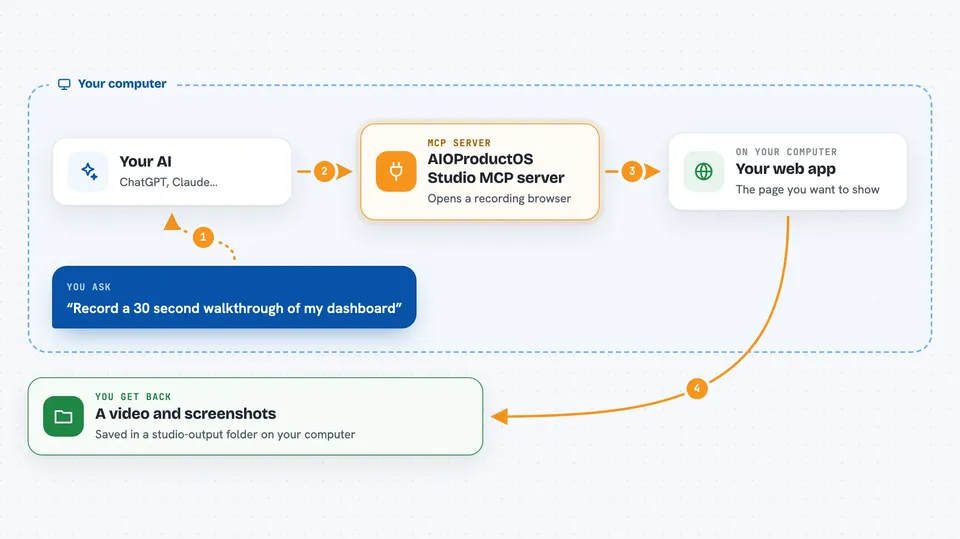
On its own, your AI can only chat with you. An MCP server is a small helper program that gives your AI a new skill or a connection to an app. This one connects your AI to a recording browser, so it can open your web app, click around, and film what happens. When you ask for a walkthrough, the AI uses this helper to actually do the recording for you.
What this MCP server does
You tell your AI what story to shoot, for example a 30 second walkthrough of your app. The AI opens a recording browser through this helper, goes to your page, and moves a visible cursor to each spot you mentioned. It can add captions, zoom in on things, highlight buttons, and end with a closing card. When it finishes, it saves a video file (and screenshots if you asked) into a folder on your computer.
 Click to zoom
What you can do with it
- Record a short walkthrough video of your web app
- Take high quality screenshots of a page or a single element
- Add on-screen captions that tell the story
- Zoom in on a chart, button or result
- Highlight an element with a ring and a label
- Record inside a logged-in area using a saved login file
- Export the video as MP4 or GIF
Try asking your AI
- “Record a 30 second walkthrough of https://app.example.com, open on the dashboard with the title Meet Example, caption the three key features, and zoom in on the analytics chart.”
- “Take a hero screenshot of my homepage at https://app.example.com.”
- “Record a short clip showing how to add a new task, then export it as a GIF for our changelog.”
- “Record a walkthrough of the settings page and end with a card that says Start free at example.com.”
What it gives back to you
You get files saved into a folder called studio-output on your computer. That includes a video file (MP4, or WebM if ffmpeg is not installed) and any screenshots you asked for as PNG images. In the chat, your AI tells you what it recorded and where the files are. It can also make a GIF if you ask.
Before you start
What you need
- Node.js 18 or newer
- Playwright Chromium (installed once with a command)
- ffmpeg on your computer if you want MP4 or GIF files
- A web app or website you want to record
Good to know
It records your own web app in a real browser, so anything visible on screen, including private data in a logged-in area, can end up in the video.
Install it with your AI
Add AIOProductOS Studio MCP server to your AI, no technical skills needed
You don't install anything by hand. You copy one prompt, paste it into an AI that can work on your computer, and it checks, installs and connects the server for you, asking you when it needs something.
Sign in to get the install prompt
Members get a ready-made prompt that lets the Claude desktop app check AIOProductOS Studio MCP server, install it and connect it for them, step by step. You don't need any technical skills: you copy, paste and answer a few questions. Your connected AI can also find and install any of the 4,361 MCP servers here for you.
Who it's for
Product managers, marketers, founders and anyone who needs demo videos or screenshots of a web app without editing software.