MCP server · Browser automation
vibe-testing MCP server
Lets your AI open a real browser, test your web app, and tell you what broke since last time.
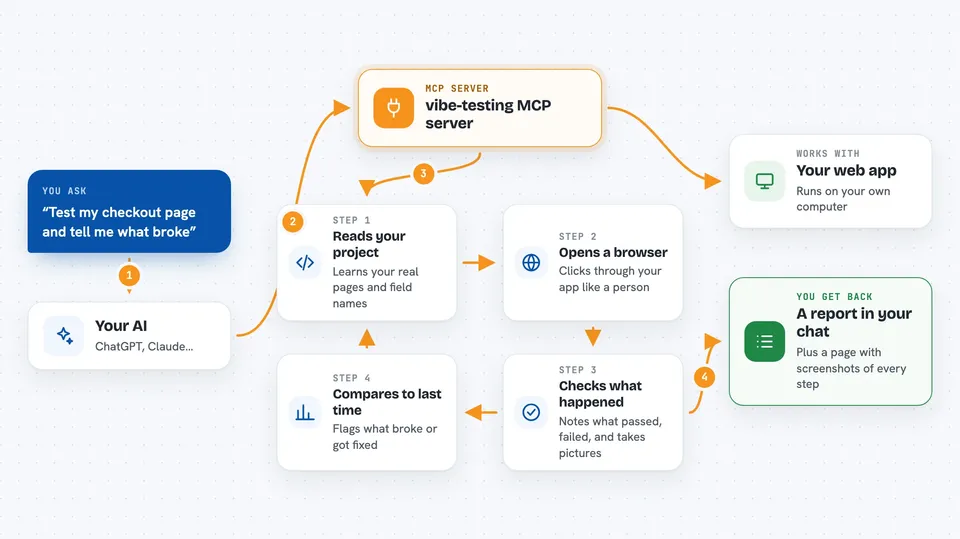
vibe-testing is a helper that lets your AI assistant actually open a web browser, click around your website or app, and check that things work. It reads your project's code first, so it uses your real page names and form fields instead of guessing. It is handy if you build or maintain a website and want quick testing without writing test scripts by hand.
What is an MCP server? The 30-second version
On its own, your AI can only chat with you. An MCP server is a small helper program that gives your AI a new skill or a connection to something else. This one connects your AI to a real web browser and to your project's code, so the AI can visit your pages, fill in forms, and click buttons for you. You just ask in plain words, and the AI uses this helper behind the scenes.
What this MCP server does
You ask your AI something like test my checkout page. The AI first reads your project's code to learn the real routes and field names. Then it uses this helper to open a real browser, log in if needed, and walk through the pages. It records what worked, what failed, and takes screenshots along the way. At the end it hands you a report and tells you what changed since the last run.
 Click to zoom
What you can do with it
- Scan your project's code to find pages, forms, and existing tests
- Open a real browser and click through your app automatically
- Log in with test credentials you provide
- Take screenshots of any page
- Run a specific test flow step by step
- Generate an HTML report that opens in your browser
- Compare this run to the last one and flag what broke or got fixed
Try asking your AI
- “Scan this codebase and test it against http://localhost:3000”
- “Test the checkout flow and use card number 4242424242424242”
- “I fixed the login redirect bug. Use vibe-test to confirm it works”
- “Explore every page and tell me what is broken”
What it gives back to you
You get back a summary in your chat: which pages passed, which failed, and what changed since the last run. It also writes an HTML report with screenshots of every step, which opens automatically in your browser. For a single page you might just get a screenshot or a list of elements found. Nothing is changed on your site unless a test itself submits a form.
Before you start
What you need
- Node.js installed on your computer
- A project you can run locally with a web address like http://localhost:3000
- An AI editor that supports MCP servers, such as Claude Code, Cursor, Windsurf, VS Code Copilot, or Roo Code
- Test login details if your app requires signing in
Good to know
Tests can fill in forms and submit them on your app, so point it at a test or local copy, not live customer data.
Install it with your AI
Add vibe-testing MCP server to your AI, no technical skills needed
You don't install anything by hand. You copy one prompt, paste it into an AI that can work on your computer, and it checks, installs and connects the server for you, asking you when it needs something.
Sign in to get the install prompt
Members get a ready-made prompt that lets the Claude desktop app check vibe-testing MCP server, install it and connect it for them, step by step. You don't need any technical skills: you copy, paste and answer a few questions. Your connected AI can also find and install any of the 4,609 MCP servers here for you.
Who it's for
Developers, testers, and anyone who builds or maintains a web app and wants quick browser testing without writing test scripts.