MCP server · Notes
In Memoria MCP server
by pi22by7
Give your AI a lasting memory of your codebase, so it stops forgetting your patterns between sessions.
In Memoria is a helper that gives your AI coding assistant a memory of your project that survives between chats. Instead of re-explaining your structure, naming habits, and decisions every time, the AI can look them up. It is handy for anyone who works with Claude, Copilot, or Cursor on the same codebase again and again.
What is an MCP server? The 30-second version
On its own, your AI can only chat with you. An MCP server is a small helper program that gives your AI a new skill or a connection to something outside the chat. This one connects your AI to your own codebase, so it can study your files and remember what it learned. Once it is connected, your AI can look things up about your project and answer with real context instead of guesses.
What this MCP server does
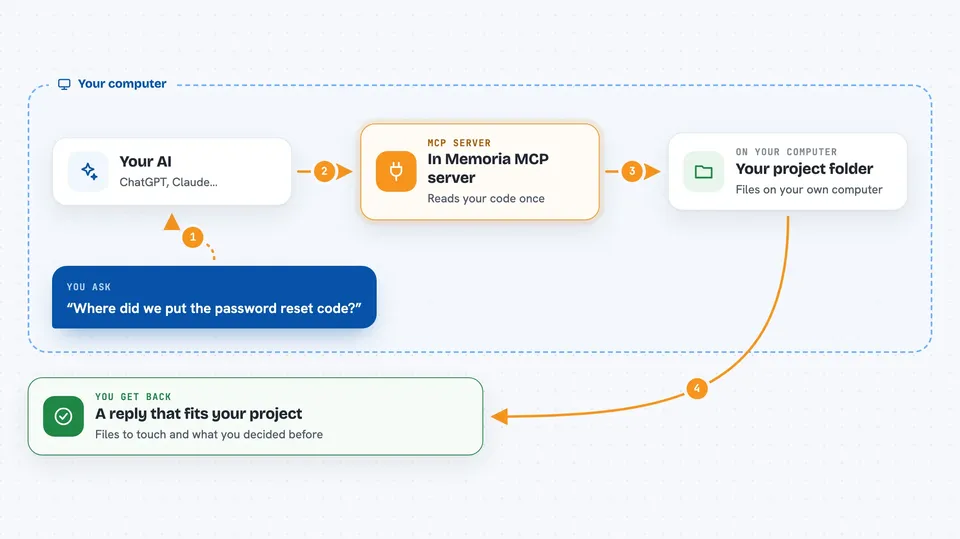
You point In Memoria at your project folder once, and it reads through your code. It picks up your habits, like how you name things and how your files are organised. Then it saves all of that on your own computer. When you ask your AI something later, the AI quietly asks In Memoria, and In Memoria hands back the relevant details. You get an answer that matches your project, even days later.
 Click to zoom
What you can do with it
- Remember your coding patterns and conventions across sessions
- Answer questions about your project's structure and tech stack
- Route a vague request like add password reset to the right files
- Find code by meaning, not just by exact keywords
- Track what you were working on and what decisions you made
- Suggest how you would likely solve a similar problem
- Record architectural decisions so they are not lost
Try asking your AI
- “Add password reset functionality”
- “Where did we put the password reset code?”
- “What tech stack and entry points does this project use?”
- “Review this code for consistency with our conventions”
What it gives back to you
You get answers in plain chat, written by your AI using what In Memoria found. That can be a short project summary, a list of matching files, or a suggested approach with the files to touch. It can also tell you what it remembers about your past tasks and decisions. You do not see raw data, just the AI's reply.
Before you start
What you need
- Node.js installed on your computer
- An AI tool that supports MCP, like Claude Desktop or Claude Code
- A project folder on your machine for it to read
Good to know
It reads your project files and stores what it learns on your computer, so avoid pointing it at folders with secrets or private data you would not want analysed.
Install it with your AI
Add In Memoria MCP server to your AI, no technical skills needed
You don't install anything by hand. You copy one prompt, paste it into an AI that can work on your computer, and it checks, installs and connects the server for you, asking you when it needs something.
Sign in to get the install prompt
Members get a ready-made prompt that lets the Claude desktop app check In Memoria MCP server, install it and connect it for them, step by step. You don't need any technical skills: you copy, paste and answer a few questions. Your connected AI can also find and install any of the 4,361 MCP servers here for you.
Who it's for
Developers and technical teams who use AI coding assistants on the same codebase often and are tired of repeating themselves.