MCP server · Notes
THOR memory for AI coding assistants
by nworks3d
Give your AI assistant a local memory that can warn it, and sometimes stop a wrong change before it happens.

THOR is a memory helper for AI coding assistants. You tell it things about your project once, in your own words, and it brings those notes back at the right moment. It is handy if you keep repeating the same warnings to your assistant and it keeps forgetting them.
What is an MCP server? The 30-second version
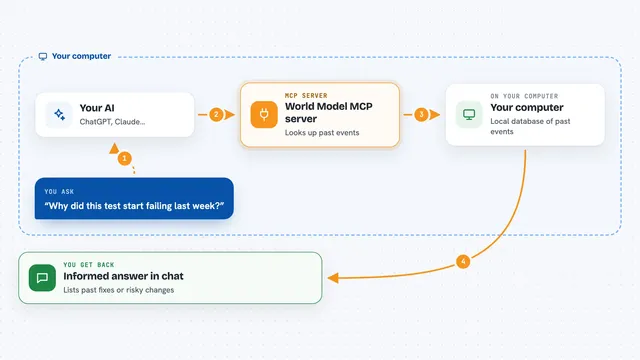
On its own, your AI can only chat with you. An MCP server is a small helper program that gives your AI a new skill or a connection to something else. This one connects your AI to a memory that lives on your own computer, so it can save notes about your project and hand them back later. Nothing is sent to the cloud, and you do not need an account or a key.
What this MCP server does
You tell your assistant something worth remembering, like a rule or a gotcha about your project. Your assistant passes it to THOR, which stores it on your machine. Later, when your assistant is about to touch the file or run the command that note is about, THOR puts the note in front of it right then. If the note carries a small check that still passes, THOR can refuse the matching change instead of just warning. Everything stays in one file on your computer.
 Click to zoom
What you can do with it
- Save a rule or gotcha about your project once, in your own words
- Get that note back automatically when your assistant reaches the file or command it is about
- Let a note with a live check refuse a matching edit or command
- Keep each project's memory separate so rules do not leak between projects
- See a health check that names notes that have gone stale or are never read
- Let your assistant add, fix, or retire notes as you work
- Point it at a project so questions about the code get answered from the real source
What it gives back to you
It gives your assistant short notes, in plain text, at the moment they matter. Notes are capped at 300 characters, and a block of notes at four notes and 1200 characters, so what lands in the chat is small. It can also return a health check that lists notes whose checks now fail, notes pointing at nothing, and notes too crowded to ever be shown. When a note with a live check matches a change, it can refuse the change instead of just telling you about it.
Before you start
What you need
- The THOR program installed on your own computer
- An AI coding assistant that can talk to MCP servers, such as Claude Code or another tool that supports them
Good to know
A note with a live check can refuse an edit or command, so a badly written note could block honest work until you fix or retire it.
Install it with your AI
Add THOR memory for AI coding assistants to your AI, no technical skills needed
You don't install anything by hand. You copy one prompt, paste it into an AI that can work on your computer, and it checks, installs and connects the server for you, asking you when it needs something.
Sign in to get the install prompt
Members get a ready-made prompt that lets the Claude desktop app check THOR memory for AI coding assistants, install it and connect it for them, step by step. You don't need any technical skills: you copy, paste and answer a few questions. Your connected AI can also find and install any of the 4,361 MCP servers here for you.
Who it's for
Developers and anyone who works with an AI coding assistant on real projects and keeps repeating the same warnings.