MCP server · Notes
Bear Notes MCP server
by akseyh
Lets your AI read and search your Bear notes and list your tags, right from the chat.

This is a small helper that connects your AI assistant to Bear, the note-taking app for Mac. Once it is set up, you can ask your AI to find something in your notes or show you your tags without opening Bear yourself. It is handy if you keep a lot of notes in Bear and want to search them by just asking.
What is an MCP server? The 30-second version
On its own, your AI can only chat with you. An MCP server is a small helper program that gives your AI a new skill or a connection to an app, and here that app is Bear. This helper reads your Bear notes and hands the results back to your AI. So when you ask a question about your notes, your AI quietly asks this helper, and the helper looks in Bear for you.
What this MCP server does
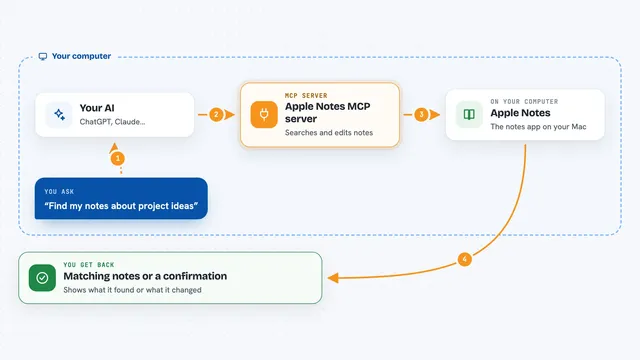
You ask your AI something about your Bear notes, like finding a note that mentions a word. Your AI passes that request to this helper program. The helper looks inside the Bear notes database on your Mac and pulls out the matching notes or tags. Then your AI shows you the results in the chat, in plain words. You never have to open Bear or type any commands yourself.
 Click to zoom
What you can do with it
- Read your Bear notes
- Search your notes for a word or phrase
- List all the tags you use in Bear
- Ask your AI to find a note you half remember
- See which tags exist before you search by tag
Try asking your AI
- “Find my Bear notes that mention the word invoice”
- “List all my Bear tags”
- “Show me my notes about the kitchen renovation”
- “Search my Bear notes for anything about the trip to Lisbon”
What it gives back to you
You get back a list of matching notes, usually with their titles and text, or a simple list of your tags. Your AI can then sum them up or point you to the one you meant. Everything shows up right in the chat as normal text. It only reads, so nothing in your notes gets changed.
Before you start
What you need
- A Mac, since Bear only runs on macOS
- The Bear note app installed with some notes in it
- Node.js installed if you use the npx option, or Docker if you use that option
- Permission for the helper to read the Bear database folder on your Mac
Good to know
It reads your private Bear notes, so only connect it on a computer you trust and be aware your AI will see whatever it looks up.
Install it with your AI
Add Bear Notes MCP server to your AI, no technical skills needed
You don't install anything by hand. You copy one prompt, paste it into an AI that can work on your computer, and it checks, installs and connects the server for you, asking you when it needs something.
Sign in to get the install prompt
Members get a ready-made prompt that lets the Claude desktop app check Bear Notes MCP server, install it and connect it for them, step by step. You don't need any technical skills: you copy, paste and answer a few questions. Your connected AI can also find and install any of the 4,361 MCP servers here for you.
Who it's for
Mac users who keep their notes in Bear and want to search or browse them by chatting with their AI.