MCP server · Notes
Apple Notes MCP server
Lets your AI search, read, create, update, and move your Apple Notes for you.
This is a small helper that connects your AI assistant to your Apple Notes app on a Mac. Once it is set up, you can just ask in plain words and your AI will go look things up or make changes in your notes. It is handy if you keep a lot of notes and want to find or tidy them without clicking around.
What is an MCP server? The 30-second version
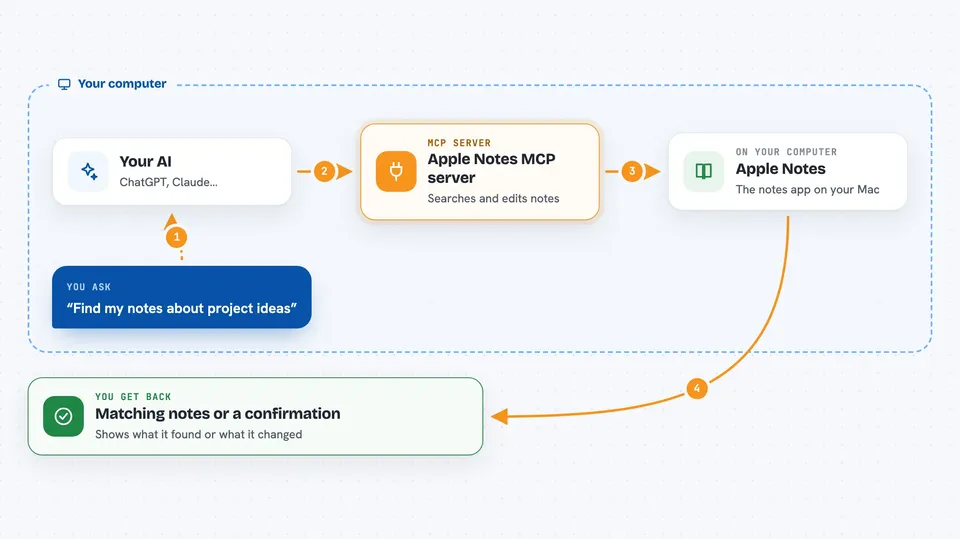
On its own, your AI can only chat. It cannot see your Apple Notes. An MCP server is a small helper program that gives your AI a new skill, and this one gives it a connection to your Apple Notes on your Mac. So when you ask about a note, your AI asks this helper, the helper talks to Apple Notes, and the answer comes back to you in the chat.
What this MCP server does
You ask your AI something about your notes, like finding meeting notes or creating a new one. Your AI passes that request to this helper program running on your Mac. The helper talks to the Apple Notes app, searches or changes your notes, and sends the result back. Your AI then shows you the answer or confirms the change. It can also build a search index of your notes so finding things by meaning works well, not just by exact words.
 Click to zoom
What you can do with it
- Search your notes by meaning, not just exact keywords
- Read the full content of a note by its title
- Create new notes in a folder you choose
- Update, move, or delete existing notes
- List your folders and notes sorted by date or title
- Find notes that share tags or are related to each other
- Pull table data out of a note
Try asking your AI
- “Search my notes for project ideas”
- “Create a note called Meeting Notes in the Work folder”
- “What is in my note about vacation plans?”
- “Move the Old Project note to Archive”
What it gives back to you
You get answers in the chat, like a list of matching notes with short previews, or the full text of one note. When it makes a change, like creating or moving a note, it tells you what it did. If you ask for tables, it gives you the rows and columns as structured data. Search results can include a preview or the full content, depending on what you ask for.
Before you start
What you need
- A Mac, since it uses the Apple Notes app
- The Apple Notes app with some notes in it
- Bun runtime installed (a program that runs this helper)
- Permission for automation when your Mac asks
Good to know
It can create, change, move, and delete your real Apple Notes, so be careful with delete and batch-delete requests and consider turning on the read-only setting if you only want to look things up.
Install it with your AI
Add Apple Notes MCP server to your AI, no technical skills needed
You don't install anything by hand. You copy one prompt, paste it into an AI that can work on your computer, and it checks, installs and connects the server for you, asking you when it needs something.
Sign in to get the install prompt
Members get a ready-made prompt that lets the Claude desktop app check Apple Notes MCP server, install it and connect it for them, step by step. You don't need any technical skills: you copy, paste and answer a few questions. Your connected AI can also find and install any of the 4,609 MCP servers here for you.
Who it's for
Mac users who keep a lot of notes in Apple Notes and want to search or manage them by just asking their AI.