MCP server · Notes
Bear MCP server
by bart6114
Lets your AI read your Bear notes and tags so it can search and show them for you.
This is a small helper that connects your AI assistant to the Bear note-taking app on your Mac. Once it is set up, you can ask your AI to find notes, open a note by its title, or list your tags, and it will read them straight from Bear. It is handy if you keep a lot of notes in Bear and want to search them by chatting instead of clicking around.
What is an MCP server? The 30-second version
On its own, your AI can only chat with you. It cannot see anything on your computer or in your apps. An MCP server is a small helper program that gives your AI one new skill. This one gives it a connection to your Bear notes, so when you ask about a note or a tag, the AI can go look it up in Bear and tell you what it found.
What this MCP server does
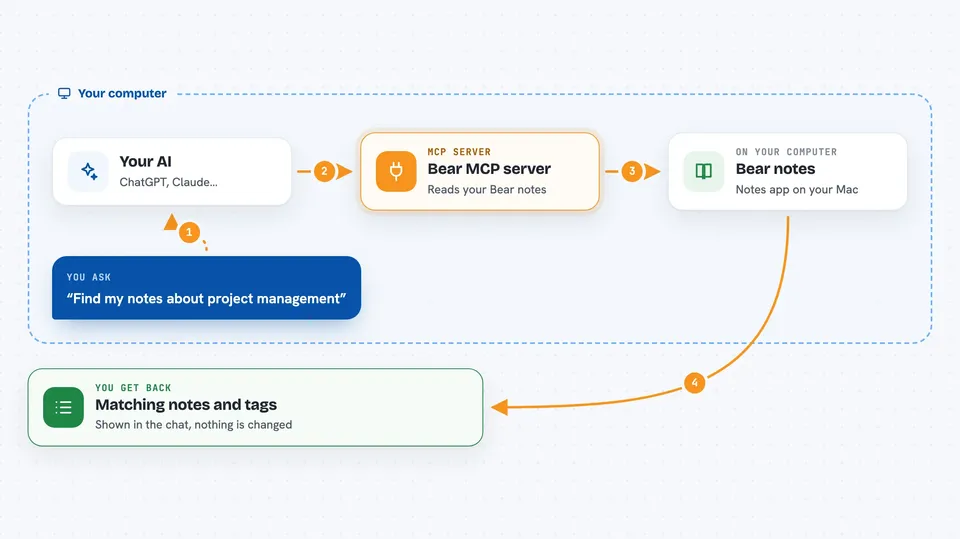
You ask your AI something about your Bear notes, like finding notes about a topic or opening a note by its title. The AI passes that request to this helper. The helper opens your Bear database, which is the file where Bear keeps your notes, and runs a read-only search. It sends the matching notes or tags back to the AI, and the AI shows them to you in the chat.
 Click to zoom
What you can do with it
- Search your Bear notes for a word or phrase
- Open a specific note by its title or ID
- List all the tags you use in Bear
- Show every note that has a certain tag
- Look things up in your notes without leaving the chat
Try asking your AI
- “Find all my notes about project management”
- “Show me my note titled Meeting Notes - March 2025”
- “What tags do I have in my Bear notes?”
- “Show me all notes with the #work tag”
What it gives back to you
You get back the notes or tags that match what you asked for, shown as text in the chat. For a search, that usually means a list of note titles and their contents. For tags, you get a list of tag names. Nothing is changed in Bear, it only reads.
Before you start
What you need
- A Mac with the Bear app installed
- Node.js 18 or higher on your Mac
- The Claude desktop app or the Claude VS Code extension
Good to know
It only reads your Bear database and cannot change or delete anything, so your notes stay safe.
Install it with your AI
Add Bear MCP server to your AI, no technical skills needed
You don't install anything by hand. You copy one prompt, paste it into an AI that can work on your computer, and it checks, installs and connects the server for you, asking you when it needs something.
Sign in to get the install prompt
Members get a ready-made prompt that lets the Claude desktop app check Bear MCP server, install it and connect it for them, step by step. You don't need any technical skills: you copy, paste and answer a few questions. Your connected AI can also find and install any of the 4,361 MCP servers here for you.
Who it's for
Bear users on a Mac who want to search and read their notes by chatting with an AI assistant.