
MCP server · Developer tools
Web Validator by DigestSEO
by AKzar1el
Check your web pages for HTML, CSS, SEO, and accessibility problems, and take screenshots at different screen sizes.
Web Validator is a helper for your AI that checks web pages for common mistakes. It looks at your HTML and CSS, spots SEO and accessibility issues, checks your structured data, tests links, and can even take screenshots at desktop, tablet, and mobile sizes. It is handy if you build or edit websites and want a quick second pair of eyes.
What is an MCP server? The 30-second version
On its own, your AI can only chat with you. An MCP server is a small helper program that gives your AI a new skill or a connection to another service. This one connects your AI to web validation tools, so when you ask it to check a page, it can actually run the checks and bring the results back to you. You do not need to know how it works under the hood. You just ask, and it does the looking.
What this MCP server does
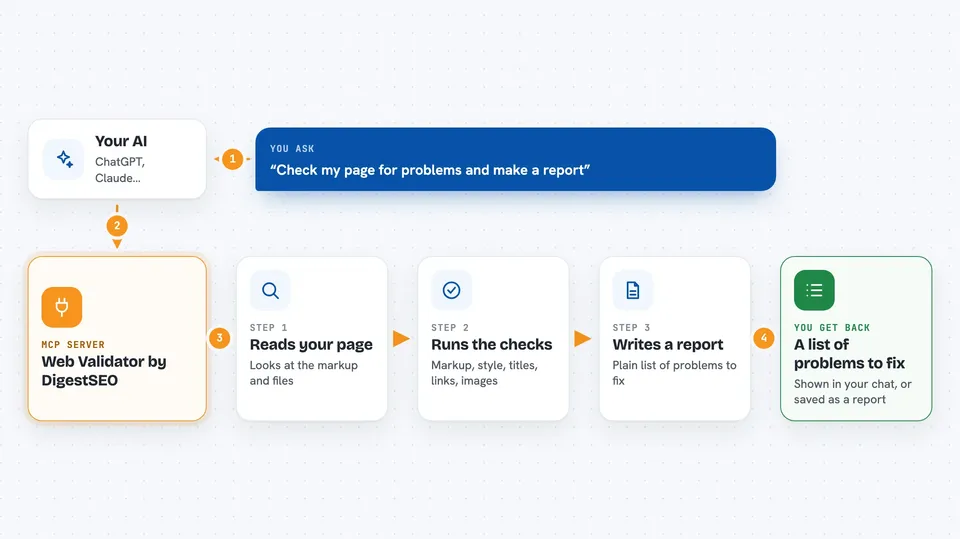
You ask your AI to check a web page or a file you have. The AI passes your request to this helper. The helper reads the page or file, sends the markup to well-known validators, and looks at things like titles, descriptions, headings, image alt text, and structured data. Then it hands the findings back to your AI, which shows them to you in plain language, often as a tidy report.
 Click to zoom
What you can do with it
- Validate an HTML or XHTML file for markup errors
- Check a live web page's HTML by its URL
- Validate a CSS file for syntax problems
- Audit a page's titles, descriptions, headings, and image alt text
- Check JSON-LD structured data for syntax errors
- Test links found in your page for broken ones
- Capture screenshots at desktop, tablet, and mobile sizes
- Generate a combined Markdown report of all the checks
Try asking your AI
- “Check this HTML file for validation errors and tell me what is wrong”
- “Audit the SEO metadata on this page and list anything missing”
- “Are there any broken links in this page's HTML?”
- “Take a mobile screenshot of this page and save it to my screenshots folder”
What it gives back to you
You get back lists of problems, short explanations, and sometimes a Markdown report you can read or save. For screenshots, you get PNG image files written to a folder you choose. The answers appear right in your chat, so you can read them and decide what to fix.
Before you start
What you need
- Node.js 22.12.0 or newer (for the local version)
- An MCP client that supports local servers or the hosted web address
- The page or file you want to check
Good to know
Only check files and pages you own or have permission to inspect, and remove private tokens or personal details from web addresses before you submit them.
Install it with your AI
Add Web Validator by DigestSEO to your AI, no technical skills needed
You don't install anything by hand. You copy one prompt, paste it into an AI that can work on your computer, and it checks, installs and connects the server for you, asking you when it needs something.
Sign in to get the install prompt
Members get a ready-made prompt that lets the Claude desktop app check Web Validator by DigestSEO, install it and connect it for them, step by step. You don't need any technical skills: you copy, paste and answer a few questions. Your connected AI can also find and install any of the 4,609 MCP servers here for you.
Who it's for
Web developers, content editors, and anyone who builds or maintains websites and wants a quick check without opening lots of separate tools.



