
MCP server · API
Context Firewall MCP server
Your AI gets one tidy helper that shrinks big tool results and hides dozens of tools behind four simple ones.
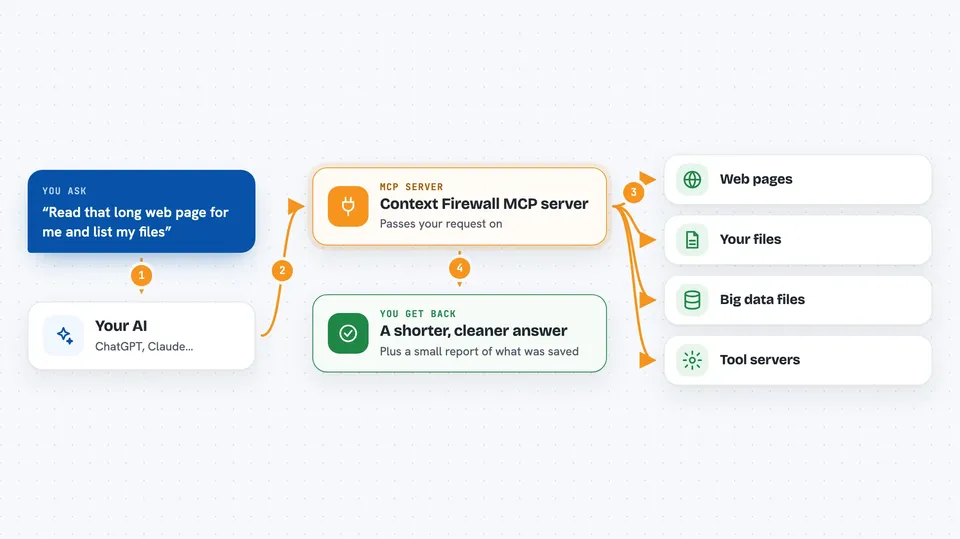
Context Firewall is a small helper program that sits between your AI assistant and the other tool servers you use. It shrinks long results before they reach your AI, so your chats stay fast and don't fill up. It is handy if you use several tool servers at once and keep hitting limits or slow replies.
What is an MCP server? The 30-second version
On its own, your AI can only chat with you. An MCP server is a small helper program that gives your AI a new skill or a connection to another app. This one is a middle layer: you point it at the tool servers you already use, and it becomes the single helper your AI talks to. So instead of your AI juggling many helpers, it talks to Context Firewall, which passes requests along and trims the answers.
What this MCP server does
You ask your AI something that needs a tool, like reading a web page or listing files. Your AI asks Context Firewall, which forwards the request to the right tool server behind it. When the answer comes back, Context Firewall trims it down: it strips junk, turns web pages into plain text, and shortens huge lists. Your AI sees a much smaller answer, and the full original is kept aside in case you need it. If you want the whole thing, your AI can ask for it in pieces.
 Click to zoom
What you can do with it
- Shrink long web pages and big data files before your AI reads them
- Hide dozens of tools behind four simple ones so your AI stays focused
- Search for the right tool by keyword instead of loading every tool up front
- Run a tool from any connected server through one shared entry point
- Pull back the full original text of anything that was trimmed
- Block certain tools from being used at all, like anything starting with delete
- Print a short report at the end showing how much space was saved
What it gives back to you
You get a shorter, cleaner version of whatever the tool sent back, usually as text in the chat. If something was trimmed, your AI can ask for the rest and you'll see it in chunks. At the end of a session, you also get a small report showing how much was saved and which tools saved the most.
Before you start
What you need
- Node.js 18 or newer installed on your computer
- A config file listing the tool servers you want it to manage
- The Claude desktop app or another AI client that supports MCP servers
Good to know
It can run any tool on the servers you connect, including ones that change or delete things, so only connect servers you trust and use the block list for risky tools.
Install it with your AI
Add Context Firewall MCP server to your AI, no technical skills needed
You don't install anything by hand. You copy one prompt, paste it into an AI that can work on your computer, and it checks, installs and connects the server for you, asking you when it needs something.
Sign in to get the install prompt
Members get a ready-made prompt that lets the Claude desktop app check Context Firewall MCP server, install it and connect it for them, step by step. You don't need any technical skills: you copy, paste and answer a few questions. Your connected AI can also find and install any of the 4,609 MCP servers here for you.
Who it's for
People who use several AI tool servers at once and want faster replies and less clutter, especially developers and heavy Claude or Cursor users.


