MCP server · Research
WebReaper MCP server
by alex-on-ai
Turn web pages into clean Markdown or structured data your AI can read and use.

WebReaper is a small program that fetches web pages and turns them into clean, readable text. It comes with an MCP server, which is the part that lets your AI assistant use it directly. It is handy if you often copy articles, blog posts, or product pages into your AI and want that to happen automatically.
What is an MCP server? The 30-second version
On its own, your AI can only chat with you using what it already knows. An MCP server is a small helper program that gives your AI a new skill or a connection to something outside the chat. This MCP server connects your AI to WebReaper, a web scraper, so the AI can go fetch a page and read it for you. You ask in plain words, and the AI quietly uses this helper behind the scenes.
What this MCP server does
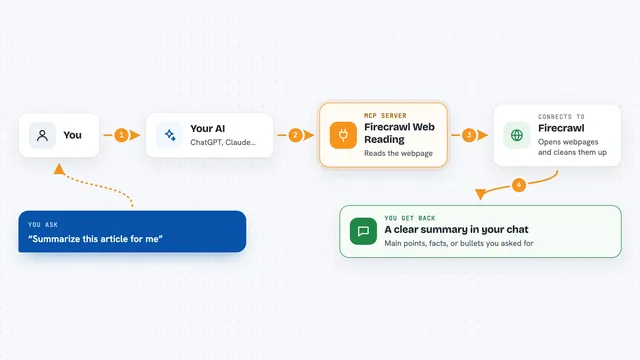
You ask your AI something like "give me the text of this article." The AI passes that request to the WebReaper MCP server, which is running on your own computer. WebReaper fetches the page, strips out menus, ads, and clutter, and turns the main content into tidy Markdown. It can also walk through a whole site to find pages, or pull out specific fields like a title and price. The result comes back into your chat as readable text or a list.
 Click to zoom
What you can do with it
- Turn any web page into clean Markdown text
- List all the links or pages on a website
- Pull out specific fields like titles, prices, or authors
- Crawl a whole site and collect every page
- Fetch pages that are normally hard to read with a plain request
- Extract information using a description you write in plain words
Try asking your AI
- “Give me the markdown of this article: https://example.com/post”
- “What blog posts are on https://example.com and what are their titles?”
- “Scrape the top 5 stories on Hacker News and summarize each one”
- “Pull the product name and price from this page”
What it gives back to you
You get back clean text, usually as Markdown, that you can read or paste into another prompt. For structured requests, you get a short list of the fields you asked for, like a title and a price. For site-wide crawls, you get a collection of pages, one after another. Everything shows up right in your chat, so you can keep working with it.
Before you start
What you need
- The WebReaper program installed on your computer (a single file, no setup)
- An MCP-capable AI app like Claude Desktop or Cursor
- For some features, an account or key from an AI provider like OpenAI (a kind of password for apps)
Good to know
It fetches pages from the web, so be careful about scraping sites you do not have permission to use, and about running it on private or internal pages.
Install it with your AI
Add WebReaper MCP server to your AI, no technical skills needed
You don't install anything by hand. You copy one prompt, paste it into an AI that can work on your computer, and it checks, installs and connects the server for you, asking you when it needs something.
Sign in to get the install prompt
Members get a ready-made prompt that lets the Claude desktop app check WebReaper MCP server, install it and connect it for them, step by step. You don't need any technical skills: you copy, paste and answer a few questions. Your connected AI can also find and install any of the 4,609 MCP servers here for you.
Who it's for
Anyone who regularly copies web content into their AI, like researchers, writers, analysts, and support teams.