MCP server · Developer tools
NetOps MCP server
by alpadalar
Lets your AI run network checks like ping, traceroute, DNS lookups and port scans for you.
This is a helper for your AI that gives it a set of everyday network and system checking tools. Instead of you opening a terminal and typing commands, you just ask your AI in plain words. It is handy for anyone who has to check whether a server is reachable, a website responds, or a machine is running low on disk.
What is an MCP server? The 30-second version
On its own, your AI can only chat. It cannot actually ping a server or look up a domain name. An MCP server is a small helper program that gives your AI a new skill, and this one gives it network and system checking skills. Once it is connected, your AI can run those checks for you and tell you what came back.
What this MCP server does
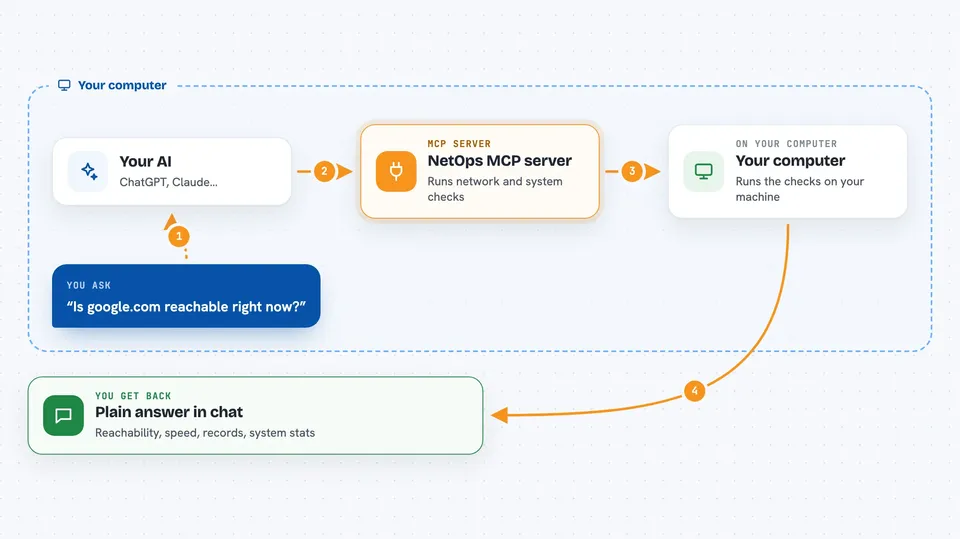
You ask your AI something like whether a website is up. Your AI passes that request to this helper program running on your own computer. The helper runs the matching standard tool, such as ping or dig, and collects the output. It sends the result back to your AI, which explains it to you in normal words. It can also look at your machine's CPU, memory, disk and running processes.
 Click to zoom
What you can do with it
- Check if a server or website is reachable with ping
- Trace the path your traffic takes to a destination
- Look up DNS records for a domain
- Check whether a specific port is open on a host
- See which services are running on a machine
- Check CPU, memory and disk usage on your system
- List running processes and see which tools are installed
Try asking your AI
- “Is google.com reachable right now?”
- “Trace the route from my machine to example.com and show me where it slows down”
- “What DNS records does mycompany.com have?”
- “How much disk space is left on this machine and what is using the most CPU?”
What it gives back to you
You get back the plain output of the check, explained in the chat. For a ping you see whether replies came back and how fast. For a DNS lookup you see the records. For a system check you see numbers like CPU load, free memory and disk space. If a scan finds open ports, you get a list of them.
Before you start
What you need
- A computer running Linux or macOS (Windows is not supported)
- Python 3.10 or newer, plus the uv tool (recommended)
- The standard network tools installed, such as ping, dig, nmap and curl
- An MCP client like Claude Desktop, Claude Code or Cursor
Good to know
The scanning tools can be illegal if you use them on networks you do not own or have permission to test, and some checks can change or probe systems, so only point it at machines you are allowed to touch.
Install it with your AI
Add NetOps MCP server to your AI, no technical skills needed
You don't install anything by hand. You copy one prompt, paste it into an AI that can work on your computer, and it checks, installs and connects the server for you, asking you when it needs something.
Sign in to get the install prompt
Members get a ready-made prompt that lets the Claude desktop app check NetOps MCP server, install it and connect it for them, step by step. You don't need any technical skills: you copy, paste and answer a few questions. Your connected AI can also find and install any of the 4,361 MCP servers here for you.
Who it's for
People who handle servers, networks or IT support and want quick checks without opening a terminal, plus developers who want their AI to look at system health.