
MCP server · Analytics
Apple Search Ads MCP server
by andrealufino
Ask your AI about your Apple Search Ads campaigns, keywords, and performance in plain English.
This is a small helper program that connects your AI assistant to your Apple Search Ads account. Once it is set up, you can ask questions about your campaigns and get answers back in the chat, without clicking around the Apple dashboard. It is handy for anyone who runs Apple Search Ads and wants quick answers or simple reports.
What is an MCP server? The 30-second version
On its own, your AI can only chat. It cannot see your Apple Search Ads account or look anything up there. An MCP server is a small helper program that gives your AI a new skill, in this case a connection to Apple Search Ads. You install this helper yourself, and then your AI can ask it for campaign and keyword information when you request it.
What this MCP server does
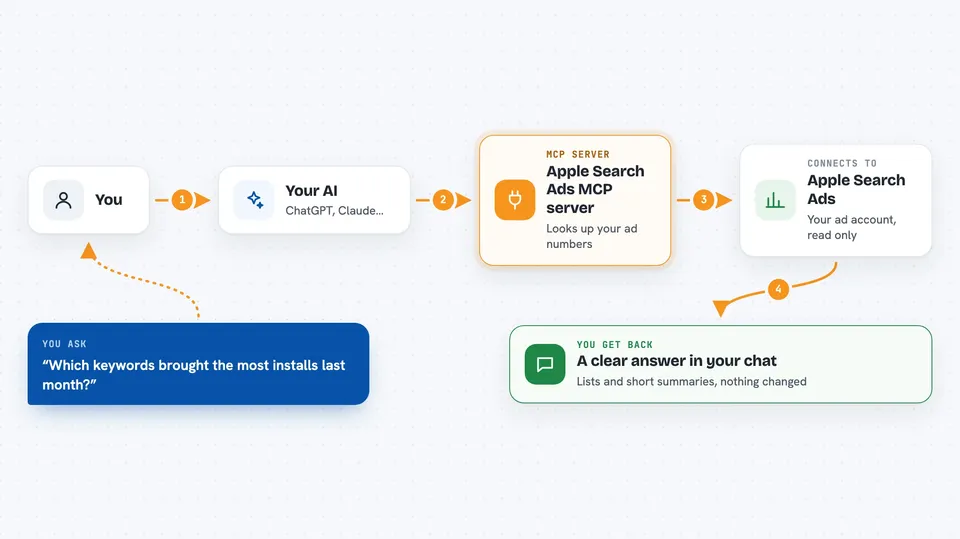
You type a question in plain English, like asking which keywords brought the most installs last month. Your AI reads your question and decides it needs data from Apple Search Ads. It sends that request to this helper program, which talks to the Apple Search Ads API using your account details. The helper brings the numbers back, and your AI turns them into a clear answer in the chat. Everything here is read only, so it looks things up but never changes your campaigns.
 Click to zoom
What you can do with it
- List your Apple Search Ads campaigns and their status
- See ad groups inside a campaign with their bid amounts
- Check targeting keywords, bids, and match types
- Get campaign performance like impressions, taps, installs, and spend
- Break performance down by ad group or by keyword
- See the real search terms that triggered your ads
- Compare spend and results over daily, weekly, or monthly periods
Try asking your AI
- “List my Apple Ads campaigns”
- “Show me the last 30 days of campaign performance”
- “Which keywords drove installs in my Brand campaign last week?”
- “What search terms triggered my ads in the past month? Focus on ones with impressions but no installs.”
What it gives back to you
You get answers in the chat, usually as lists or short summaries. For example, a list of campaigns, a table of keywords with bids, or a report of impressions, taps, installs, and spend for a period. You can ask for daily, weekly, or monthly breakdowns. Nothing is changed in your account, so it is safe to explore.
Before you start
What you need
- An Apple Search Ads account with Campaign Management API access
- An API user created in Apple Search Ads with a client ID, team ID, and key ID
- An ES256 key pair (a private key file and a public key you upload to Apple)
- The Claude desktop app, or another app that supports MCP servers
- Node.js installed on your computer to build and run the server
Good to know
It is read only, so it will not change or pause your campaigns, but it does read your Apple Search Ads account data, so keep your private key safe and never share or commit it.
Install it with your AI
Add Apple Search Ads MCP server to your AI, no technical skills needed
You don't install anything by hand. You copy one prompt, paste it into an AI that can work on your computer, and it checks, installs and connects the server for you, asking you when it needs something.
Sign in to get the install prompt
Members get a ready-made prompt that lets the Claude desktop app check Apple Search Ads MCP server, install it and connect it for them, step by step. You don't need any technical skills: you copy, paste and answer a few questions. Your connected AI can also find and install any of the 4,361 MCP servers here for you.
Who it's for
This is most useful for marketers, app owners, and analysts who run Apple Search Ads and want fast answers without digging through the Apple dashboard.





