MCP server · Analytics
MCPSpend MCP server
See what your AI tool calls actually cost, broken down by tool, project, and customer.
MCPSpend keeps an eye on how much your AI tool calls are costing you. It sits quietly between your AI app and the tools it uses, and adds up the spend as you go. It is handy for anyone who uses AI agents for work and wants to know where the money goes.
What is an MCP server? The 30-second version
On its own, your AI can only chat with you. An MCP server is a small helper program that gives your AI a new skill or a connection to another service. This one connects your AI to MCPSpend, so it can look up your usage and cost numbers for you. You just ask in plain words, and the helper fetches the answer from MCPSpend.
What this MCP server does
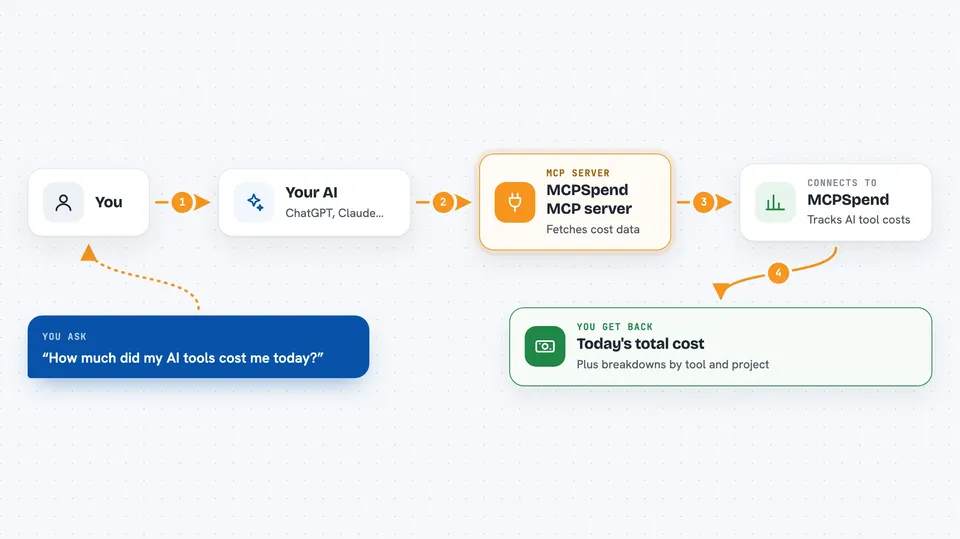
You ask your AI something like how much you spent today. Your AI passes that question to this helper. The helper talks to MCPSpend, which has been quietly recording the cost of every tool call your AI made. MCPSpend sends back the numbers, and your AI shows them to you right in the chat. It also works the other way: a small proxy watches your tool calls and streams the costs to your dashboard.
 Click to zoom
What you can do with it
- Check today's total AI spend
- See which tools cost the most
- Look at cost per project
- Break down spend by end customer
- Review recent sessions and their costs
- Export your usage as a CSV file
Try asking your AI
- “How much did my AI tools cost me today?”
- “Which tool has been the most expensive this week?”
- “Show me the spend for the Acme project this month.”
- “List my top five tools by cost.”
What it gives back to you
You get back plain numbers and short lists in the chat. For example, a total for the day, a ranked list of your most expensive tools, or a breakdown per project or customer. If you ask for a CSV, you get a file you can open in a spreadsheet.
Before you start
What you need
- A free MCPSpend account (25,000 tool calls per month, no card needed)
- An MCPSpend API key, which looks like mcps_live_xxx (the site gives you one when you sign up)
- Node.js installed on your computer if you use the one-command installer
Good to know
The proxy watches your tool calls and sends usage details to MCPSpend, so if you handle sensitive work, read their privacy page first; they say tool arguments and responses never leave your machine.
Install it with your AI
Add MCPSpend MCP server to your AI, no technical skills needed
You don't install anything by hand. You copy one prompt, paste it into an AI that can work on your computer, and it checks, installs and connects the server for you, asking you when it needs something.
Sign in to get the install prompt
Members get a ready-made prompt that lets the Claude desktop app check MCPSpend MCP server, install it and connect it for them, step by step. You don't need any technical skills: you copy, paste and answer a few questions. Your connected AI can also find and install any of the 4,361 MCP servers here for you.
Who it's for
Anyone who runs AI agents for work and wants to keep an eye on the cost, like team leads, freelancers, and small agencies billing clients.