
MCP server · Social media
YouTube Uploader MCP server
by anwerj
Let your AI upload videos to YouTube and fill in the title, description, and tags for you.
This is a small helper that connects your AI assistant to your YouTube channel. Once it is set up, you can ask your AI to upload a video file and it will do the uploading for you, including the title, description, and tags. It is handy for anyone who posts videos and would rather not click through YouTube Studio.
What is an MCP server? The 30-second version
On its own, your AI can only chat with you. An MCP server is a small helper program that gives your AI a new skill or a connection to an app. This one connects your AI to YouTube. So when you ask it to upload a video, it can actually do that instead of just telling you how.
What this MCP server does
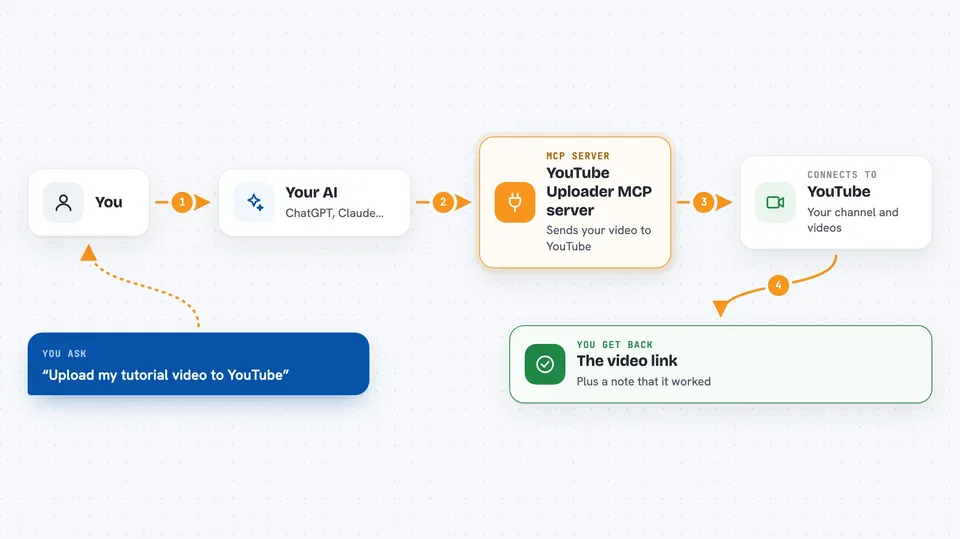
You tell your AI which video file you want to upload and what the video is about. Your AI uses this helper to sign in to your YouTube account and send the file to YouTube. The helper also fills in the details you asked for, like the title, description, tags, and whether the video should be public, private, or unlisted. When it is done, it tells you the result. Later, you can ask it to add the video to a playlist, set a thumbnail, or add subtitles.
 Click to zoom
What you can do with it
- Upload a video file to your YouTube channel
- Write the title, description, and tags for the video
- Set the video to public, private, or unlisted
- Schedule a video to publish at a later time
- Add an uploaded video to a playlist
- Upload a custom thumbnail image for a video
- Attach subtitle or caption files to a video
- List the videos already on your channel
Try asking your AI
- “Upload the video at /Users/me/Videos/tutorial.mp4 to my YouTube channel with the title Getting Started with Spreadsheets”
- “Make the video I just uploaded private and schedule it to go live next Monday at 9am”
- “Add the video called March Update to my Tutorials playlist”
- “Show me the private videos on my channel from the last month”
What it gives back to you
You get back short answers in the chat, like the video link once it is uploaded, or a list of your videos with their titles and privacy settings. If something goes wrong, it tells you what failed. It also confirms changes it made, such as adding a video to a playlist or setting a thumbnail.
Before you start
What you need
- A Google account with a YouTube channel
- A client_secret.json file from the Google Developer Console (the setup guide walks you through getting one)
- The Claude desktop app or another MCP client like Cursor or VS Code
Good to know
This helper can upload and change things on your real YouTube channel, so check the title, description, and privacy setting before you let it publish anything.
Install it with your AI
Add YouTube Uploader MCP server to your AI, no technical skills needed
You don't install anything by hand. You copy one prompt, paste it into an AI that can work on your computer, and it checks, installs and connects the server for you, asking you when it needs something.
Sign in to get the install prompt
Members get a ready-made prompt that lets the Claude desktop app check YouTube Uploader MCP server, install it and connect it for them, step by step. You don't need any technical skills: you copy, paste and answer a few questions. Your connected AI can also find and install any of the 4,361 MCP servers here for you.
Who it's for
Anyone who posts videos to YouTube and wants to upload and manage them by just asking their AI, without opening YouTube Studio.





