
MCP server · Developer tools
BumpGuard MCP server
Check which lines of your code break when you upgrade a library, and catch made-up API calls.
BumpGuard is a small helper that your AI assistant can use to check your code before you upgrade a library. It tells you exactly which lines of your own code would break, with line numbers and fix hints. It is handy for anyone who writes Python, .NET, or Java code and leans on an AI assistant to help.
What is an MCP server? The 30-second version
On its own, your AI can only chat with you. It cannot look inside your project or check what is really installed on your computer. An MCP server is a small helper program that gives your AI a new skill. BumpGuard is that helper here: it reads the real libraries on your machine and answers questions about them, so your AI stops guessing.
What this MCP server does
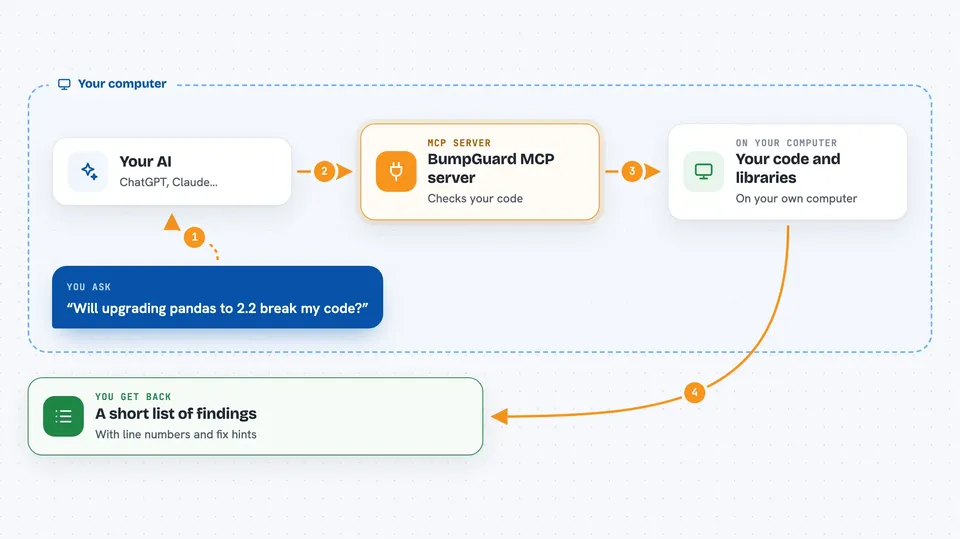
You ask your AI something like whether upgrading pandas to 2.2 will break your code. Your AI passes the question and your code to BumpGuard. BumpGuard reads the library's real public list of functions and classes, compares the old version with the new one, and checks which of those changes touch your code. It then hands back a short list of findings with line numbers and suggestions. Your AI shows you that list in the chat.
 Click to zoom
What you can do with it
- Check if upgrading a library will break your code, with line numbers
- See what changed between two versions of a library
- Verify that the imports and calls in a snippet really exist
- Check whether a package is installed, and get the closest real name if not
- List the real public functions and classes of a package
- Catch made-up or wrong API calls in AI-written code
Try asking your AI
- “Before upgrading pandas to 2.2, check whether my data pipeline breaks.”
- “Verify this snippet actually uses the installed OpenAI SDK.”
- “List the real methods on httpx.Client.”
- “What changed between pydantic 1.10.13 and 2.0.3?”
What it gives back to you
You get back a short list of findings, each with the symbol, the line number in your code, how serious it is, and a fix hint. You also get a small summary with counts, like how many breaking changes were found. If nothing is proven to break, it says so plainly. Everything appears as text in your chat.
Before you start
What you need
- Python 3.10 or newer
- BumpGuard installed in the same environment as the project you are working on
- An MCP-compatible client, like Claude Desktop, Claude Code, Cursor, Windsurf, or VS Code with Copilot
- For .NET checks: the .NET SDK installed
Good to know
BumpGuard uses static analysis, so a clean result means nothing was proven to break, not that everything is safe.
Install it with your AI
Add BumpGuard MCP server to your AI, no technical skills needed
You don't install anything by hand. You copy one prompt, paste it into an AI that can work on your computer, and it checks, installs and connects the server for you, asking you when it needs something.
Sign in to get the install prompt
Members get a ready-made prompt that lets the Claude desktop app check BumpGuard MCP server, install it and connect it for them, step by step. You don't need any technical skills: you copy, paste and answer a few questions. Your connected AI can also find and install any of the 4,609 MCP servers here for you.
Who it's for
Developers and anyone who upgrades libraries in Python, .NET, or Java projects and uses an AI assistant to help.




