MCP server · Developer tools
Confluent MCP server
by confluentinc
Lets your AI look at and manage your Kafka topics, connectors, and Confluent Cloud resources for you.

This is a small helper that connects your AI assistant to Confluent, the company behind Apache Kafka. Kafka is a system many companies use to move data between apps, and Confluent Cloud is the hosted version of it. If you work with Kafka topics, connectors, or Flink queries, this helper lets you ask your AI about them in plain English instead of clicking through dashboards.
What is an MCP server? The 30-second version
On its own, your AI can only chat. An MCP server is a small helper program that gives your AI a new skill or a connection to an app or service. This one connects your AI to Confluent Cloud, Confluent Platform, and Apache Kafka. Once it is set up, your AI can look things up and do things in Confluent when you ask, like listing your topics or checking a connector.
What this MCP server does
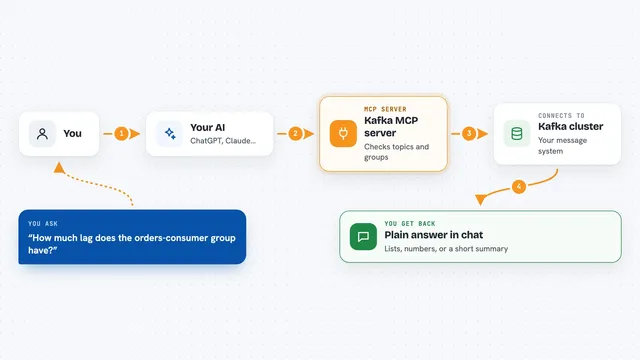
You ask your AI something about your Confluent setup, like which topics exist or why a connector is failing. The AI passes that request to this helper program. The helper talks to Confluent Cloud or your Kafka cluster using the connection details you gave it. Confluent sends back the answer, and the helper hands it to the AI. The AI then explains it to you in the chat, in normal words.
 Click to zoom
What you can do with it
- List your Kafka topics and see their settings
- Create or delete topics
- Send a test message to a topic and read messages back
- Check consumer groups and how far behind they are
- Look at your connectors and see if any are failing
- Pause, resume, or restart a connector
- Search Confluent documentation and read a doc page
Try asking your AI
- “List all the Kafka topics in my Confluent Cloud environment”
- “Why is my S3 connector failing? Show me the error and what to do”
- “How many messages are in the orders topic right now?”
- “Search the Confluent docs for how Tableflow works”
What it gives back to you
You get answers in the chat, in plain language. For example, a list of topic names, a summary of a connector's status, or an explanation of an error. If you ask it to create or change something, it tells you what it did. It can also pull up documentation pages and summarize them for you.
Before you start
What you need
- Node.js version 22.19.0 or newer installed on your computer
- A Confluent Cloud account, or a Kafka cluster you can connect to
- Connection details for your cluster (like the server address and login keys), which you put in a config file
Good to know
It can create, change, and delete real things in your Confluent setup, like topics and connectors, so be careful with what you ask it to do.
Install it with your AI
Add Confluent MCP server to your AI, no technical skills needed
You don't install anything by hand. You copy one prompt, paste it into an AI that can work on your computer, and it checks, installs and connects the server for you, asking you when it needs something.
Sign in to get the install prompt
Members get a ready-made prompt that lets the Claude desktop app check Confluent MCP server, install it and connect it for them, step by step. You don't need any technical skills: you copy, paste and answer a few questions. Your connected AI can also find and install any of the 4,361 MCP servers here for you.
Who it's for
People who work with Kafka or Confluent Cloud at their job, like data engineers, platform engineers, and support teams who want quick answers without clicking through dashboards.