MCP server · Developer tools
Firebase MCP server
by gannonh
Lets your AI read and change data, files and users in your Firebase project for you.
This is a small helper that connects your AI assistant to Firebase, Google's set of tools for apps and websites. Once it is set up, you can ask your AI to look up records, upload files or check a user account, and it does it for you. It is handy for anyone who works with a Firebase project but does not want to click around the console all day.
What is an MCP server? The 30-second version
On its own, your AI can only chat. It cannot see your apps or your data. An MCP server is a little helper program that gives your AI one new skill, here a connection to your Firebase project. You add it once to your AI app, and from then on the AI can look things up in Firebase or make changes there when you ask.
What this MCP server does
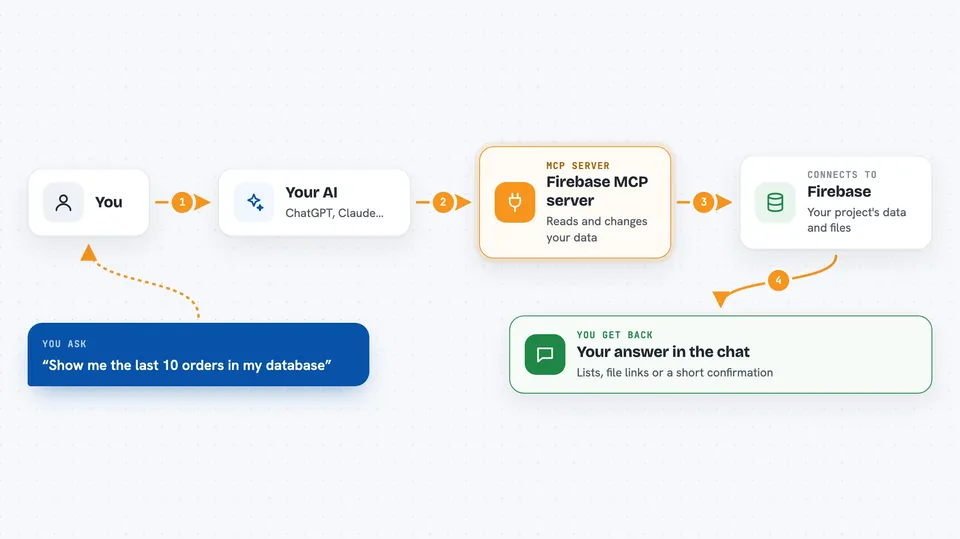
You type a request in plain words, like asking to see the latest orders or to upload a file. Your AI passes that request to this helper. The helper talks to Firebase using your project's credentials. Firebase sends back the data, the file link or the confirmation, and the helper hands it to your AI. Your AI then shows you the answer in the chat, in a normal readable way.
 Click to zoom
What you can do with it
- List the collections in your Firestore database
- Read, add, update or delete documents in a collection
- Search documents with filters or across subcollections
- List files stored in Firebase Storage
- Upload a file from your computer or from a web link
- Get the download link and details of a stored file
- Look up a user account by email or user ID
Try asking your AI
- “List all the collections in my Firestore database”
- “Show me the last 10 documents in the orders collection”
- “Add a new document to the customers collection with name Anna and city Berlin”
- “Upload this text as a file called notes/todo.txt in Firebase Storage”
- “Find the user with the email anna@example.com and tell me their account details”
What it gives back to you
You get answers in the chat: lists of collections or documents, the fields inside a document, file details with a download link, or a short confirmation that something was added, updated or deleted. Uploads come back with the file name, size, type and a clickable link. User lookups return the account details for that person. Everything is shown as normal text or a small table, not code.
Before you start
What you need
- A Firebase project with a service account key file (a JSON file you download from the Firebase Console; it works like a password for your project)
- Node.js installed on your computer
- An AI app that supports MCP servers, such as Claude Desktop, Cursor or VS Code
Good to know
This helper can change and delete your real Firebase data and files, so double-check before you let your AI update or remove anything, and keep your service account key file private.
Install it with your AI
Add Firebase MCP server to your AI, no technical skills needed
You don't install anything by hand. You copy one prompt, paste it into an AI that can work on your computer, and it checks, installs and connects the server for you, asking you when it needs something.
Sign in to get the install prompt
Members get a ready-made prompt that lets the Claude desktop app check Firebase MCP server, install it and connect it for them, step by step. You don't need any technical skills: you copy, paste and answer a few questions. Your connected AI can also find and install any of the 4,361 MCP servers here for you.
Who it's for
Developers, support staff and small teams who already use Firebase and want to check or change their data without opening the Firebase Console.