
MCP server · Productivity
Attendance Engine MCP server
by arifur9993
Let your AI do exact timecard math: overtime, overnight shifts, meal breaks, and California rules.
This is a small helper that lets your AI do real attendance math instead of guessing. It works out overtime, overnight shifts, meal and rest breaks, and rotating rosters, and it checks California wage-and-hour rules. It is handy if you deal with timecards, payroll, HR questions, or schedules and you want answers you can actually trust.
What is an MCP server? The 30-second version
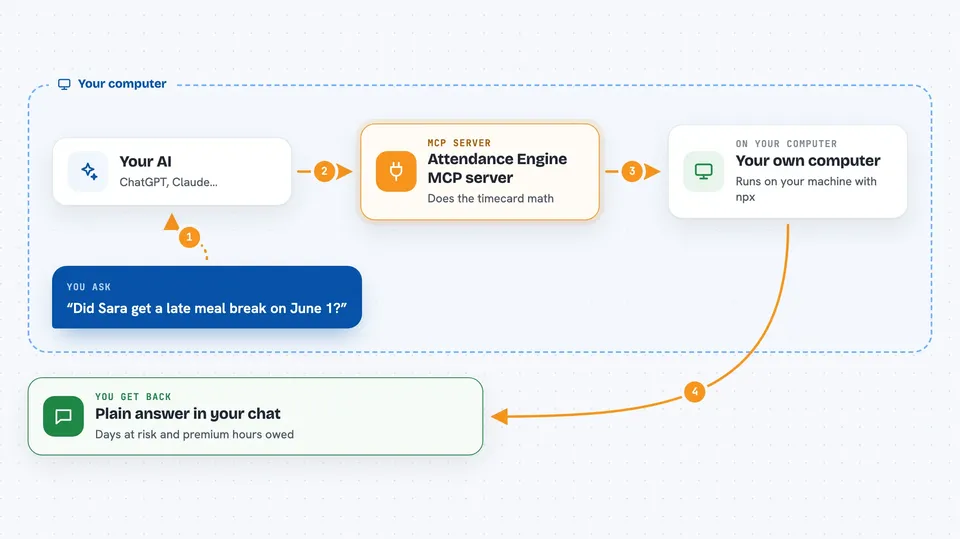
On its own, your AI can only chat. It can read your question, but it cannot do reliable math or look up rules. An MCP server is a small helper program that gives your AI a new skill. This one gives it a timecard calculator, so when you ask about someone's shift, the AI hands the numbers to this helper and reads back the exact result.
What this MCP server does
You ask your AI a question about someone's hours, like whether a meal break was late or how much overtime was worked. The AI picks the right tool from this helper and fills in the punches, the shift, and the time zone. The helper runs the math and the rule checks, then sends back a structured answer. Your AI turns that into a plain-English reply with the details, like which days are at risk and how many premium hours are owed. The same question always gives the same answer, because the math is done by the helper, not guessed by the AI.
 Click to zoom
What you can do with it
- Work out a single day from raw clock punches, including overnight shifts
- Check meal and rest breaks under California rules and see if any premium is owed
- Audit a whole pay period and list the days that need a human look
- Round worked and overtime minutes while keeping the exact minutes for proof
- Triage a punch stream to see if it is trustworthy before you use it
- Build rotating rosters like 2-2-3, 4-on-4-off, DuPont, or Pitman
- List which rule packs (jurisdictions) are supported
Try asking your AI
- “Sara worked 22:00 to 06:00 on June 1st. Punches were 21:54, 02:00, 02:30, 06:18. Apply California rules.”
- “Run a compliance audit for employee EMP-007 across June 2026 using California rules.”
- “I have punches 09:00, 13:00, 14:00 for June 1st. Can I trust these?”
- “Build me a 4-on-4-off roster for July 2026.”
What it gives back to you
You get answers in the chat, in plain words. That can be a day summary with lateness, overtime, segments, and flags, or a period roll-up with total premium hours and high-risk days. It can also return a roster as a list or table, or a recommendation on whether a punch stream looks usable. Nothing is changed anywhere; it only calculates and reports.
Before you start
What you need
- An MCP host like Claude Desktop, Cursor, or Windsurf
- Node.js 18 or newer installed on your computer
Good to know
It only calculates and reports, so it does not change your records, but its answers are only as good as the punches and settings you give it, so check the time zone and shift details before relying on the result.
Install it with your AI
Add Attendance Engine MCP server to your AI, no technical skills needed
You don't install anything by hand. You copy one prompt, paste it into an AI that can work on your computer, and it checks, installs and connects the server for you, asking you when it needs something.
Sign in to get the install prompt
Members get a ready-made prompt that lets the Claude desktop app check Attendance Engine MCP server, install it and connect it for them, step by step. You don't need any technical skills: you copy, paste and answer a few questions. Your connected AI can also find and install any of the 4,609 MCP servers here for you.
Who it's for
HR, payroll, and workforce teams, plus anyone who checks timecards or schedules and wants their AI to get the math right.





