
MCP server · Developer tools
Package Registry MCP server
by artmann
Lets your AI look up npm, Cargo, PyPI, NuGet and Go packages and check them for known security problems.
This is a small helper that connects your AI assistant to the big public libraries of software building blocks, called package registries. Once it is set up, you can ask your AI things like what a package does, which version is newest, or whether it has any known security holes. It is handy for developers, but also for anyone who has to check a software component before using it.
What is an MCP server? The 30-second version
On its own, your AI can only chat with you using what it already learned. An MCP server is a small helper program that gives your AI one extra skill. This helper connects your AI to package registries like npm, Cargo, PyPI, NuGet and Go, so it can look up real, current package information for you. You just ask in normal words, and the helper fetches the facts.
What this MCP server does
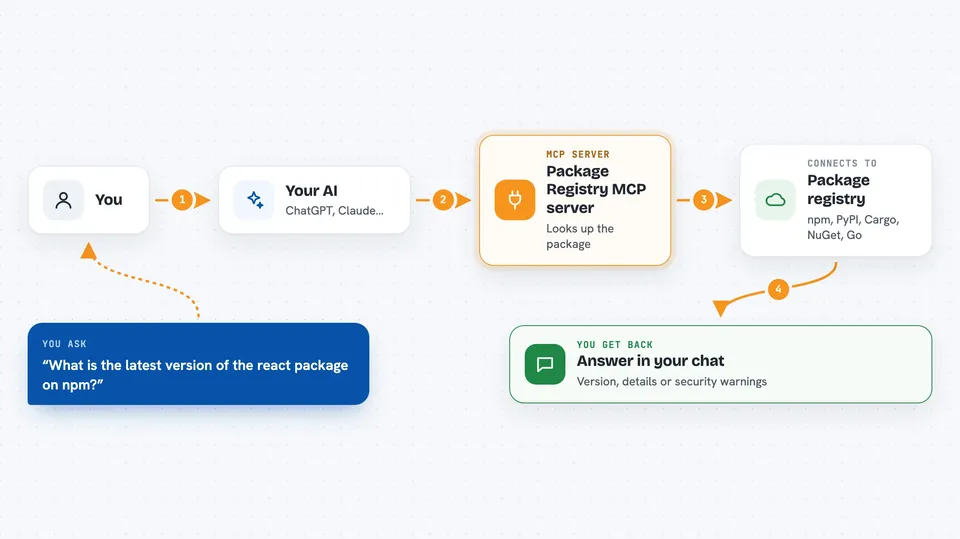
You ask your AI a question about a software package, for example what it does or which version is current. Your AI passes that question to this helper program running on your computer. The helper then talks to the right registry, like npm or PyPI, over the internet and pulls back the latest information. Your AI reads the answer and explains it to you in the chat. You never have to visit the registry website yourself or copy anything by hand.
 Click to zoom
What you can do with it
- Search npm, Cargo and NuGet for packages by keyword
- Get details about a specific npm, Cargo, NuGet, PyPI or Go package
- List all versions of a package, newest first
- Check which version is the latest one
- Look up security advisories for a package
- Search the GitHub Security Advisory database by severity or ecosystem
- Read the details of a specific security advisory
Try asking your AI
- “What is the latest version of the react package on npm?”
- “Show me details for the Python package requests, including its dependencies.”
- “Are there any critical security advisories for the npm package lodash?”
- “List the last 20 versions of the Rust crate serde.”
What it gives back to you
You get answers written in the chat, based on live data from the registries. That can be a short list of matching packages, a summary of one package with its version, license, dependencies and links, or a list of versions newest first. For security questions you get the advisory details, severity and which versions are affected or fixed. It is all text you can read and copy, not files.
Before you start
What you need
- Node.js 18 or newer, or the Bun runtime
- An internet connection
- An AI app that supports MCP servers, like Claude Desktop, Claude Code or Cursor
Good to know
It only reads public package information from the internet, so it does not change anything on your computer or in your accounts.
Install it with your AI
Add Package Registry MCP server to your AI, no technical skills needed
You don't install anything by hand. You copy one prompt, paste it into an AI that can work on your computer, and it checks, installs and connects the server for you, asking you when it needs something.
Sign in to get the install prompt
Members get a ready-made prompt that lets the Claude desktop app check Package Registry MCP server, install it and connect it for them, step by step. You don't need any technical skills: you copy, paste and answer a few questions. Your connected AI can also find and install any of the 4,609 MCP servers here for you.
Who it's for
Developers, testers and anyone who needs to check software packages and their security before using them.



