
MCP server · Security
ROADrecon MCP server
by atomicchonk
Lets your AI read your ROADrecon Azure AD data and run security checks on it for you.
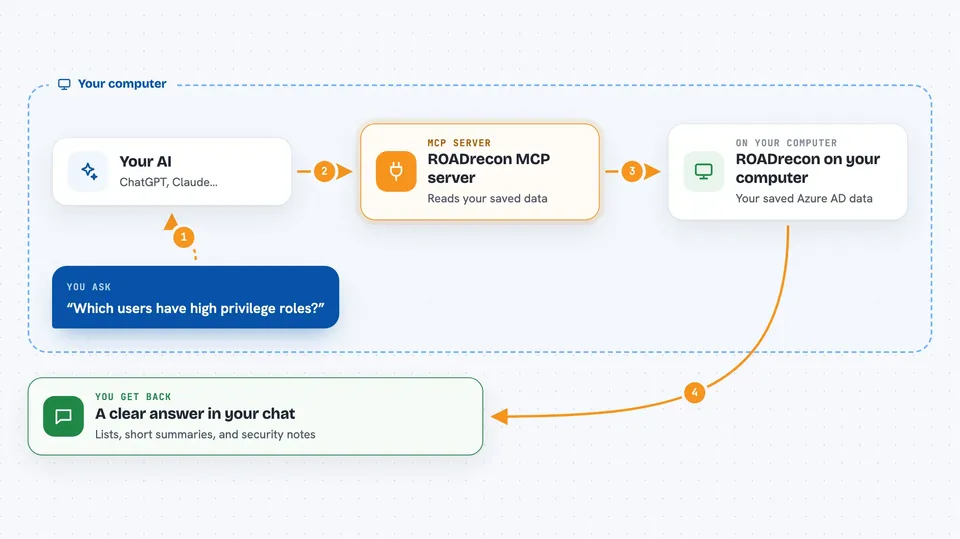
This is a small helper that connects your AI assistant to ROADrecon, a tool that collects information about an Azure AD (Microsoft cloud directory) environment. Once connected, you can ask your AI plain questions about that data and it will look things up and run checks for you. It is handy for security analysts and IT admins who already use ROADrecon and want to explore the results without clicking around the web interface.
What is an MCP server? The 30-second version
On its own, your AI can only chat with you. An MCP server is a small helper program that gives your AI a new skill or a connection to an app. This one connects your AI to your running ROADrecon instance, which holds the Azure AD data you gathered. So when you ask a question about users, groups, or roles, the AI can go and read that data and answer you.
What this MCP server does
You ask your AI something like which users have high privilege roles. The AI passes that request to this helper program. The helper talks to your ROADrecon web interface, which is running on your own machine, and pulls the matching data. The AI then reads that data and gives you back a clear answer or a short report. You never have to write any code or open the ROADrecon pages yourself.
 Click to zoom
What you can do with it
- List the users, groups, applications, and devices found in your Azure AD data
- Find users who hold high privilege roles
- Check which users have multi factor authentication set up
- Spot applications that have secrets or certificates attached
- Find accounts that have not logged in or changed password for a long time
- Review service principals with long lived credentials
- Look at legacy authentication settings that can skip MFA
Try asking your AI
- “Analyze the MFA status of users in this Azure AD tenant”
- “Find all users with privileged roles”
- “Check for applications with secrets or certificates”
- “Analyze the overall security posture of this Azure AD environment”
What it gives back to you
You get back plain answers in the chat: lists of users or groups, short summaries of what the AI found, and simple security observations. For example, it might tell you how many users lack MFA or name the accounts with the highest privileges. Some checks read a file you point it to and report what is inside. It does not change anything in your Azure AD data, it only reads and reports.
Before you start
What you need
- Python 3.8 or newer installed on your computer
- A running ROADrecon instance with its web interface reachable (by default at http://localhost:5000)
- An MCP compatible client such as the Claude desktop app
- The ROADrecon data you already gathered from your Azure AD tenant
Good to know
This server reads your Azure AD security data, which is sensitive, so only run it on a machine you trust and keep the ROADrecon interface private.
Install it with your AI
Add ROADrecon MCP server to your AI, no technical skills needed
You don't install anything by hand. You copy one prompt, paste it into an AI that can work on your computer, and it checks, installs and connects the server for you, asking you when it needs something.
Sign in to get the install prompt
Members get a ready-made prompt that lets the Claude desktop app check ROADrecon MCP server, install it and connect it for them, step by step. You don't need any technical skills: you copy, paste and answer a few questions. Your connected AI can also find and install any of the 4,609 MCP servers here for you.
Who it's for
Security analysts, penetration testers, and IT admins who already use ROADrecon and want to ask questions about the results in plain language.



