MCP server · Finance and crypto
Russian Counterparty Check MCP server
by atomno-mcp
Lets your AI look up a Russian company by INN or OGRN and give you a risk verdict before you sign.
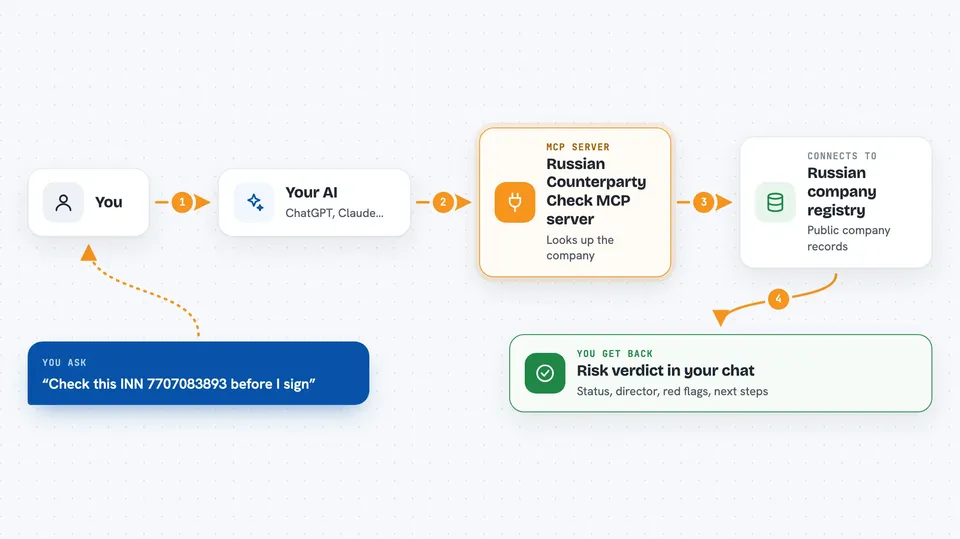
This is a small helper that lets your AI check a Russian company or sole trader before you do business with them. You give it an INN or OGRN number, and it pulls together public records about the company. It is handy for anyone who signs contracts, pays invoices, or onboards suppliers in Russia.
What is an MCP server? The 30-second version
On its own, your AI can only chat with you. An MCP server is a small helper program you connect once, and it gives your AI a new skill. This one connects your AI to Russian public registers like EGRUL, the bankruptcy register, tax debt data, bailiff records and arbitration cases. After you connect it, your AI can look up a company for you when you ask, instead of you opening five different government websites by hand.
What this MCP server does
You ask your AI something like check this INN. Your AI passes the number to this helper. The helper queries the public sources, one by one, and gathers what it finds. Then it puts everything into one report with a risk level and a plain verdict. You get the answer back in your chat, in Russian, with a short list of what to do next.
 Click to zoom
What you can do with it
- Look up a company by INN or OGRN and see its official card
- Check if the company is active, in liquidation, bankrupt or closed
- See the main activity code and what it means in plain words
- See the current director and the registered address
- Get a risk verdict: safe to proceed, manual review, high risk, or defunct
- See red flags like mass address, mass director or disqualification
- Get a short list of recommended next steps before signing
Try asking your AI
- “Check this counterparty, INN 7707083893”
- “Is company with OGRN 1027700132195 still active?”
- “Any red flags on INN 7736050003?”
- “Give me the OKVED codes and director for this INN”
What it gives back to you
You get a structured report in the chat: company name, address, director, main activity code, and legal status. It also shows a risk level and a verdict like safe_to_proceed or high_risk_do_not_proceed, with a short reason in Russian. If some sources could not be reached, that is listed too, so you know what was not checked. Nothing is changed anywhere; it only reads public data.
Before you start
What you need
- Python installed on your computer (the README uses pip, uv or pipx to install the package)
- An MCP client such as Claude Desktop, Cursor, Claude Code or Cline
- No account or API key: the sources are public
Good to know
Some checks often cannot run automatically because the public sites block robots or show a picture code, so a clean-looking report does not always mean the company is clean; treat the result as a starting point, not a legal opinion.
Install it with your AI
Add Russian Counterparty Check MCP server to your AI, no technical skills needed
You don't install anything by hand. You copy one prompt, paste it into an AI that can work on your computer, and it checks, installs and connects the server for you, asking you when it needs something.
Sign in to get the install prompt
Members get a ready-made prompt that lets the Claude desktop app check Russian Counterparty Check MCP server, install it and connect it for them, step by step. You don't need any technical skills: you copy, paste and answer a few questions. Your connected AI can also find and install any of the 4,609 MCP servers here for you.
Who it's for
People who check Russian suppliers, customers or partners before signing, like finance, procurement, sales and legal teams in small and mid-size companies.