MCP server · Analytics
Calculator MCP server
by avisangle
Lets your AI do accurate math, statistics, unit conversions and finance calculations for you.

This is a small helper program that gives your AI a proper calculator. Instead of guessing at numbers, your AI sends the sum to this tool and gets back an exact answer. It is handy for anyone who works with figures, budgets, reports or measurements and wants to trust the results.
What is an MCP server? The 30-second version
On its own, your AI can only chat. It does not have a real calculator inside, so it sometimes makes mistakes with numbers. An MCP server is a small helper program that gives your AI a new skill, and this one gives it the skill of doing math properly. Once it is connected, your AI can hand a calculation to this helper and read back the correct answer.
What this MCP server does
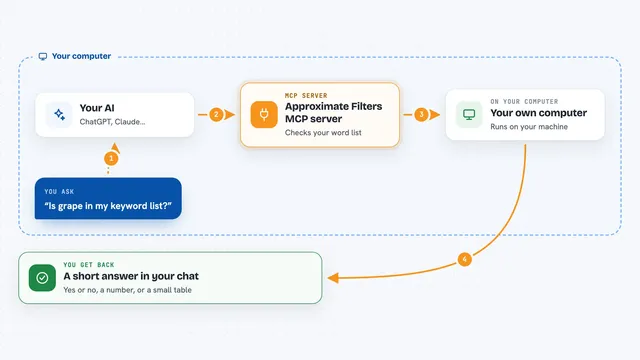
You ask your AI something like what is 15 percent of 240, or what is the average of these numbers. Your AI passes the numbers and the operation to this calculator helper. The helper does the arithmetic, statistics, unit conversion or finance formula and sends the result back. Your AI then shows you the answer in the chat, usually with the steps or the figures it used.
 Click to zoom
What you can do with it
- Add, subtract, multiply and divide lists of numbers with a set number of decimal places
- Work out averages, medians, standard deviations and percentiles for a set of numbers
- Convert between units like centimetres to metres, pounds to kilograms or Celsius to Fahrenheit
- Calculate loan payments, compound interest, ROI, present value and future value
- Compare several loan or investment options side by side
- Evaluate a written math expression, including constants like pi and e
- Run scientific functions such as square root, logarithms and trigonometry
Try asking your AI
- “What is the average and standard deviation of 12, 15, 18, 22, 29 and 31?”
- “Convert 250 centimetres to feet and inches.”
- “If I borrow 20000 at 6 percent over 5 years, what is my monthly payment?”
- “What is the net present value of cash flows of -50000, 15000, 20000, 25000 and 30000 at an 8 percent discount rate?”
What it gives back to you
You get back a short answer in the chat, usually a single number or a small list of numbers. For statistics you may get a summary with the mean, median, standard deviation and a few percentiles. For loan or investment comparisons you get the figures for each option so you can compare them. Everything appears as plain text you can read and copy.
Before you start
What you need
- Go 1.21 or newer installed on your computer
- Git, to download the project
- A terminal where you can run a few commands
Good to know
It only calculates and converts, it does not change anything on your computer, but always double check the numbers and units you give it, since a wrong input gives a wrong answer.
Install it with your AI
Add Calculator MCP server to your AI, no technical skills needed
You don't install anything by hand. You copy one prompt, paste it into an AI that can work on your computer, and it checks, installs and connects the server for you, asking you when it needs something.
Sign in to get the install prompt
Members get a ready-made prompt that lets the Claude desktop app check Calculator MCP server, install it and connect it for them, step by step. You don't need any technical skills: you copy, paste and answer a few questions. Your connected AI can also find and install any of the 4,361 MCP servers here for you.
Who it's for
Anyone who handles numbers at work, such as analysts, finance and admin staff, students and small business owners.