
MCP server · Notes
Myco MCP server
by Battam1111
Give your AI a long-term memory that survives across chats, projects, and even new AI models.
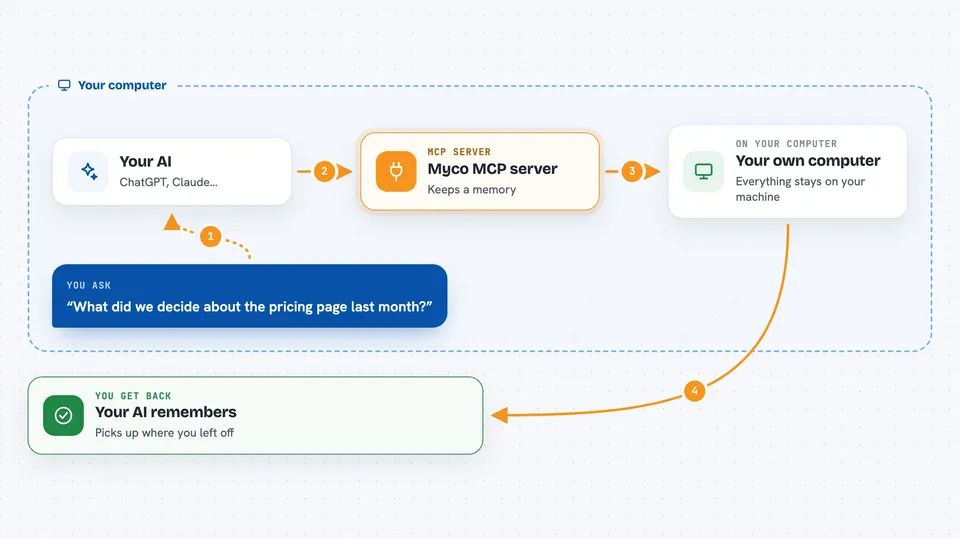
Myco is a memory helper for your AI. It remembers what you talked about, what you decided, and what mattered, so you do not have to start over every time you open a new chat or switch to a newer AI model. It is handy if you work with an AI assistant often and are tired of re-explaining yourself.
What is an MCP server? The 30-second version
On its own, your AI can only chat. It forgets everything the moment the conversation ends. An MCP server is a small helper program that gives your AI a new skill or a connection to something outside the chat. Myco is that helper, and its skill is memory: it keeps a living record of your work and hands it back to your AI whenever it is useful.
What this MCP server does
You talk to your AI like you normally would. Behind the scenes, Myco quietly takes in what you share and what your AI works on. It turns that into a lasting record, keeps the parts that still matter, and lets old parts fade. When you come back later, or start a new chat, or even move to a newer AI model, Myco hands your context back so the conversation picks up where it left off.
 Click to zoom
What you can do with it
- Remember decisions and context across different chats
- Carry your notes and preferences into new AI sessions
- Keep a record of what you worked on in past projects
- Let go of outdated information so the memory stays clean
- Work with Claude Code, Claude Desktop, Cursor, Windsurf, Zed, and other MCP hosts
- Run entirely on your own computer, with no account or key needed
Try asking your AI
- “What did we decide about the pricing page last month?”
- “Remind me of the goals I set for this project.”
- “Pick up where we left off on the onboarding rewrite.”
- “What was the reason we dropped the old design?”
What it gives back to you
You get answers in the chat that sound like your AI actually remembers your work. It can bring back past decisions, notes, and context, and it can tell you what it has kept or let go. You do not see any files or code, just a smarter, more continuous conversation.
Before you start
What you need
- The Claude desktop app or another MCP host like Cursor, Windsurf, or Zed
- Rust 1.80 or newer, Node 22 or newer, and Python 3.13 or newer installed on your computer
- A terminal where you can run a few commands
Good to know
This is an early alpha version, so it may change or break, and it keeps a long-term record of your work on your computer.
Install it with your AI
Add Myco MCP server to your AI, no technical skills needed
You don't install anything by hand. You copy one prompt, paste it into an AI that can work on your computer, and it checks, installs and connects the server for you, asking you when it needs something.
Sign in to get the install prompt
Members get a ready-made prompt that lets the Claude desktop app check Myco MCP server, install it and connect it for them, step by step. You don't need any technical skills: you copy, paste and answer a few questions. Your connected AI can also find and install any of the 4,609 MCP servers here for you.
Who it's for
People who use an AI assistant every day for real work and want it to remember their projects, decisions, and preferences over time.





