
MCP server · Browser automation
Browser Use MCP server
by BB-fat
Let your AI open web pages, click, type, take screenshots and read page content for you.
This is a small helper program that gives your AI a web browser it can actually use. It is made for people who want their AI to visit pages, fill in fields or grab text from a site without doing it by hand. You do not need to be a programmer to benefit from it, but someone technical usually sets it up once for you.
What is an MCP server? The 30-second version
On its own, your AI can only chat with you. An MCP server is a small helper program that gives your AI one extra skill. This helper gives your AI a connection to a real web browser on your computer. So when you ask your AI to look something up on a page or click a button, it can actually do that instead of just talking about it.
What this MCP server does
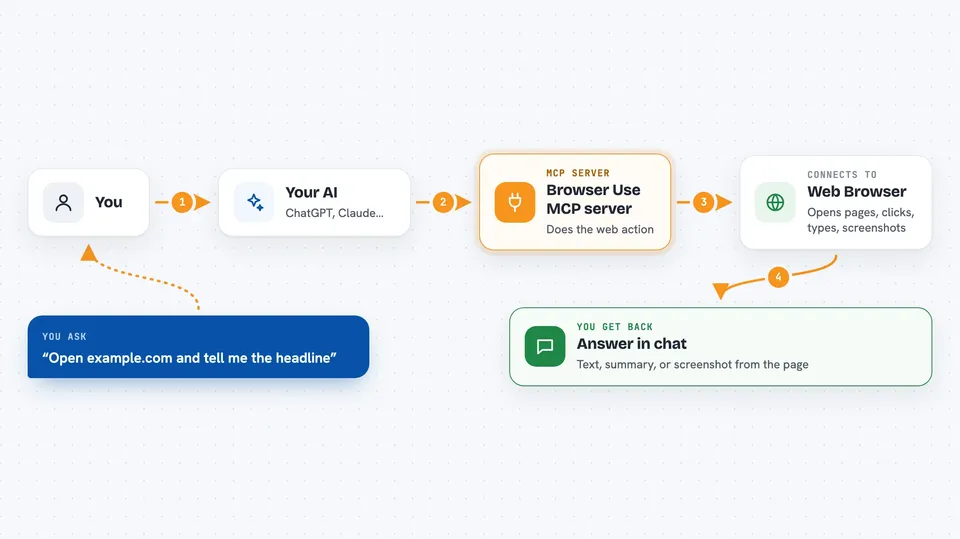
You ask your AI something that involves a website, like reading a page or filling in a form. Your AI passes that request to this helper program. The helper opens a browser, goes to the page, and does the action you asked for, such as clicking, typing or taking a picture of the screen. Then it sends the result back to your AI, and your AI tells you what it found or what it changed. Everything happens in a normal browser window or quietly in the background, depending on how it was started.
 Click to zoom
What you can do with it
- Open a web address and read the text on the page
- Click buttons and links on a page
- Type into search boxes and form fields
- Take a screenshot of what the page looks like
- List the clickable and fillable parts of a page so your AI can pick one
- Follow a simple step by step routine across a few pages
Try asking your AI
- “Open example.com and tell me what the main headline says”
- “Go to the search page, type best coffee shops in Berlin, and show me the first five results”
- “Take a screenshot of our pricing page so I can check how it looks today”
- “Fill in the contact form on this page with my name and email, then tell me if it worked”
What it gives back to you
You get answers in plain chat: text pulled from a page, a short summary, or a screenshot image you can look at. When your AI clicks or types something, it tells you what it did and whether it worked. If it lists the parts of a page, you see a numbered list of buttons, links and fields it found.
Before you start
What you need
- A computer with Chrome or Chromium installed
- Someone to set up the helper program once (it is a small piece of software)
- Rust 1.70 or newer if you are building it yourself
Good to know
It can click and type on real websites, so it may submit forms, change settings or trigger actions on your accounts, so watch what you ask it to do.
Install it with your AI
Add Browser Use MCP server to your AI, no technical skills needed
You don't install anything by hand. You copy one prompt, paste it into an AI that can work on your computer, and it checks, installs and connects the server for you, asking you when it needs something.
Sign in to get the install prompt
Members get a ready-made prompt that lets the Claude desktop app check Browser Use MCP server, install it and connect it for them, step by step. You don't need any technical skills: you copy, paste and answer a few questions. Your connected AI can also find and install any of the 4,361 MCP servers here for you.
Who it's for
People who want their AI to handle simple web tasks for them, like checking pages, filling forms or grabbing text, and who have a technical colleague or guide to set it up.


