MCP server · Browser automation
BeatBrowser MCP server
by BeatAPI
Let your AI use the Chrome you already have, with your logins, in background task windows.
BeatBrowser connects your AI assistant to the Chrome browser you already use, so it can open pages, read them, and fill in forms without you switching browsers or logging in again. It works with agents like Codex and Claude Code. It is handy if you want your AI to help with real websites that need you to be signed in.
What is an MCP server? The 30-second version
On its own, your AI can only chat with you. An MCP server is a small helper program that gives your AI a new skill or a connection to an app. This one is a helper that connects your AI to your own Chrome browser. Once it is set up, your AI can look at pages and do things in Chrome when you ask, using the logins you already have.
What this MCP server does
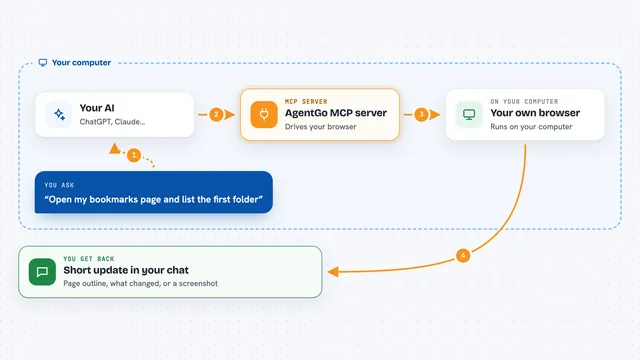
You ask your AI to do something in the browser, like read a page or fill a form. Your AI sends that request to this helper, which runs on your computer. The helper talks to a small Chrome extension that is loaded in your browser. The extension opens a background task window, does the work there, and sends the result back. You see the answer in your chat, and you can watch or take over the task in the extension's Workspace.
What you can do with it
- Read pages you are already signed in to and pull out the details you need
- Fill in a form with information you give it, then pause before submitting
- Open several pages in separate background tasks and compare them
- Take a screenshot of a page so you can see what it looks like
- Click buttons, type text, and scroll on a page for you
- Pause a task and take over the page yourself when you want
- Ask you a question when it hits a login, a code, or a decision
Try asking your AI
- “Use BeatBrowser to open my invoices page and list the amounts and dates in a table.”
- “Fill in this contact form with the details I paste below, then pause before the final submit so I can check it.”
- “Open these two product pages in separate background tasks and summarize the prices and shipping times.”
- “Take a screenshot of my dashboard and tell me if there are any red warnings.”
What it gives back to you
You get answers in your chat: lists, short summaries, tables, or screenshots of pages. If it filled in a form or clicked something, it tells you what it did. It can also pause and ask you a question when it needs your help. The extension's Workspace shows the running and finished tasks so you can look back at them.
Before you start
What you need
- Node.js 20 or newer on your computer
- Chrome 116 or newer
- An AI client that can connect to a local MCP server, like Codex or Claude Code
- The BeatBrowser extension loaded in Chrome (the setup command shows you the folder)
Good to know
This extension has broad access to your browser and can click, type, and submit things on sites where you are signed in, so only use it with agents you trust and review important actions before they happen.
Install it with your AI
Add BeatBrowser MCP server to your AI, no technical skills needed
You don't install anything by hand. You copy one prompt, paste it into an AI that can work on your computer, and it checks, installs and connects the server for you, asking you when it needs something.
Sign in to get the install prompt
Members get a ready-made prompt that lets the Claude desktop app check BeatBrowser MCP server, install it and connect it for them, step by step. You don't need any technical skills: you copy, paste and answer a few questions. Your connected AI can also find and install any of the 4,611 MCP servers here for you.
Who it's for
People who want their AI to help with real, signed-in websites without switching browsers, such as office workers, researchers, and anyone doing repetitive web tasks.