
MCP server · Developer tools
agent-lsp MCP server
Lets your AI understand code properly: find who calls what, preview edits safely, and check nothing breaks.
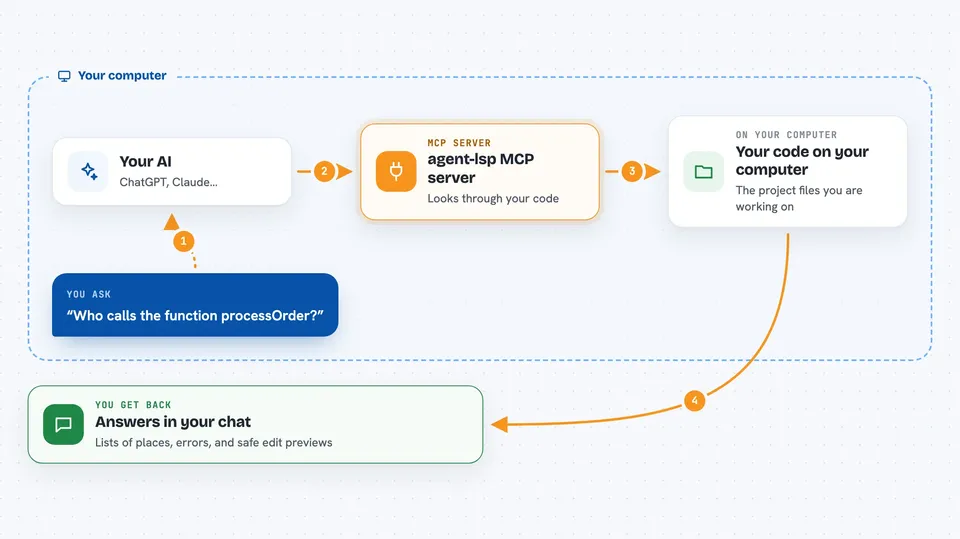
agent-lsp is a helper that gives your AI real understanding of code, not just text search. It plugs into the same code intelligence tools that editors like VS Code use, so your AI can find references, check types, and preview changes before saving. It is handy if you or your team work with code and want the AI to make safer edits.
What is an MCP server? The 30-second version
On its own, your AI can only chat with you. An MCP server is a small helper program that gives your AI a new skill or a connection to another tool. This one connects your AI to language servers, which are the programs editors use to understand code. Once connected, your AI can ask those programs real questions about your code instead of guessing from text.
What this MCP server does
You ask your AI something about your code, like who calls a function or what breaks if you rename it. Your AI sends that request to agent-lsp, which is running quietly on your computer. agent-lsp talks to the right language server for your project, gathers the answer, and sends it back. Your AI then explains the result to you in the chat. It can also preview edits in memory first, so you see what would break before anything is saved.
 Click to zoom
What you can do with it
- Find every place a function or variable is used across your project
- Preview what would break if you renamed or changed something, without saving
- List all the symbols in a file or project so you can see the structure
- Check for errors and warnings after an edit
- Find which classes implement an interface
- Detect code that nothing uses anymore
- Run a full safe-edit workflow: preview, check, apply, verify
Try asking your AI
- “Who calls the function processOrder in this project?”
- “What would break if I rename getUserById to fetchUserById?”
- “Show me all the symbols in src/main.go”
- “Are there any errors in this file right now?”
What it gives back to you
You get answers in the chat: lists of places a function is used, counts of errors and warnings, or a preview of what an edit would change. For bigger questions, you get a summary of the impact, like which files and tests would be affected. If you apply an edit, the AI tells you what changed and whether anything broke.
Before you start
What you need
- The agent-lsp program installed on your computer (the README gives a one-line install command)
- An AI tool that supports MCP, like Claude Code, Cursor, or Windsurf
- The language server for your project (for example gopls for Go), which agent-lsp can usually set up for you
Good to know
It can change files on your computer when you ask it to apply edits, so review previews before saving.
Install it with your AI
Add agent-lsp MCP server to your AI, no technical skills needed
You don't install anything by hand. You copy one prompt, paste it into an AI that can work on your computer, and it checks, installs and connects the server for you, asking you when it needs something.
Sign in to get the install prompt
Members get a ready-made prompt that lets the Claude desktop app check agent-lsp MCP server, install it and connect it for them, step by step. You don't need any technical skills: you copy, paste and answer a few questions. Your connected AI can also find and install any of the 4,609 MCP servers here for you.
Who it's for
Developers and anyone who edits code with an AI assistant and wants safer, more accurate changes.




