MCP server · Analytics
NetworkX MCP server
by Bright-L01
Lets your AI build and analyze graphs and citation networks, then explain what it found.
This is a small helper that connects your AI to NetworkX, a well known tool for working with graphs. A graph is just dots (called nodes) joined by lines (called edges), which is how you draw things like who cites whom or who works with whom. It is handy for researchers, students, and anyone who wants to explore connections between papers, authors, or ideas without learning to code.
What is an MCP server? The 30-second version
On its own, your AI can only chat with you. An MCP server is a small helper program that gives your AI a new skill or a connection to another tool. This one connects your AI to NetworkX, a graph analysis library, plus the CrossRef database of academic papers. Once it is set up, you can just ask a question in plain words and the AI will use this helper to do the graph work for you.
What this MCP server does
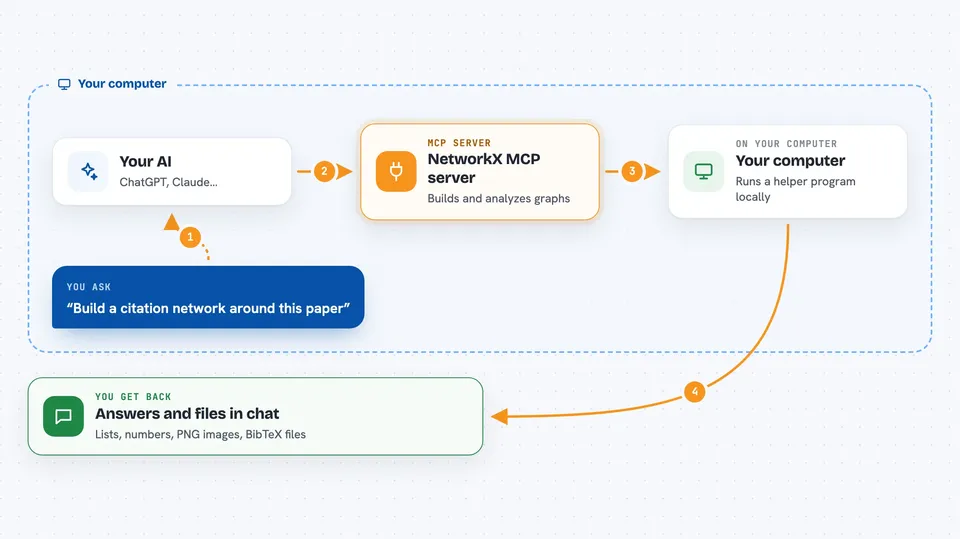
You ask your AI something like "build a citation network around this paper" or "find the shortest path between these two nodes". The AI sends that request to this helper program running on your computer. The helper uses NetworkX to build or change the graph, and it can also look up paper details through CrossRef. Then it sends the results back, and the AI explains them to you in the chat. You never have to write any code yourself.
 Click to zoom
What you can do with it
- Build a citation network starting from a paper's DOI
- Calculate an author's h-index and total citations
- Find the shortest path between two nodes in a graph
- Detect communities or clusters inside a network
- Run PageRank to see which nodes matter most
- Create a picture of your graph as a PNG file
- Export a citation network as a BibTeX file for LaTeX
Try asking your AI
- “Create a graph called test, add nodes 1, 2, 3 with edges between them, then find the shortest path from 1 to 3”
- “Build a citation network around the paper Attention Is All You Need and tell me the main clusters”
- “What is the h-index and total citations for this author”
- “Visualize this graph and save it as a PNG”
What it gives back to you
You get back plain answers in the chat: lists of nodes or papers, numbers like h-index or citation counts, short summaries of what the graph looks like, and sometimes a PNG image or a BibTeX file you can download. The AI usually explains the result in a sentence or two so you know what it means. If you asked it to change a graph, it will confirm what it added or removed.
Before you start
What you need
- Python installed on your computer
- The networkx-mcp-server package installed with pip
- A Claude Desktop app (or another AI tool that supports MCP servers)
- An internet connection if you want to look up papers on CrossRef
Good to know
It can look up papers online and store graphs on your computer, so avoid sharing private or unpublished data you would not want sent to CrossRef.
Install it with your AI
Add NetworkX MCP server to your AI, no technical skills needed
You don't install anything by hand. You copy one prompt, paste it into an AI that can work on your computer, and it checks, installs and connects the server for you, asking you when it needs something.
Sign in to get the install prompt
Members get a ready-made prompt that lets the Claude desktop app check NetworkX MCP server, install it and connect it for them, step by step. You don't need any technical skills: you copy, paste and answer a few questions. Your connected AI can also find and install any of the 4,609 MCP servers here for you.
Who it's for
Researchers, academics, and students who want to explore citation networks or author impact without learning to code.