
MCP server · Developer tools
squiggles MCP server
by carldaws
Lets your AI read code errors, jump to definitions, rename things and run language-specific helpers in your project.
squiggles is a helper that connects your AI assistant to the same code-checking tools your code editor uses behind the scenes. Those tools are called language servers, and they are what put red squiggly lines under mistakes in an IDE. If you work with code and want your AI to actually see those problems instead of guessing, this is for you.
What is an MCP server? The 30-second version
On its own, your AI can only chat with you. An MCP server is a small helper program that gives your AI a new skill or a connection to another tool. squiggles is that helper, and the skill it adds is talking to language servers, the programs that understand TypeScript, Rust, Ruby, Go, Python, C++ or Lua code. Once it is set up, your AI can ask those programs what is wrong with a file, where something is defined, or how to rename it safely.
What this MCP server does
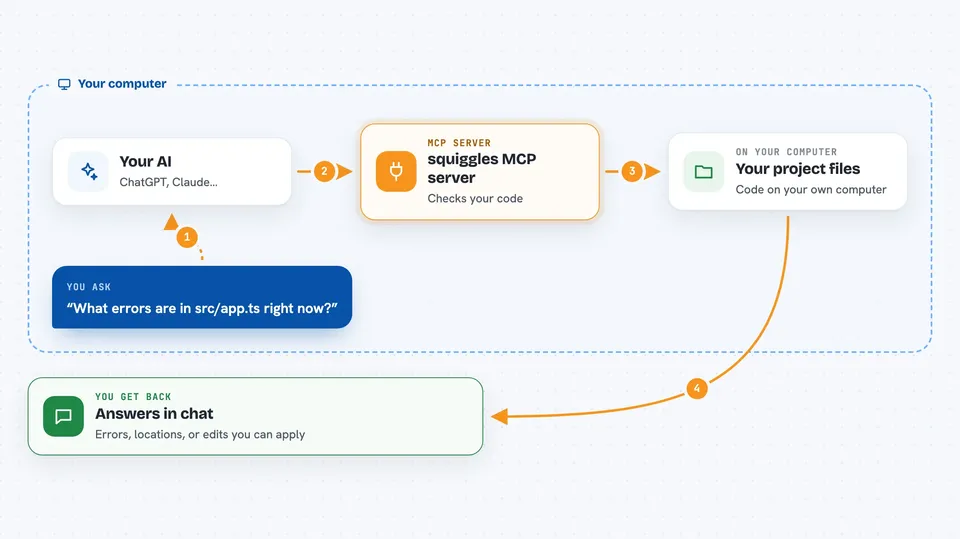
You ask your AI something about your code, like where a function is defined or why a file has errors. Your AI sends that question to squiggles, which passes it to the right language server for that kind of file. The language server looks at your project and sends back an answer, like a list of errors, a file and line number, or a suggested edit. squiggles hands that back to your AI, which explains it to you in the chat. Some actions, like renaming or formatting, can actually change your files on disk if you ask for that.
 Click to zoom
What you can do with it
- See all the errors and warnings in a file, the same ones your editor shows
- Jump to where a function, class or variable is defined
- Find every place something is used across your project
- Rename a symbol everywhere it appears, safely
- Format a file the way your project expects
- Expand a Rust macro to see the code it generates
- Discover and jump between test files and the code they test
Try asking your AI
- “What errors are in src/app.ts right now?”
- “Where is the function parseConfig defined?”
- “Find all the places that use the User class.”
- “Rename the function oldName to newName everywhere in this project.”
- “Show me what this Rust macro expands to.”
What it gives back to you
You get answers in plain chat: lists of errors with file and line numbers, the location of a definition, or a summary of what would change. For actions like rename or format, your AI can either show you the suggested edit or actually write it to your files, depending on what you ask. Some tools return structured details, like a list of dependencies or the syntax tree of a file, which your AI will explain in normal words.
Before you start
What you need
- Node.js installed on your computer (the free runtime that runs npx commands)
- The language server for your language installed and available on your PATH, for example typescript-language-server for TypeScript or rust-analyzer for Rust
- A squiggles.yaml file in your project root, which you can create by running npx squiggles init
- An AI assistant that supports MCP servers, like Claude Desktop or Claude Code
Good to know
Some tools can change or delete things in your project files, like rename, format, organize imports and add import, so review what your AI is about to do before you say yes.
Install it with your AI
Add squiggles MCP server to your AI, no technical skills needed
You don't install anything by hand. You copy one prompt, paste it into an AI that can work on your computer, and it checks, installs and connects the server for you, asking you when it needs something.
Sign in to get the install prompt
Members get a ready-made prompt that lets the Claude desktop app check squiggles MCP server, install it and connect it for them, step by step. You don't need any technical skills: you copy, paste and answer a few questions. Your connected AI can also find and install any of the 4,609 MCP servers here for you.
Who it's for
Developers and anyone who works with code in an AI assistant and wants it to see real errors, definitions and refactors instead of guessing.




