
MCP server · Developer tools
Tuning Engines MCP server
Let your AI fine-tune open-source coding models on your repo and track training jobs for you.
This is a helper that connects your AI assistant to Tuning Engines, a service that trains open-source coding models on your own data. It is handy if you want a model that knows your codebase, your naming style, or your team's debugging habits, without learning any of the technical setup yourself. You just ask your AI in plain words, and it does the work through this connection.
What is an MCP server? The 30-second version
On its own, your AI can only chat with you using what it already learned. An MCP server is a small helper program that gives your AI a new skill or a connection to another service. This one connects your AI to Tuning Engines, so the AI can start training jobs, check on them, and look at your models for you. You do not install anything complicated; you add this helper once and then just talk to your AI.
What this MCP server does
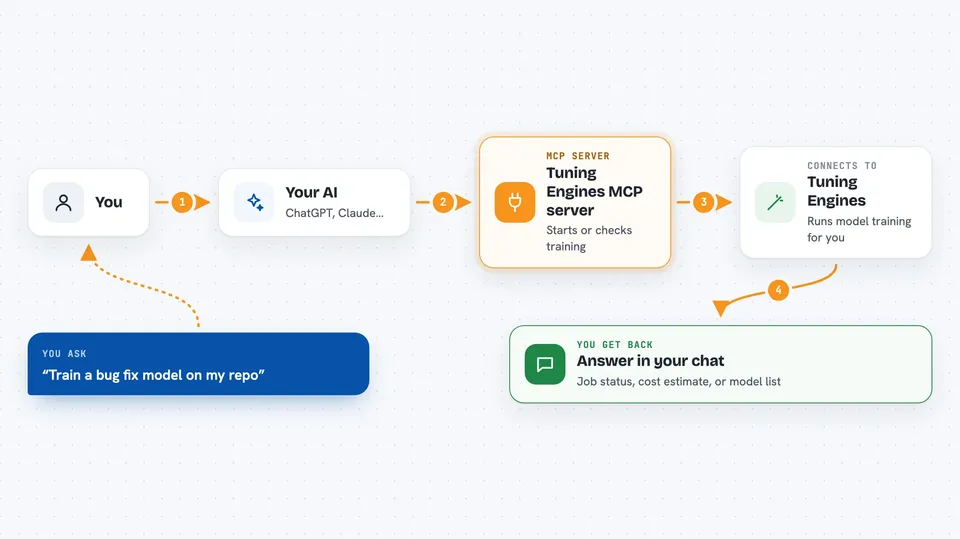
You ask your AI something like "train a bug-fix model on my repo" or "how much would training cost?" Your AI passes that request to this helper. The helper talks to Tuning Engines, which picks the right training agent, starts or checks the job, and sends the answer back. Your AI then shows you the result in the chat, like a job status, a cost estimate, or a list of your models. You never have to type the technical commands yourself.
 Click to zoom
What you can do with it
- Start a fine-tuning job on a GitHub repository
- Estimate the cost of a training run before you start
- Check the status of a training job while it runs
- List the models you have already trained
- Export a trained model to your own storage bucket
- Check your account balance and usage
- Pick the right training agent automatically based on what you ask
Try asking your AI
- “Fine-tune Qwen 7B on my-org/my-repo using the SIERA agent with high quality”
- “How much would it cost to train a 32B model for 3 epochs on this repo?”
- “Check the status of my latest training job”
- “List my trained models”
What it gives back to you
You get answers right in the chat: a cost estimate in dollars, a job ID with its current status, a list of your trained models, or a confirmation that an export finished. When a job is running, you can ask again and see updated progress. Everything is written in plain sentences, not raw technical output.
Before you start
What you need
- A Tuning Engines account (you can sign up when you log in)
- A TE_API_KEY, which is a kind of password the service gives you
- Node.js 18 or newer on your computer if you run the helper yourself
- Credits on your Tuning Engines account to pay for training
Good to know
Training jobs cost money, so check the estimate before you start one, and keep your TE_API_KEY private.
Install it with your AI
Add Tuning Engines MCP server to your AI, no technical skills needed
You don't install anything by hand. You copy one prompt, paste it into an AI that can work on your computer, and it checks, installs and connects the server for you, asking you when it needs something.
Sign in to get the install prompt
Members get a ready-made prompt that lets the Claude desktop app check Tuning Engines MCP server, install it and connect it for them, step by step. You don't need any technical skills: you copy, paste and answer a few questions. Your connected AI can also find and install any of the 4,609 MCP servers here for you.
Who it's for
Developers and technical teams who want a coding model tuned to their own repository but would rather ask their AI than run commands.



