MCP server · Security
ReasonGate MCP server
by cgrtml
Adds a safety gate in front of your MCP tools so poisoned content cannot trigger risky actions.
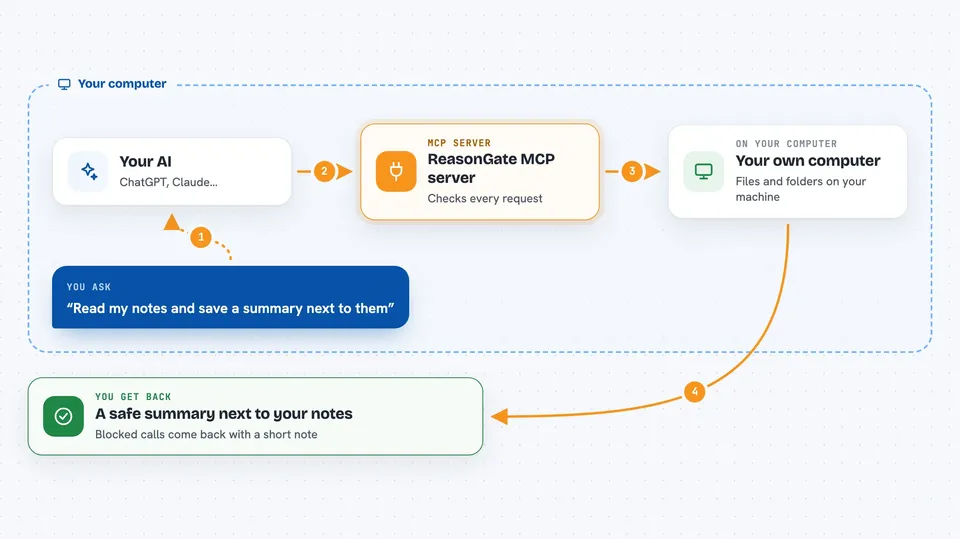
ReasonGate is a small safety layer you put in front of the MCP servers you already use. It watches the tool calls your AI makes and blocks the risky ones when the details came from untrusted content, like a document or a web page the AI read. It is handy for anyone who lets an AI read files, emails or web pages and then act on them.
What is an MCP server? The 30-second version
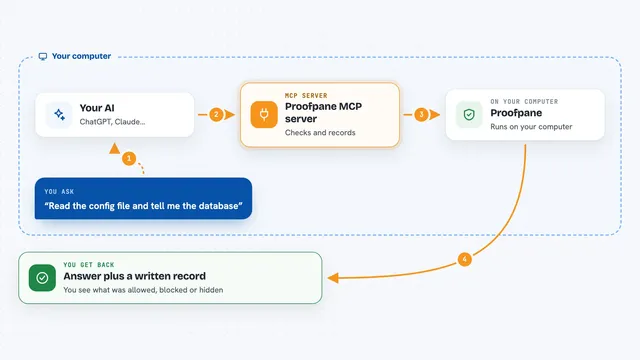
On its own, your AI can only chat. An MCP server is a small helper program that gives your AI a new skill or a connection to an app, and ReasonGate is a helper that sits between your AI and your other helpers. When your AI asks one of those helpers to do something, the request passes through ReasonGate first. ReasonGate looks at where the details came from and decides whether the call is allowed to go through.
What this MCP server does
You connect ReasonGate in front of an MCP server you already use, like the filesystem server. From then on, every tool call your AI makes goes through ReasonGate before it reaches the real server. ReasonGate checks whether the destination or the content of that call came from something the AI read, such as a file or a tool result, rather than from you. If it did, and the tool is a sensitive one, ReasonGate blocks the call and answers your AI with a short explanation instead. If the call looks fine, it is forwarded to the real server as usual.
 Click to zoom
What you can do with it
- Block a file write when the destination path came from a document the AI read
- Stop an email or transfer when the address or account was quoted from untrusted content
- Draft tool policies automatically from the tool list of the server it wraps
- Keep a full audit log of every allowed and blocked call
- Show you, for each argument, whether it came from you, from a tool result, or from nowhere it read
- Ask you a yes or no question before a risky call, in hosts that support it
- Carry trust across several servers so a document read in one cannot be acted on in another
Try asking your AI
- “Read the notes in my Documents folder and save a summary next to them”
- “Send an email to the address in this customer record”
- “Transfer the balance shown in this account file”
- “Write a backup copy of this file to a new path”
What it gives back to you
In the chat, a blocked call comes back as a tool error that says Blocked by ReasonGate, with a short note about where the risky detail came from. Allowed calls return whatever the real server normally returns. ReasonGate also writes one line per decision to its log, and with the audit option it saves the full records, which you can read back later as a report.
Before you start
What you need
- Python installed on your computer
- The reasongate package installed with pip
- An MCP server you already use, for example the filesystem server
- The Claude desktop app, Cursor, or another host that supports MCP
Good to know
It only catches known phrasings and calls whose details can be traced back to untrusted content, so treat it as one layer of protection and not a guarantee.
Install it with your AI
Add ReasonGate MCP server to your AI, no technical skills needed
You don't install anything by hand. You copy one prompt, paste it into an AI that can work on your computer, and it checks, installs and connects the server for you, asking you when it needs something.
Sign in to get the install prompt
Members get a ready-made prompt that lets the Claude desktop app check ReasonGate MCP server, install it and connect it for them, step by step. You don't need any technical skills: you copy, paste and answer a few questions. Your connected AI can also find and install any of the 4,609 MCP servers here for you.
Who it's for
Anyone who lets an AI read files, emails or web pages and then take actions, especially people worried about an AI being tricked into doing something harmful.