MCP server · Browser automation
Page Capture MCP server
by chasesaurabh
Let your AI take screenshots of web pages and pull out their content for you.
This is a small helper that lets your AI open a web page, take a picture of it, and read what is on it. It is handy if you often need to show someone what a page looks like, or grab the text from a page without copying and pasting it yourself.
What is an MCP server? The 30-second version
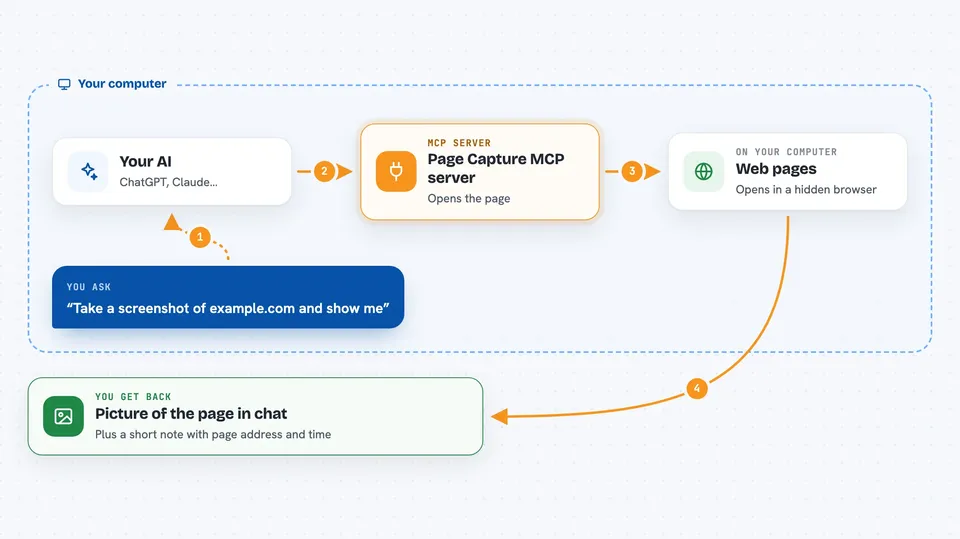
On its own, your AI can only chat with you. An MCP server is a little helper program that gives your AI a new skill, in this case the ability to visit web pages. Once this helper is connected, your AI can open a page in a quiet browser, take a screenshot or read the page content, and hand the result back to you in the chat.
What this MCP server does
You ask your AI to look at a web page. The AI passes your request to this helper. The helper opens the page in a hidden browser, waits for it to load, and takes a screenshot or reads the page content. It then sends the picture or the text back to your AI, and your AI shows it to you. You can also ask it to fill in a form, click a button, or scroll before it takes the picture.
 Click to zoom
What you can do with it
- Take a screenshot of any web page
- Capture a full page image, not just the part you can see
- Read the text content of a page or a section of it
- Pretend to be a phone or tablet to see the mobile version
- Fill in a form and take a picture of the result
- Click a button and capture what happens next
- Scroll down to a section before taking the picture
Try asking your AI
- “Take a screenshot of example.com and show it to me”
- “Capture the full page of this article so I can see the whole thing”
- “Read the main text from this documentation page and summarise it”
- “Show me what this page looks like on an iPad”
What it gives back to you
You get a picture of the page right in the chat, plus a short note with the page address, the time it was taken, the screen size, and the file size. If you asked for the page text instead, you get that text back as a message. Either way, it shows up like a normal reply from your AI.
Before you start
What you need
- Node.js version 18 or newer installed on your computer
- npm version 9 or newer
- An internet connection so the helper can reach the web pages you ask about
Good to know
It can fill in forms and click buttons on real websites, so avoid pointing it at pages where you would not want an action to actually happen.
Install it with your AI
Add Page Capture MCP server to your AI, no technical skills needed
You don't install anything by hand. You copy one prompt, paste it into an AI that can work on your computer, and it checks, installs and connects the server for you, asking you when it needs something.
Sign in to get the install prompt
Members get a ready-made prompt that lets the Claude desktop app check Page Capture MCP server, install it and connect it for them, step by step. You don't need any technical skills: you copy, paste and answer a few questions. Your connected AI can also find and install any of the 4,361 MCP servers here for you.
Who it's for
Anyone who needs to check, share, or grab content from web pages, like support staff, researchers, testers, or people who write reports.