MCP server · Research
servo-fetch MCP server
by konippi
Lets your AI open web pages, read them as clean text, and take screenshots without a browser installed.
servo-fetch is a small program that reads web pages for you. It opens a page, runs the page's scripts, and hands back the main content as tidy text, a screenshot, or structured data. It is handy if you often ask your AI about things on the web and want it to actually look at the page instead of guessing.
What is an MCP server? The 30-second version
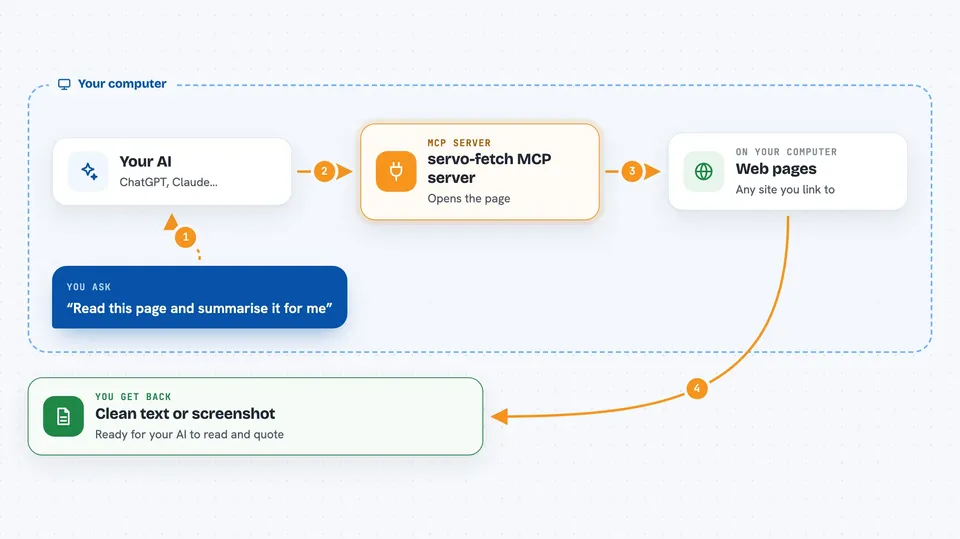
On its own, your AI can only chat with you using what it already knows. An MCP server is a small helper program you connect once, and it gives your AI a new skill. This one gives your AI the skill of opening web pages and reading them. So when you ask about a page, your AI asks this helper, the helper visits the site, and the answer comes back to your chat.
What this MCP server does
You ask your AI something that involves a web page. Your AI passes the web address to this helper. The helper opens the page, runs its scripts, and works out what the real content is, ignoring menus, sidebars, footers, cookie banners and hidden text. Then it sends back the page as clean text, a screenshot, or a small table of facts. Your AI reads that and answers you in the chat.
 Click to zoom
What you can do with it
- Read any web page as clean text your AI can quote
- Take a screenshot of a page, including the full scrolling page
- Fetch several pages at once and compare them
- Follow links across a site and collect many pages
- List the pages a site has, using its sitemap
- Pull specific details off a page, like a product name and price
- Run a small script on a page and return the result
Try asking your AI
- “Read this page and summarise the main points for me: https://example.com/article”
- “Take a screenshot of this page and tell me what the layout looks like”
- “Go through the docs at https://docs.example.com and list every page you find”
- “Fetch these three product pages and give me a table of names and prices”
What it gives back to you
You get back clean text, a screenshot file, or a small structured list, depending on what you asked for. For a single page it is usually a tidy block of text you can read or ask follow-up questions about. For several pages it can be a list with one entry per page. Screenshots come back as image files you can open.
Before you start
What you need
- The servo-fetch program installed on your computer (the README gives a one-line install command)
- On Linux servers you may also need a few system libraries and to run it through xvfb-run
- On Windows, download the zip from the Releases page instead of using cargo binstall, because the zip includes two extra files the program needs
Good to know
It opens real web pages for you, so it can reach sites you would rather it did not, and it cannot get past CAPTCHA pages.
Install it with your AI
Add servo-fetch MCP server to your AI, no technical skills needed
You don't install anything by hand. You copy one prompt, paste it into an AI that can work on your computer, and it checks, installs and connects the server for you, asking you when it needs something.
Sign in to get the install prompt
Members get a ready-made prompt that lets the Claude desktop app check servo-fetch MCP server, install it and connect it for them, step by step. You don't need any technical skills: you copy, paste and answer a few questions. Your connected AI can also find and install any of the 4,361 MCP servers here for you.
Who it's for
Anyone who asks their AI about web pages, such as researchers, writers, analysts, and support or marketing staff who collect information from sites.