MCP server · Research
Scrapeless MCP server
Lets your AI search Google, browse web pages, and pull content from sites for you.
Scrapeless is a helper that connects your AI assistant to the live web. Instead of just chatting from what it already knows, your AI can search Google, open pages, click around, and bring back the text or a screenshot. It is handy if you often need fresh information from websites but do not want to copy and paste it yourself.
What is an MCP server? The 30-second version
On its own, your AI can only talk with you using what it learned during training. An MCP server is a small helper program that gives your AI a new skill, like a new app on your phone. This one connects your AI to Scrapeless, a service that visits and reads web pages for you. So when you ask your AI to look something up online, it quietly asks Scrapeless, and Scrapeless goes and gets it.
What this MCP server does
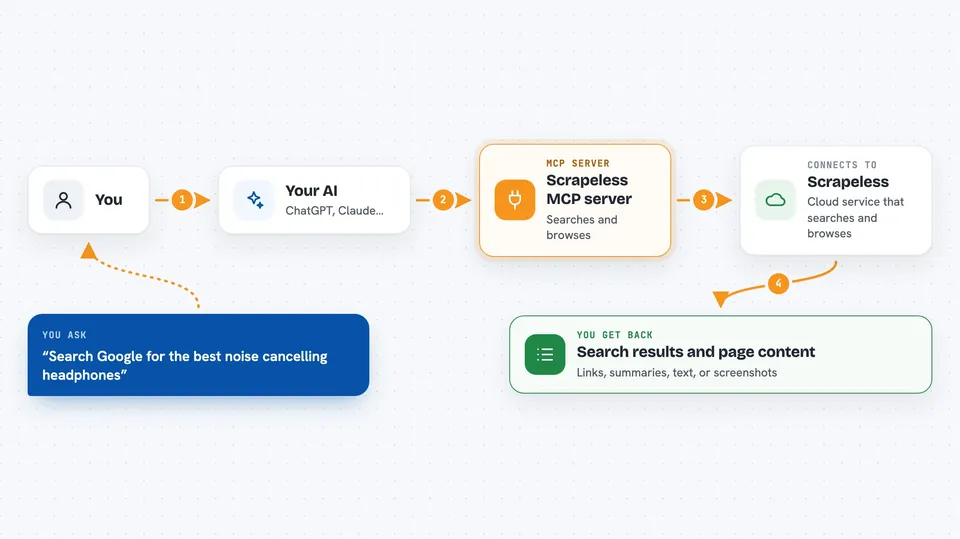
You ask your AI something like "search Google for the latest news on electric cars". Your AI passes that request to this helper, which talks to the Scrapeless service. Scrapeless runs the search or opens the page in a cloud browser, then sends the results back. Your AI shows you the answer in the chat, often as a list of links, a summary, or a block of text. For trickier pages, it can also click, scroll, and take screenshots, like a tiny robot browsing for you.
 Click to zoom
What you can do with it
- Search Google and get back titles, links, and short summaries
- Check what people are searching for on Google Trends
- Open a web page in a cloud browser and read its text
- Click buttons, type in fields, and scroll pages for you
- Save a page's content as HTML or Markdown text
- Take a screenshot of any web page
- Crawl a whole site by following its links, page by page
Try asking your AI
- “Search Google for the best noise cancelling headphones under 200 dollars”
- “Open example.com and tell me what the page is about”
- “Take a screenshot of scrapeless.com”
- “Find the search interest for AI over the last year”
What it gives back to you
You get answers right in the chat: lists of search results with titles and links, short summaries of pages, plain text pulled from a site, or a screenshot image. For bigger jobs like crawling a whole site, it can hand back the collected pages as text or files. If it clicked or typed something for you, it tells you what it did.
Before you start
What you need
- A Scrapeless account (there is a free trial)
- A Scrapeless API key, which you copy from your Scrapeless dashboard
- An MCP-ready app like Claude Desktop or Cursor
Good to know
Web pages can contain hidden tricks aimed at your AI, so treat anything it scrapes as untrusted and double check important facts before you rely on them.
Install it with your AI
Add Scrapeless MCP server to your AI, no technical skills needed
You don't install anything by hand. You copy one prompt, paste it into an AI that can work on your computer, and it checks, installs and connects the server for you, asking you when it needs something.
Sign in to get the install prompt
Members get a ready-made prompt that lets the Claude desktop app check Scrapeless MCP server, install it and connect it for them, step by step. You don't need any technical skills: you copy, paste and answer a few questions. Your connected AI can also find and install any of the 4,361 MCP servers here for you.
Who it's for
Anyone who needs fresh web information in their AI chat, like researchers, marketers, writers, and analysts who do not want to copy and paste from websites by hand.