
MCP server · Notes
ChatSum MCP server
by chatmcp
Lets your AI read your saved chat messages and sum them up for you.
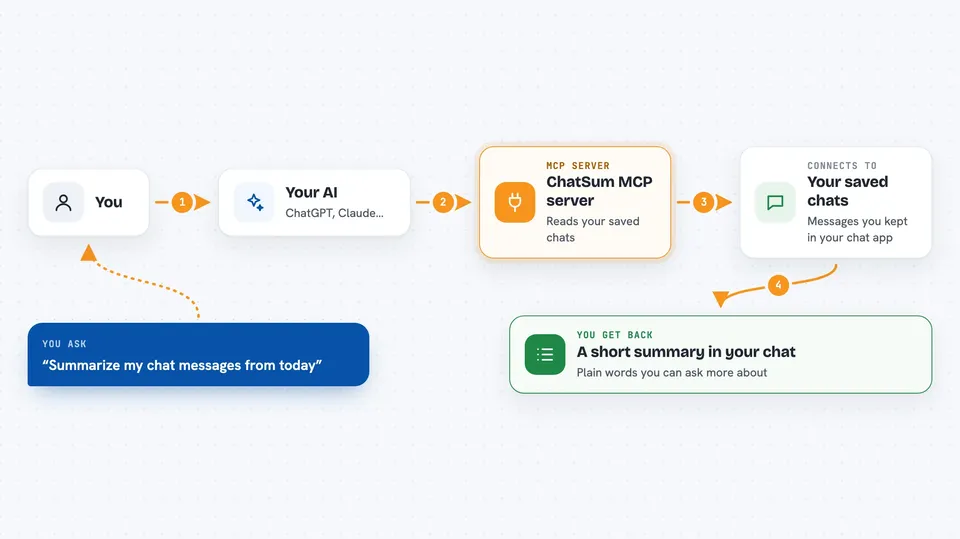
ChatSum is a small helper that connects your AI assistant to a database of your own chat messages. Once it is set up, you can ask your AI to look through those chats and give you a summary. It is handy if you keep a lot of chat history and want the short version without scrolling.
What is an MCP server? The 30-second version
On its own, your AI can only chat with you. An MCP server is a small helper program that gives your AI a new skill or a connection to something else. This one connects your AI to a chat message database, so when you ask a question about your chats, the AI can go look there and bring back an answer. You do not have to copy and paste anything yourself.
What this MCP server does
You ask your AI something about your chat messages, like what people talked about today. The AI passes that request to this helper program. The helper opens your chat database and pulls out the matching messages. It then uses your prompt to summarize them. You get the summary back in the chat window, in plain words.
 Click to zoom
What you can do with it
- Summarize your chat messages from a chosen time or topic
- Search your saved chats for what was said about something
- Get a short recap of a busy conversation
- Pull out the main points from a long chat history
- Ask follow-up questions about the messages it found
Try asking your AI
- “Summarize my chat messages from today”
- “What did people talk about in my chats this week?”
- “Give me the main points from my recent conversations”
- “Search my chats for anything about the project deadline”
What it gives back to you
You get a written summary or a short list of the messages that matched your request. It shows up as normal text in your chat with the AI. You can then ask the AI to shorten it, expand a point, or dig into one message.
Before you start
What you need
- The chatbot part of this project set up first, so your chat messages are saved in a database
- The path to that chat database file, set as CHAT_DB_PATH
- Node.js and pnpm to install and build the server
- The Claude desktop app (or another app that supports MCP servers)
Good to know
It reads your saved chat messages, so make sure you are comfortable with your AI seeing that history.
Install it with your AI
Add ChatSum MCP server to your AI, no technical skills needed
You don't install anything by hand. You copy one prompt, paste it into an AI that can work on your computer, and it checks, installs and connects the server for you, asking you when it needs something.
Sign in to get the install prompt
Members get a ready-made prompt that lets the Claude desktop app check ChatSum MCP server, install it and connect it for them, step by step. You don't need any technical skills: you copy, paste and answer a few questions. Your connected AI can also find and install any of the 4,066 MCP servers here for you.
Who it's for
People who keep a lot of chat history and want quick summaries without reading everything themselves.




