
MCP server · Finance and crypto
Clicks Protocol MCP server
Let your AI check USDC payment receipts and settlement status on Base, and split payments into yield.
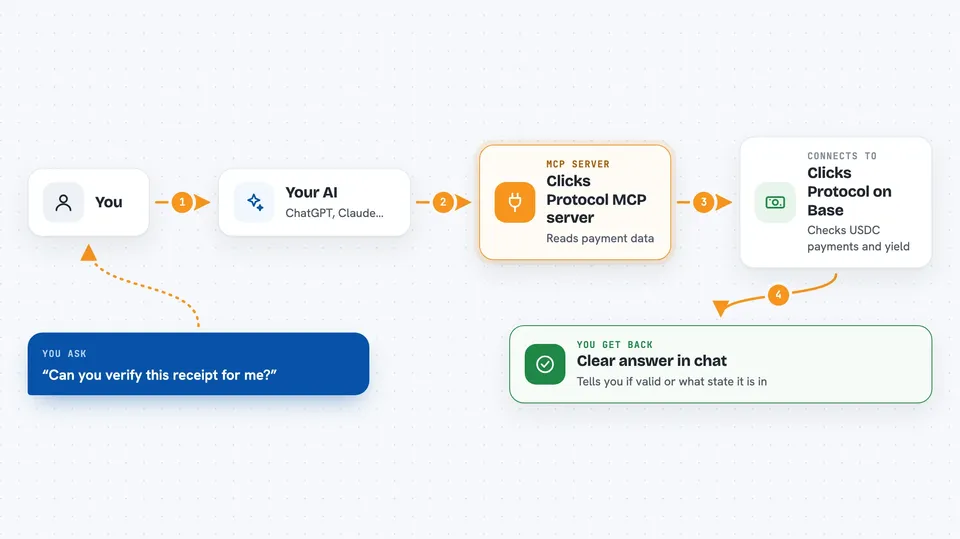
This is a helper for your AI that connects it to the Clicks Protocol, a system for handling USDC payments on the Base network. It is handy if you work with payments, crypto, or finance and want your AI to look up receipt details or check how a payment is doing. You do not need to be a developer to understand what it does, but you will need some setup from your team.
What is an MCP server? The 30-second version
On its own, your AI can only chat. An MCP server is a small helper program that gives your AI a new skill or a connection to an app or service. This one connects your AI to the Clicks Protocol on Base, so your AI can look up payment receipts, check settlement status, and even split payments between a liquid balance and a yield balance when you ask. Think of it as giving your AI a pair of hands to check and move money-related information for you.
What this MCP server does
You ask your AI something like "check this receipt" or "what is the settlement status for this payment?" Your AI then uses this helper to talk to the Clicks Protocol on Base. The helper reads the receipt or settlement data and sends it back to your AI. Your AI then explains it to you in plain words, like whether the receipt is valid or what state the payment is in. For write actions, like splitting a payment, the helper can also make changes if you have given it the right permissions.
 Click to zoom
What you can do with it
- Verify a payment receipt to check if it is intact
- Check the settlement status of a payment
- Reconcile a settlement by reading evidence from Base
- Compare a policy definition with the policy hash on a receipt
- Read the history of a receipt from a local ledger
- Split a payment between a liquid balance and a yield balance
- Withdraw from a yield balance anytime
Try asking your AI
- “Can you verify this receipt for me?”
- “What is the settlement status for this payment?”
- “Split 100 USDC into 50 for spending and 50 for yield”
- “Check the APY on my yield balance”
What it gives back to you
You get back clear answers in the chat, like whether a receipt is valid, what state a settlement is in, or a summary of the receipt trail. For write actions, it tells you what change was made, such as how a payment was split. It can also show numbers like the current APY or the amounts in each balance.
Before you start
What you need
- A Clicks Protocol account or access to the protocol
- The private key for write actions (a long password that lets the helper make changes; keep it safe)
- A local file path for the receipt ledger if you want to inspect receipt trails
- The Claude desktop app or another AI app that supports MCP servers
Good to know
This helper can make changes to payments if you give it the private key, so only use it with trusted clients and keep your key safe.
Install it with your AI
Add Clicks Protocol MCP server to your AI, no technical skills needed
You don't install anything by hand. You copy one prompt, paste it into an AI that can work on your computer, and it checks, installs and connects the server for you, asking you when it needs something.
Sign in to get the install prompt
Members get a ready-made prompt that lets the Claude desktop app check Clicks Protocol MCP server, install it and connect it for them, step by step. You don't need any technical skills: you copy, paste and answer a few questions. Your connected AI can also find and install any of the 4,609 MCP servers here for you.
Who it's for
This is most useful for people in finance, crypto, or payments who work with USDC on Base and want their AI to help check receipts and settlements.



