
MCP server · Developer tools · official
Lineai MCP server
by CodeLogicIncEngineering · official
Lets your AI check what a code or database change might break before you make it.
This is a helper that connects your AI assistant to Lineai, a service that maps how your code and database pieces depend on each other. Once it is set up, you can ask your AI things like what a change to one method might affect, and it will look that up for you. It is most useful for developers working in Java, JavaScript, TypeScript, or C# codebases.
What is an MCP server? The 30-second version
On its own, your AI can only chat with you using what it already knows. An MCP server is a small helper program that gives your AI a new skill or a connection to another service. This one connects your AI to Lineai, so it can look up dependency and impact information in your workspace. You just ask a question in plain words, and the helper goes and fetches the answer.
What this MCP server does
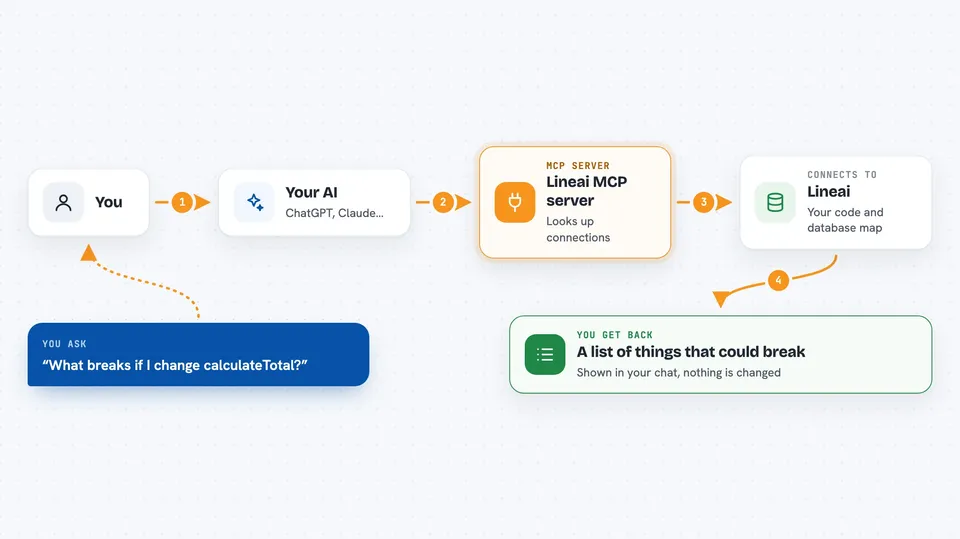
You ask your AI a question about your code, like what a change to a method might affect. The AI calls this helper, which signs in to your Lineai server and asks it for the impact data. Lineai looks at how your code and database pieces are connected and sends back what it finds. The AI then shows you the results in the chat, usually as a list or summary. There are also graph tools for searching nodes, tracing paths, and checking who owns what.
 Click to zoom
What you can do with it
- Check what a change to a method might affect elsewhere
- See how a database table, column, or view connects to your code
- Search your code graph for a node by name
- Trace the shortest path between two nodes
- Get a risk checklist for a proposed change
- Find who owns a piece of code
- See which relationship types and limits the graph supports
Try asking your AI
- “What would break if I change the calculateTotal method in the Order class?”
- “Which parts of the code use the customers table?”
- “Search the graph for anything named invoice”
- “What is the path between the OrderService node and the PaymentRepo node?”
- “Who owns the code around the billing module?”
What it gives back to you
You get back a written answer in the chat, usually a list of affected methods, tables, or nodes, sometimes with a short summary or risk note. The graph tools can return matching nodes, a path explanation, or an owner list. It does not change your code or database; it only reports what it finds.
Before you start
What you need
- A Lineai account with a server address, username, and password
- The name of your Lineai workspace
- Astral UV installed on your computer (the tool that runs this helper)
- An AI app that supports MCP, like VS Code with Copilot, Claude Desktop, Cursor, or Windsurf
Good to know
You need to put your Lineai username and password in the setup file, so keep that file private and do not share it.
Install it with your AI
Add Lineai MCP server to your AI, no technical skills needed
You don't install anything by hand. You copy one prompt, paste it into an AI that can work on your computer, and it checks, installs and connects the server for you, asking you when it needs something.
Sign in to get the install prompt
Members get a ready-made prompt that lets the Claude desktop app check Lineai MCP server, install it and connect it for them, step by step. You don't need any technical skills: you copy, paste and answer a few questions. Your connected AI can also find and install any of the 4,609 MCP servers here for you.
Who it's for
Developers and teams working on Java, JavaScript, TypeScript, or C# codebases who want to understand the impact of changes before making them.



