
MCP server · Analytics
Google Search Console MCP server
Ask your AI about your search traffic, near-miss keywords, sitemaps, and whether a page is indexed.
This is a small helper that connects your AI assistant to Google Search Console, the free Google tool that shows how your site performs in search. Once it is set up, you can just ask questions in plain English instead of clicking through Search Console's menus. It is handy for anyone who looks after a website and wants quick answers about search traffic.
What is an MCP server? The 30-second version
On its own, your AI can only chat with you. An MCP server is a small helper program that gives your AI a new skill or a connection to an app or service. This one connects your AI to Google Search Console, so it can look up your search data and manage your sitemaps when you ask. You set it up once, and after that you just talk to your assistant like normal.
What this MCP server does
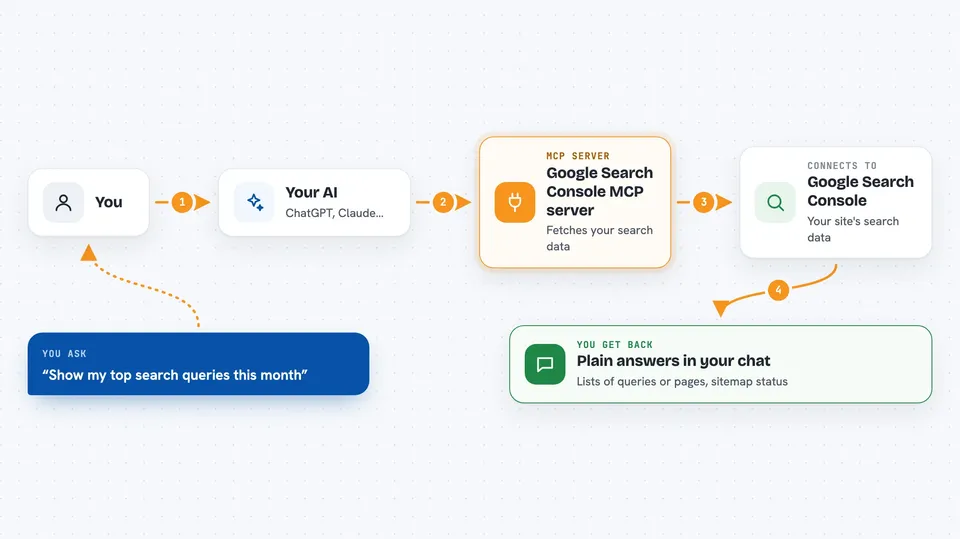
You ask your AI a question about your site's search performance. The AI passes that request to this helper program. The helper talks to Google Search Console using a saved credential you set up, and Google sends back the numbers. The AI then turns those numbers into a plain answer in your chat, like a list of keywords or a short summary. For sitemaps, it can also send a change to Google on your behalf.
 Click to zoom
What you can do with it
- See which search queries and pages get the most clicks and impressions
- Find keywords sitting just outside page one that are worth improving
- Break your search data down by country, device, or date
- Check the status of your submitted sitemaps
- Submit a sitemap to Google so it knows about your pages
- Remove a sitemap you no longer want registered
- Check whether a specific URL is indexed and how Google sees it
Try asking your AI
- “List my Search Console properties”
- “Show me striking-distance keywords for my site over the last 28 days”
- “Which pages got the most clicks in the last month, broken down by country”
- “Are my sitemaps healthy? Any warnings or errors?”
- “Is this URL indexed, and what did Google say about it?”
What it gives back to you
You get answers in your chat, not files to download. That usually means lists of queries or pages with clicks, impressions, click-through rate, and average position, or a short summary of your sitemap status. For a URL inspection, you get the index status, last crawl date, and Google's verdicts on mobile and rich results. If you submit or remove a sitemap, it tells you whether the change went through.
Before you start
What you need
- A website you have already verified in Google Search Console
- A saved Google credential file for Search Console, created through a short one-time setup in Google Cloud Console (the README walks through it; it opens a browser for one consent click)
- Node.js installed on your computer, since the server runs with npx
Good to know
Two tools can change things on Google's side: submitting a sitemap, and removing one, which is destructive, so be sure before you ask for it.
Install it with your AI
Add Google Search Console MCP server to your AI, no technical skills needed
You don't install anything by hand. You copy one prompt, paste it into an AI that can work on your computer, and it checks, installs and connects the server for you, asking you when it needs something.
Sign in to get the install prompt
Members get a ready-made prompt that lets the Claude desktop app check Google Search Console MCP server, install it and connect it for them, step by step. You don't need any technical skills: you copy, paste and answer a few questions. Your connected AI can also find and install any of the 4,609 MCP servers here for you.
Who it's for
Website owners, marketers, and SEO folks who want quick answers about search performance without clicking around Search Console.




