
MCP server · Social media
Postlint MCP server
Check your draft post against the real character limits of X, Bluesky, LinkedIn, Threads, Mastodon and Discord before you publish.
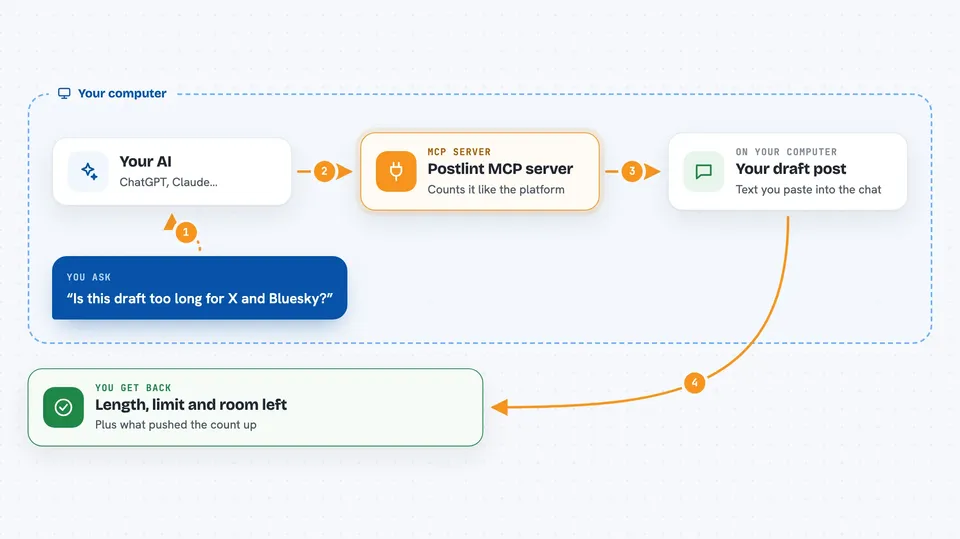
Postlint is a small helper that answers one question: does this post fit? You paste a draft, tell your AI which platform it is for, and it tells you the exact counted length, the limit, and how much room is left. It is handy for anyone who writes social posts and has ever been surprised by a rejected or cut-off post.
What is an MCP server? The 30-second version
On its own, your AI can only chat. It cannot truly count characters in a post, because counting by eye is not something a language model does reliably. An MCP server is a small helper program that gives your AI one new skill. This one gives it the skill of measuring a post against the real rules of X, Bluesky, LinkedIn, Threads, Mastodon and Discord, so you get a real number instead of a guess.
What this MCP server does
You paste a draft post into your chat and say which platform it is for. Your AI passes the text to this helper. The helper counts it the way that platform actually counts, including the odd rules about links and emoji. Then it hands back a verdict: the counted length, the limit, how much room is left, and what pushed the count up. Nothing is posted anywhere. It only measures.
 Click to zoom
What you can do with it
- Check one draft post against a single platform's limit
- Check the same draft against every supported platform at once
- See how much room you have left before you hit the limit
- See what drove the count, such as links being priced at a fixed length
- Look up each platform's limit and the unit it is counted in
- Catch a post that is over the limit before you publish it
Try asking your AI
- “Check this post for X and Bluesky and tell me if it fits”
- “How many characters is this draft on LinkedIn and Threads?”
- “This X post feels long, is it over 280?”
- “Show me the limits for all the platforms you support”
What it gives back to you
You get a short verdict in the chat. For one platform it shows the counted length, the limit, how much room is left, and a line explaining what drove the count, such as three links costing 23 each. For all platforms you get one row per platform, with the breakdown only on the rows that fail. It also warns you when a draft still has a placeholder like [URL] in it, because that count is only a floor.
Before you start
What you need
- Node.js 18 or newer on your computer
- The Claude desktop app, Claude Code, or another assistant that supports MCP servers
Good to know
It only measures text, so it does not count media, polls, quote posts or link cards, and it does not post or edit anything for you.
Install it with your AI
Add Postlint MCP server to your AI, no technical skills needed
You don't install anything by hand. You copy one prompt, paste it into an AI that can work on your computer, and it checks, installs and connects the server for you, asking you when it needs something.
Sign in to get the install prompt
Members get a ready-made prompt that lets the Claude desktop app check Postlint MCP server, install it and connect it for them, step by step. You don't need any technical skills: you copy, paste and answer a few questions. Your connected AI can also find and install any of the 4,361 MCP servers here for you.
Who it's for
Social media managers, marketers, podcasters, founders and anyone who writes posts for several platforms and is tired of being caught by character limits.





