
MCP server · Developer tools
rag-rat repo intelligence MCP server
by cq27-dev
Lets your AI answer questions about your codebase and remember important facts about it.
rag-rat is a helper that reads your code repository and builds a searchable map of it. Once it is connected, your AI assistant can look up where things live in your code, who calls what, and what past decisions were made. It is handy for anyone who works in a codebase and wants their AI to stop guessing.
What is an MCP server? The 30-second version
On its own, your AI can only chat with you. An MCP server is a small helper program that gives your AI a new skill or a connection to something else. This one connects your AI to your code repository, so it can look things up there and answer with real evidence instead of making things up. You ask a question, your AI asks rag-rat, and rag-rat reads the repo and replies.
What this MCP server does
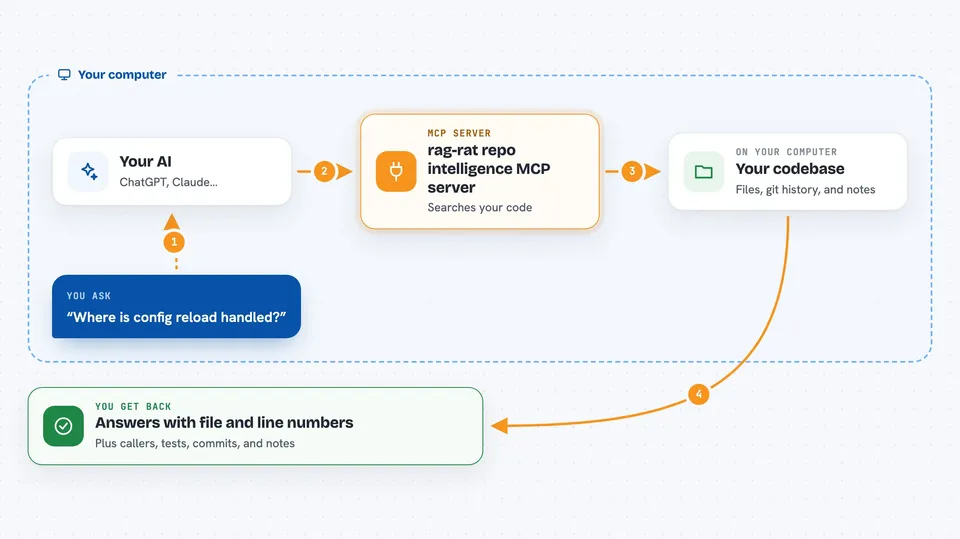
You ask your AI something about your codebase, like where a setting is handled or what calls a function. Your AI sends that question to rag-rat. rag-rat searches the source files, the code graph, the git history, and any notes previous sessions saved. It sends back an answer with the exact files, lines, and confidence labels, and your AI shows you that in the chat.
 Click to zoom
What you can do with it
- Find where a piece of logic lives in your code
- See who calls a function and what it calls
- Check which tests touch a file before you change it
- Look up recent commits and past decisions about a symbol
- Spot when new code duplicates something already in the repo
- Save a note about an important rule so future sessions remember it
- List the most important symbols in the repository
Try asking your AI
- “Where is config reload handled?”
- “Show me the callers and tests for parse_config before I edit it.”
- “Does this helper duplicate anything already in the codebase?”
- “Record an invariant on parse_config: reload must not allocate after the scheduler starts.”
What it gives back to you
You get answers in the chat with the source files and line numbers behind them. You also get lists of callers, callees, tests, recent commits, and saved notes, each with a confidence label. When you save a memory, it is stored and shows up again in later answers about the same symbol or path.
Before you start
What you need
- A code repository on your computer
- A coding agent that supports MCP, such as Claude Code, Codex, or opencode
- Node.js if you install the prebuilt package with npm
Good to know
It reads your source files and git history, so only point it at repositories you are comfortable sharing with your AI assistant.
Install it with your AI
Add rag-rat repo intelligence MCP server to your AI, no technical skills needed
You don't install anything by hand. You copy one prompt, paste it into an AI that can work on your computer, and it checks, installs and connects the server for you, asking you when it needs something.
Sign in to get the install prompt
Members get a ready-made prompt that lets the Claude desktop app check rag-rat repo intelligence MCP server, install it and connect it for them, step by step. You don't need any technical skills: you copy, paste and answer a few questions. Your connected AI can also find and install any of the 4,609 MCP servers here for you.
Who it's for
Developers and anyone who works inside a code repository and wants their AI assistant to understand it.




