
MCP server · Analytics
Elasticsearch MCP server
by cr7258
Lets your AI search, read, and manage your Elasticsearch or OpenSearch data for you.
This is a small helper that connects your AI assistant to Elasticsearch or OpenSearch, the tools many companies use to store and search large amounts of data. Once it is set up, you can just ask questions in plain English instead of writing search queries yourself. It is handy for anyone who works with logs, records, or search data but does not want to learn the query language.
What is an MCP server? The 30-second version
On its own, your AI can only chat with you. An MCP server is a small helper program that gives your AI a new skill or a connection to another app. This one connects your AI to your Elasticsearch or OpenSearch cluster, so it can look things up and make changes there when you ask. You stay in the chat, and the helper does the technical talking behind the scenes.
What this MCP server does
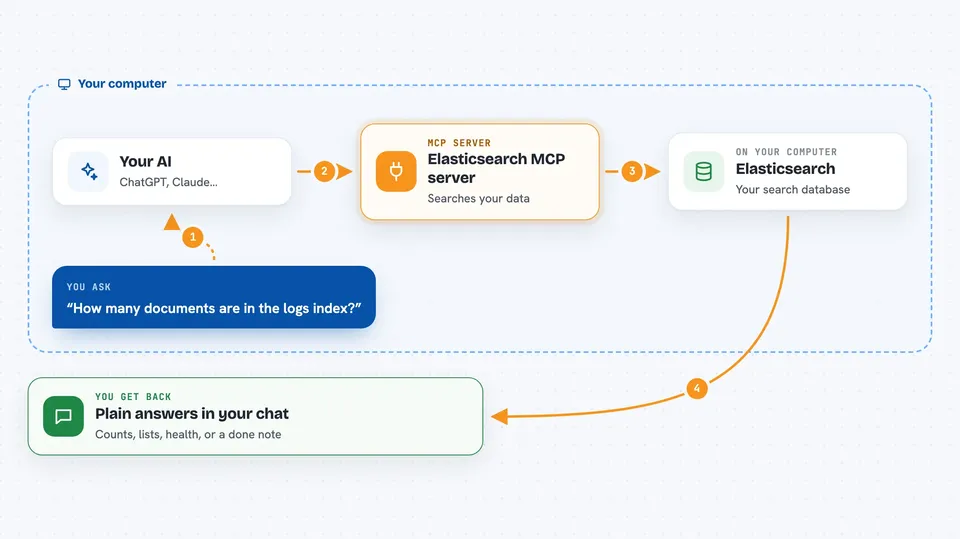
You ask your AI a question, like how many records match something or what is in a certain index. The AI sends that request to this helper program running on your computer. The helper then talks to your Elasticsearch or OpenSearch cluster using your login details. It brings the answer back and the AI explains it to you in the chat. If you ask it to change something, like adding or deleting a record, the helper does that too.
 Click to zoom
What you can do with it
- Search your documents and get matching results
- List all the indices in your cluster
- Check the health and statistics of your cluster
- Look up a single document by its ID
- Create or update a document
- Delete a document or a set of documents
- Test how text gets broken up by an analyzer
Try asking your AI
- “How many documents are in the logs index?”
- “Show me the health of my cluster”
- “Find the last 10 error messages in the logs index”
- “List all the indices and tell me which ones are biggest”
What it gives back to you
You get answers in plain language in your chat window. That could be a count, a list of documents, a summary of your cluster health, or a confirmation that a change was made. For searches, the AI usually shows the matching records or a short summary of them. You do not have to read raw technical output unless you want to.
Before you start
What you need
- An Elasticsearch or OpenSearch cluster you can reach (a web address for it)
- A username and password, or an API key, for that cluster
- Python and the uvx tool installed on your computer
- The Claude desktop app or another AI app that supports MCP servers
Good to know
This server can change and delete your data, so be careful with requests that add, update, or remove things.
Install it with your AI
Add Elasticsearch MCP server to your AI, no technical skills needed
You don't install anything by hand. You copy one prompt, paste it into an AI that can work on your computer, and it checks, installs and connects the server for you, asking you when it needs something.
Sign in to get the install prompt
Members get a ready-made prompt that lets the Claude desktop app check Elasticsearch MCP server, install it and connect it for them, step by step. You don't need any technical skills: you copy, paste and answer a few questions. Your connected AI can also find and install any of the 4,609 MCP servers here for you.
Who it's for
Anyone who works with Elasticsearch or OpenSearch data, like support teams, analysts, or developers who want to ask questions in plain English.


