
MCP server · Finance and crypto
CHP spend and tool-approval MCP server
by Cubiczan
Lets your AI check spend limits and require a human approval receipt before it runs sensitive tools.
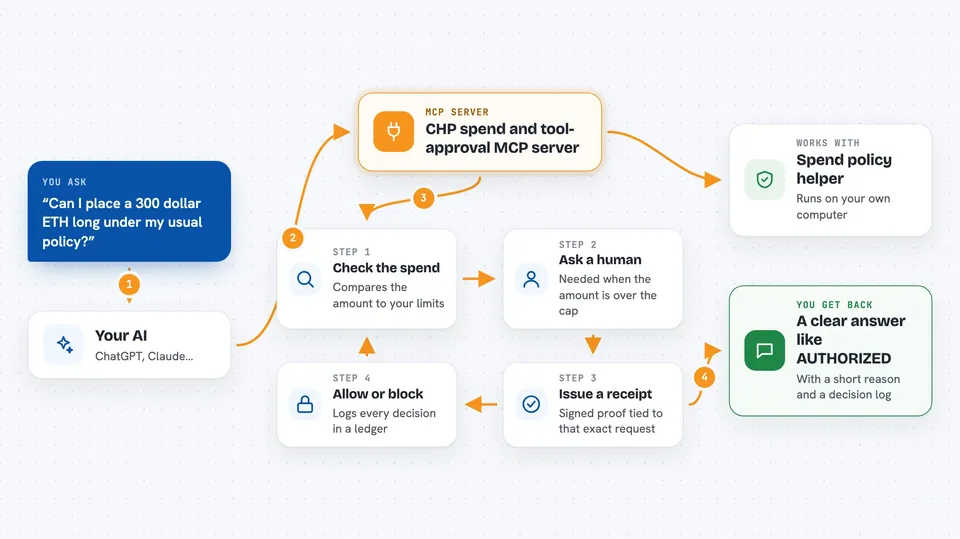
This is a helper that sits between your AI assistant and risky actions like spending money or calling finance tools. It makes the AI stop and ask for a signed approval before it does anything that touches a limit or a sensitive tool. It is handy for anyone who wants a human in the loop before the AI acts on money or important systems.
What is an MCP server? The 30-second version
On its own, your AI can only chat. An MCP server is a small helper program that gives your AI a new skill or a connection to an app or service. This helper connects your AI to a set of spend and tool-approval rules, so the AI can check limits, ask for a human sign-off, and only then let a tool run. You ask in plain words, and the helper handles the checking and the receipts behind the scenes.
What this MCP server does
You ask your AI to do something like place an order or call a tool. The AI passes the details to this helper. The helper checks the spend against your policy rules, like a maximum amount or a daily cap. If the amount is over a threshold, it asks for a human approval and issues a signed receipt. Only when the receipt matches the exact call does the helper let the action go through, and it logs every deny or allow in a ledger.
 Click to zoom
What you can do with it
- Check whether a spend fits your policy limits
- Ask a human to approve a spend that is over the threshold
- Issue a signed approval receipt for a specific tool call
- Block a tool call if the arguments changed after approval
- Block a tool call if the receipt is expired or already used
- Record every deny or allow in an audit ledger
- Place a synthetic equity order only with a valid receipt
- Send a synthetic treasury wire that always needs human approval
Try asking your AI
- “Can I place a 300 dollar ETH long with 0.9 confidence under my usual policy?”
- “Ask the CFO to approve this 2500 dollar charge to customer cus_123”
- “Authorize this search tool call with the receipt we just issued”
- “Show me the last few deny and allow entries in the audit ledger”
What it gives back to you
You get back a clear answer like LOCKED, HITL_REQUIRED, BLOCKED, AUTHORIZED, or DENIED, along with a short reason code. When a receipt is issued, you get the whole receipt object and a decision log showing who approved, the arguments hash, and a one-time nonce. For ledger checks, you get a list of recent deny, authorize, and execute entries. Everything shows up as text in your chat.
Before you start
What you need
- Node.js installed on your computer
- An MCP client like Cursor, Claude Desktop, or Claude Code
- A secret key set as CHP_RECEIPT_KEY or AUDIT_LEDGER_KEY (a kind of password for signing receipts; without it the server uses an insecure default that is fine for local testing only)
Good to know
It can block or deny actions, and the finance tools are synthetic, so do not use them for real money without checking with your team first.
Install it with your AI
Add CHP spend and tool-approval MCP server to your AI, no technical skills needed
You don't install anything by hand. You copy one prompt, paste it into an AI that can work on your computer, and it checks, installs and connects the server for you, asking you when it needs something.
Sign in to get the install prompt
Members get a ready-made prompt that lets the Claude desktop app check CHP spend and tool-approval MCP server, install it and connect it for them, step by step. You don't need any technical skills: you copy, paste and answer a few questions. Your connected AI can also find and install any of the 4,609 MCP servers here for you.
Who it's for
Finance, operations, and engineering teams who want a human approval step before their AI touches money or sensitive tools.



