
MCP server · Browser automation
PageBolt MCP server
Let your AI take screenshots, make PDFs, build social images, and record demo videos of web pages.
PageBolt is a helper that lets your AI assistant capture web pages for you. You ask in plain words, and it takes screenshots, makes PDFs, creates social preview images, or records short demo videos. It is handy for anyone who needs a picture or a file of a page without opening a design tool.
What is an MCP server? The 30-second version
On its own, your AI can only chat. An MCP server is a small helper program that gives your AI a new skill or a connection to another service. This one connects your AI to PageBolt, a web capture service. Once it is connected, your AI can ask PageBolt to snap a page, make a PDF, or record a video, and hand the result back to you in the chat.
What this MCP server does
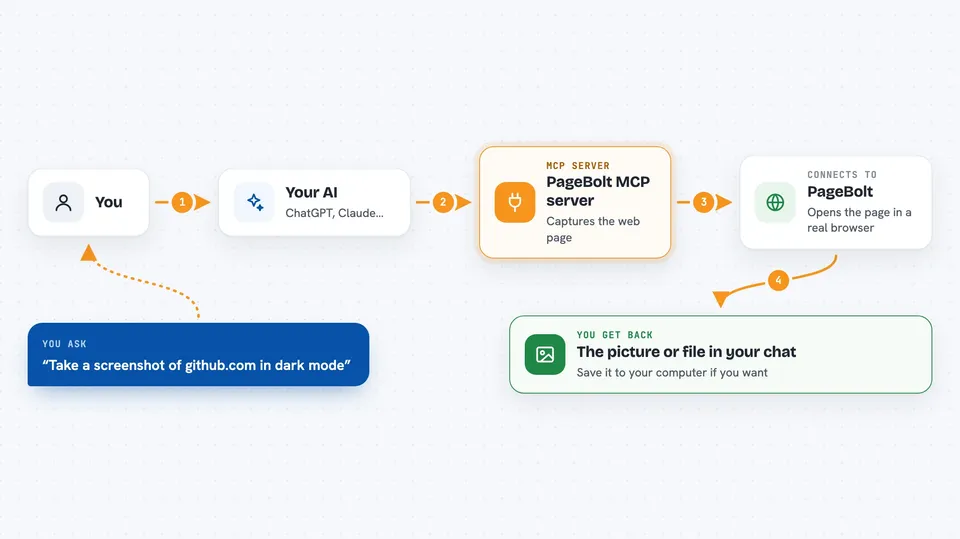
You type a request, like asking for a screenshot of a page. Your AI passes that request to the PageBolt helper. The helper talks to PageBolt's web capture service, which opens the page in a real browser and does the work. The result comes back and shows up right in your chat, so you can see the image or get the file without leaving the conversation.
 Click to zoom
What you can do with it
- Take a screenshot of any web page, in light or dark mode
- Turn a page or a piece of HTML into a PDF
- Create a social preview image with a title and colors
- Record a short demo video of a browser flow
- Inspect a page to see its buttons, links, and forms
- Run a multi-step browser flow like click, fill, and screenshot
- Check how many requests you have left this month
Try asking your AI
- “Take a screenshot of https://github.com in dark mode at 1920x1080”
- “Generate a PDF of https://example.com and save it to ./report.pdf”
- “Create an OG image with the title How to Build a SaaS using the gradient template”
- “Record a video of logging into https://example.com with a spotlight cursor”
What it gives back to you
You get the result right in the chat. Screenshots appear as pictures you can look at. PDFs and videos can be saved to a file on your computer if you ask for a path. For page inspections, you get a list of buttons, links, and forms with their names.
Before you start
What you need
- A PageBolt account and API key (sign up at pagebolt.dev; the free tier gives 100 requests a month, no card needed)
- Node.js installed on your computer (the helper runs with a tool called npx)
- An MCP-compatible app like Claude Desktop, Cursor, Windsurf, or Cline
Good to know
Some tools can click, fill, and submit things on real websites, and act_on_page can log in with credentials you give it, so point it only at pages and flows you are comfortable automating.
Install it with your AI
Add PageBolt MCP server to your AI, no technical skills needed
You don't install anything by hand. You copy one prompt, paste it into an AI that can work on your computer, and it checks, installs and connects the server for you, asking you when it needs something.
Sign in to get the install prompt
Members get a ready-made prompt that lets the Claude desktop app check PageBolt MCP server, install it and connect it for them, step by step. You don't need any technical skills: you copy, paste and answer a few questions. Your connected AI can also find and install any of the 4,361 MCP servers here for you.
Who it's for
Anyone who needs quick screenshots, PDFs, or demo videos of web pages, like marketers, support teams, writers, and people making docs or social posts.


