
MCP server · Notes
Klypix MCP server
by dahshanlabs
Give your coding AI a shared project brain so it remembers decisions across sessions and tools.
Klypix is a shared memory for your coding projects. It keeps one file called brain.klypix in your project folder, and that file holds the decisions your team and your AI assistants have made. It is handy if you use more than one coding assistant, like Claude Code, Codex, or Cursor, and you are tired of explaining the same things again.
What is an MCP server? The 30-second version
On its own, your AI can only chat with you. An MCP server is a small helper program that gives your AI a new skill or a connection to an app or service. This one connects your AI to Klypix, a project memory that lives in a file inside your project. Once it is connected, your AI can look up past decisions, save new ones, and warn you when two sessions are about to touch the same files.
What this MCP server does
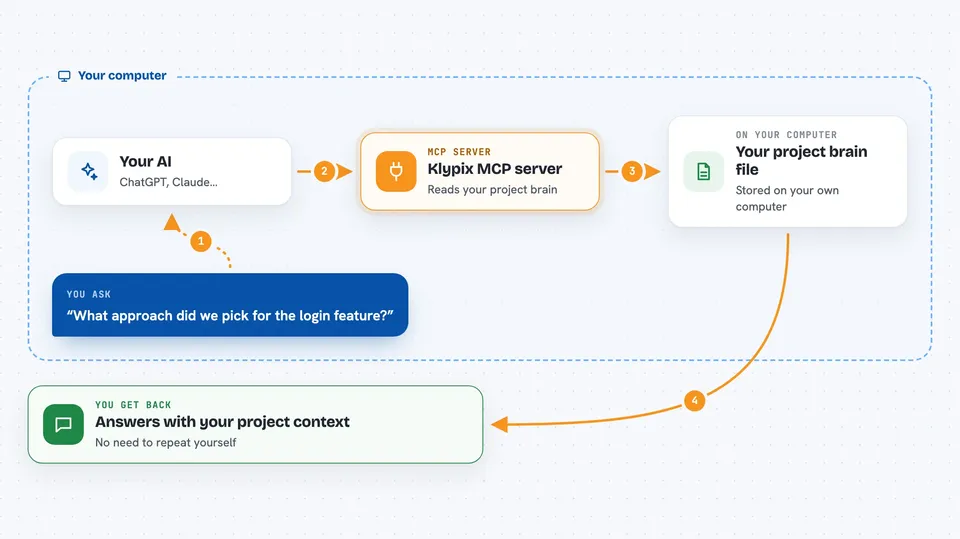
You ask your AI something about your project, like what approach was chosen for a feature. The AI uses this helper, and the helper reads the brain.klypix file in your project. It finds the relevant decisions, corrections, and notes, and hands them back to your AI. Your AI then answers you with that context, so you do not have to repeat yourself. It can also save new decisions into the file so the next session, or a different tool, will find them.
 Click to zoom
What you can do with it
- Save a project decision so future sessions can find it
- Ask what the project believed on a certain date
- Check whether an idea was already rejected or reversed
- See if another session is working on the same files
- Get a short memory brief at the start of a task
- Attach a note to a piece of code so you are warned if it changes
- Look at your project structure alongside its decisions
What it gives back to you
You get answers in plain language inside your chat. That can be a short summary of past decisions, a list of related notes, or a warning that another session is touching the same files. When you save something, it confirms the note was added to the brain file. You can also ask for a memory brief at the start of a task, which comes back as a short block of context.
Before you start
What you need
- Node.js installed on your computer
- A project folder, ideally one that uses Git
- At least one supported coding tool, like Claude Code, Codex, or Cursor
Good to know
It reads and writes the brain.klypix file in your project, so treat it like any project file and keep it in version control.
Install it with your AI
Add Klypix MCP server to your AI, no technical skills needed
You don't install anything by hand. You copy one prompt, paste it into an AI that can work on your computer, and it checks, installs and connects the server for you, asking you when it needs something.
Sign in to get the install prompt
Members get a ready-made prompt that lets the Claude desktop app check Klypix MCP server, install it and connect it for them, step by step. You don't need any technical skills: you copy, paste and answer a few questions. Your connected AI can also find and install any of the 4,609 MCP servers here for you.
Who it's for
Developers and teams who use more than one AI coding assistant on the same project and want them to share what they have learned.


