MCP server · Analytics
Google Trends MCP server
by dariomory
Ask your AI about Google Trends: what people search for, where, and what is rising right now.
This is a small helper that connects your AI assistant to Google Trends, the public site that shows what people are searching for. It comes from a coding library called Trendflow, but you do not need to write any code to use it. It is handy for anyone who needs to know what is popular or growing, like marketers, writers, shop owners, and researchers.
What is an MCP server? The 30-second version
On its own, your AI can only chat with you using what it already knows. An MCP server is a small helper program that gives your AI a new skill or a connection to an app or service. This one connects your AI to Google Trends, so it can look up search interest, regional popularity, and trending topics for you. You just ask in normal words, and the helper does the looking up.
What this MCP server does
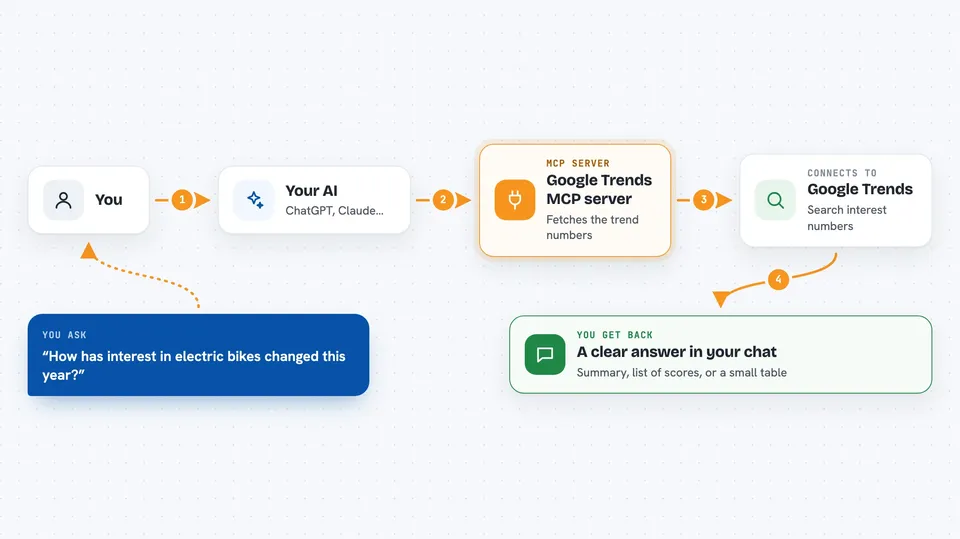
You ask your AI a question about search trends, like how popular a word has been this year. The AI passes your question to this helper. The helper asks Google Trends for the numbers, then hands them back to the AI. The AI turns those numbers into a clear answer in your chat, sometimes as a list or a small table. You never have to visit the Google Trends website yourself.
 Click to zoom
What you can do with it
- See how search interest for a word changed over time
- Compare several words against each other
- Find out which regions or cities search for something most
- Check what is trending right now in a country
- Get related searches people also type
- Find the exact topic behind a word, so results are not confused by other meanings
- Get the numbers as a list you can copy into a spreadsheet
Try asking your AI
- “How has interest in electric bikes changed over the past year in the US?”
- “Compare searches for Python, JavaScript and Rust over the last 12 months”
- “What is trending in the UK right now?”
- “Which queries are rising around machine learning in Great Britain?”
- “Is jaguar being searched more as a car or as an animal?”
What it gives back to you
You get answers in plain chat: a short summary, a list of dates with scores, a table of regions with numbers, or a list of trending topics with how fast they are growing. Scores are usually on a 0 to 100 scale, where 100 is the peak. If you ask for a file, the helper can give you the same data as a CSV or JSON file you can open in Excel or another tool.
Before you start
What you need
- The Claude desktop app or another AI app that supports MCP servers
- Node.js 18 or newer installed on your computer (a free program that runs small helper tools)
- An internet connection
Good to know
Google Trends limits how many requests it answers, so asking many questions quickly can fail, and the numbers are relative scores rather than exact search counts.
Install it with your AI
Add Google Trends MCP server to your AI, no technical skills needed
You don't install anything by hand. You copy one prompt, paste it into an AI that can work on your computer, and it checks, installs and connects the server for you, asking you when it needs something.
Sign in to get the install prompt
Members get a ready-made prompt that lets the Claude desktop app check Google Trends MCP server, install it and connect it for them, step by step. You don't need any technical skills: you copy, paste and answer a few questions. Your connected AI can also find and install any of the 4,361 MCP servers here for you.
Who it's for
Marketers, content writers, small business owners, journalists, and researchers who want quick answers about what people are searching for.