
MCP server · Security
OpenWorkProof MCP server
by dengyier
Let your AI keep a signed, checkable record of what it was allowed to do and what it actually did.
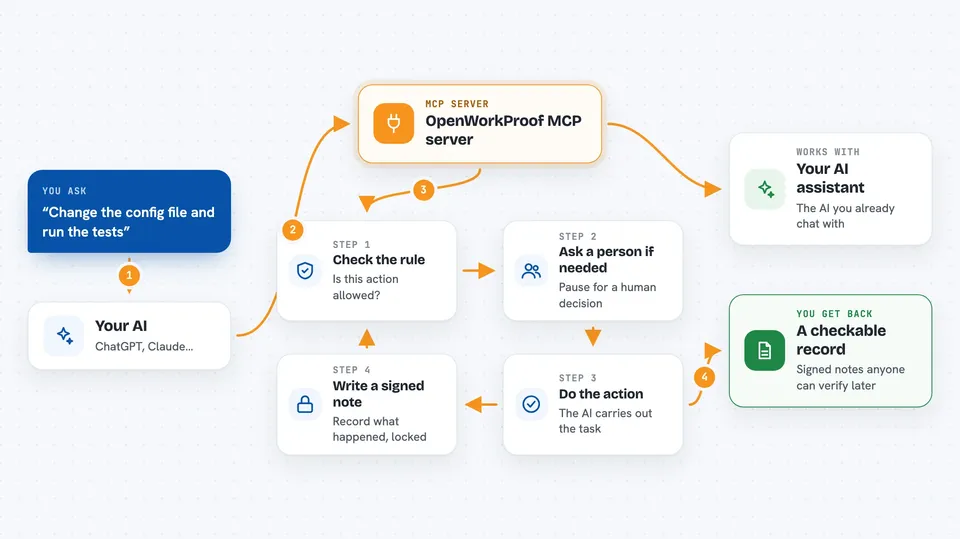
OpenWorkProof is a helper that keeps a signed record of the work an AI does for you. It writes down who allowed the task, what the AI was allowed to touch, what it actually did, and whether a person accepted the result. It is handy if you let an AI change files or run commands and you want proof later of what happened.
What is an MCP server? The 30-second version
On its own, your AI can only chat. An MCP server is a small helper program that gives your AI a new skill or a connection to another service. This one connects your AI to OpenWorkProof, a system that records and signs each step of a piece of work. So when you ask your AI to do something, the helper can check the rules first and leave a signed trail behind.
What this MCP server does
You ask your AI to do a task, like changing a file or running a test. Before it acts, the helper checks whether that action is allowed under the rules you set. If it is allowed, the AI goes ahead and the helper writes down a signed note of what it did. If the action is one a person must approve first, the helper stops it and asks for a human decision. At the end you can export a small evidence pack that someone else can check without logging into your systems.
 Click to zoom
What you can do with it
- Record who authorized a piece of AI work
- Check whether an action is allowed before the AI runs it
- Pause actions that need a human decision first
- Sign a note of each important action the AI takes
- Verify that a chain of evidence is complete and unchanged
- Export an evidence pack for someone else to check offline
- Keep verification and final human acceptance as two separate steps
What it gives back to you
You get back short answers in the chat: whether an action is allowed, reserved for a human, or denied. You can also get a list of the recorded steps, a summary of a verification result, and a folder of signed files you can save or send to someone. The files can be checked later by anyone who has the pack and the matching public key.
Before you start
What you need
- Python installed on your computer
- The openworkproof package installed (the README shows a one-line install command)
- A folder where the record files can be kept
Good to know
This records and checks what the AI is allowed to do, but it does not make the AI's results correct, and it does not decide whether you should accept the work.
Install it with your AI
Add OpenWorkProof MCP server to your AI, no technical skills needed
You don't install anything by hand. You copy one prompt, paste it into an AI that can work on your computer, and it checks, installs and connects the server for you, asking you when it needs something.
Sign in to get the install prompt
Members get a ready-made prompt that lets the Claude desktop app check OpenWorkProof MCP server, install it and connect it for them, step by step. You don't need any technical skills: you copy, paste and answer a few questions. Your connected AI can also find and install any of the 4,609 MCP servers here for you.
Who it's for
Teams and people who let an AI change code or run commands and want a signed record they can show someone else later.



