MCP server · Music
Magic Master MCP server
by denisok-ai
Master your audio to a loudness target and clean AI fingerprints, right from your chat.
Magic Master is an online helper that lets your AI assistant polish audio files for you. You ask in plain words, and it makes your track hit a target loudness for Spotify or podcasts, and can also remove the digital mark left by Suno or Udio. It is handy for podcasters, musicians and anyone who makes audio with AI tools.
What is an MCP server? The 30-second version
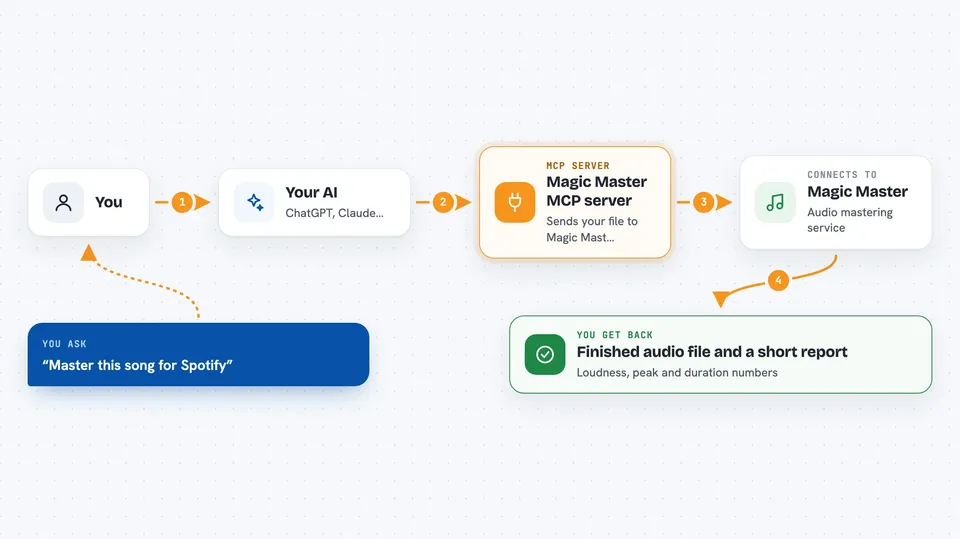
On its own, your AI can only chat. An MCP server is a small helper that gives your AI a new skill or a connection to another service. This one connects your AI to Magic Master, an audio mastering service online. Once connected, your AI can send your audio there, ask for mastering, and bring the results back to you.
What this MCP server does
You tell your AI what you want, for example master this song for Spotify. Your AI uses this helper to send your file to the Magic Master service. The service measures your track, cleans any AI fingerprint if you ask, and masters it to the loudness you want. Then your AI brings back the finished file and a short report called a mastering passport. It usually takes 20 to 60 seconds.
 Click to zoom
What you can do with it
- Check the loudness and peak levels of a track
- Remove the Suno or Udio AI fingerprint from a song
- Master a track to a target loudness for Spotify or podcasts
- Get a mastering passport with the results in your chat
- See how many free masters you have left
- Look up available mastering presets and prices
- Create a payment link for you to buy more masters
Try asking your AI
- “Analyze this track and tell me its loudness and true peak”
- “Remove the AI fingerprint from this Suno song”
- “Master this podcast episode to -16 LUFS for Spotify”
- “How many free masters do I have left this month”
What it gives back to you
You get back numbers like loudness, true peak and duration, plus a short report called a mastering passport. For mastering jobs, you get the finished audio file in one of several formats and the result metrics. For simple checks, you get a clear answer in the chat.
Before you start
What you need
- An MCP client like Claude, ChatGPT, Cursor or VS Code
- Nothing to install for the free tools
- Sign in with OAuth to use the paid mastering tools
- An audio file to work on
Good to know
Mastering uses tokens that cost money, but the AI cannot pay by itself, it only prepares a link for you.
Install it with your AI
Add Magic Master MCP server to your AI, no technical skills needed
You don't install anything by hand. You copy one prompt, paste it into an AI that can work on your computer, and it checks, installs and connects the server for you, asking you when it needs something.
Sign in to get the install prompt
Members get a ready-made prompt that lets the Claude desktop app check Magic Master MCP server, install it and connect it for them, step by step. You don't need any technical skills: you copy, paste and answer a few questions. Your connected AI can also find and install any of the 4,361 MCP servers here for you.
Who it's for
Podcasters, musicians and anyone who makes audio with AI tools and wants it ready for streaming.