MCP server · Music
REAPER MCP server
by xDarkzx
Lets your AI compose, mix, and master music inside REAPER while you watch it happen.
This is a helper that connects your AI assistant to REAPER, the music production program. Once it is set up, you can talk to your AI in plain words and it will actually build tracks, write notes, and adjust the mix inside your open REAPER project. It is handy for music makers who already use REAPER and want an AI to do the fiddly clicking for them.
What is an MCP server? The 30-second version
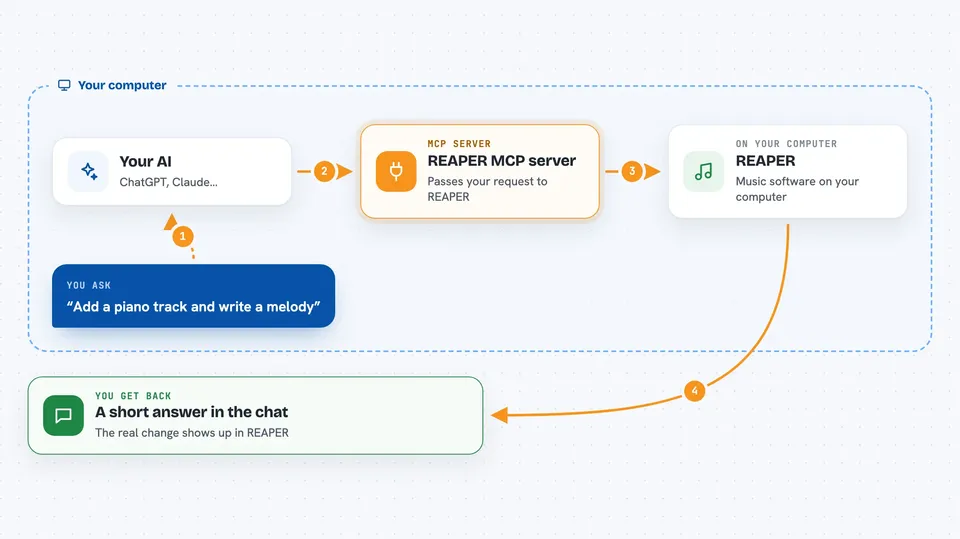
On its own, your AI can only chat. It cannot touch your music software. An MCP server is a small helper program that gives your AI one new skill, and here that skill is talking to REAPER on your computer. You ask for something in the chat, the AI passes the request to this helper, and the helper makes it happen inside REAPER.
What this MCP server does
You keep REAPER open with a small script running inside it. When you ask your AI for something like adding a track or writing a melody, the AI sends that request to this helper. The helper passes it to REAPER through a file on your computer, and REAPER does the work. Then you get a short answer back in the chat telling you what changed. Everything stays on your machine, and nothing is sent to the internet.
 Click to zoom
What you can do with it
- Create, rename, and delete tracks in your project
- Write MIDI notes and chord progressions for you
- Add effects like EQ and compression to a track
- Run an automatic mix or master pass for a chosen music style
- Set the tempo, add markers, and loop a section
- Measure loudness, clipping, and silence in your audio
- Chop a vocal into slices and rearrange them into a new pattern
Try asking your AI
- “Create 4 tracks: strings, brass, piano, and drums”
- “Compose an 8-bar string arrangement in D minor”
- “Add ReaEQ to the piano track and cut the low end below 200Hz”
- “Set the tempo to 90 BPM and loop the first 8 bars”
What it gives back to you
You get short written answers in the chat, like a list of your tracks, the tempo you set, or a note that an effect was added. When you ask it to measure something, it gives you numbers, for example the loudness level or where clipping happens. When you ask it to change something, it tells you what it changed in your project. The real result shows up in REAPER itself, on your screen.
Before you start
What you need
- REAPER installed on your computer
- Python installed, or the ready-made installer from the project
- An AI app that supports MCP, such as Claude Desktop, Claude Code, or Cursor
- REAPER open with the small Lua script loaded and running
Good to know
It can change, overwrite, or delete parts of your open REAPER project, so save your work before letting the AI make big changes.
Install it with your AI
Add REAPER MCP server to your AI, no technical skills needed
You don't install anything by hand. You copy one prompt, paste it into an AI that can work on your computer, and it checks, installs and connects the server for you, asking you when it needs something.
Sign in to get the install prompt
Members get a ready-made prompt that lets the Claude desktop app check REAPER MCP server, install it and connect it for them, step by step. You don't need any technical skills: you copy, paste and answer a few questions. Your connected AI can also find and install any of the 4,361 MCP servers here for you.
Who it's for
Music producers, composers, and hobbyist musicians who already work in REAPER and want an AI to help build and mix their tracks.